

ImpurityDecreaseDisplay#
- class skore.ImpurityDecreaseDisplay(*, importances, report_type)[source]#
Display mean decrease in impurity importances.
- Parameters:
- importancesDataFrame
The importances data to display. The columns are:
estimatorsplitfeatureimportance
- report_type{“estimator”, “cross-validation”, “comparison-estimator”, “comparison-cross-validation”}
Report type from which the display is created.
- Attributes:
- importancesDataFrame
MDI values per feature, estimator, and split.
- report_typeReportType
The type of report.
See also
EstimatorReport.inspection.impurity_decreaseCreate this display from a report.
CoefficientsDisplayDisplay linear model coefficients.
PermutationImportanceDisplayDisplay permutation importances.
Notes
For cross-validation and comparison reports,
frame()andplot()can aggregate importances across splits using theaggregateparameter.Examples
>>> from sklearn.datasets import load_iris
>>> from sklearn.ensemble import RandomForestClassifier
>>> from skore import evaluate
>>> iris = load_iris(as_frame=True)
>>> X, y = iris.data, iris.target
>>> y = iris.target_names[y]
>>> report = evaluate(RandomForestClassifier(random_state=0), X, y, splitter=0.2)
>>> display = report.inspection.impurity_decrease()
>>> display.frame()
                feature  importance
0  sepal length (cm)     0.1...
1   sepal width (cm)     0.0...
2  petal length (cm)     0.4...
3   petal width (cm)     0.4...
- frame(*, aggregate=('mean', 'std'), select_k=None, sorting_order=None)[source]#
Get the mean decrease in impurity in a dataframe format.
- Parameters:
- aggregate{“mean”, “std”}, (“mean”, “std”) or None, default=(“mean”, “std”)
Aggregate the importances over splits. Only relevant when
report_typeis"cross-validation"or"comparison-cross-validation"; ignored otherwise. IfNone, the raw per-split values are returned.- select_kint, default=None
Select features by importance: positive for top k, negative for bottom k. Selection is per estimator when applicable. For cross-validation, ranking uses mean importance across splits. When
aggregateisNone, ranking uses mean importance per feature over splits; all split rows are kept for selected features.- sorting_order{“descending”, “ascending”, None}, default=None
Sort features by importance (descending = most important first). When
aggregateisNone, ordering uses mean importance per feature over splits.
- Returns:
- DataFrame
Dataframe containing the mean decrease in impurity. When
aggregateis notNoneand the report type involves cross-validation splits, thesplitcolumn is removed andimportanceis replaced by aggregated columns:importance_meanandimportance_std.
- plot(*, select_k=None, sorting_order=None)[source]#
Plot the mean decrease in impurity for the different features.
- Parameters:
- Returns:
- matplotlib.figure.Figure
Figure containing the MDI plot.
Examples
>>> from sklearn.datasets import load_iris
>>> from sklearn.ensemble import RandomForestClassifier
>>> from skore import evaluate
>>> iris = load_iris(as_frame=True)
>>> X, y = iris.data, iris.target
>>> y = iris.target_names[y]
>>> report = evaluate(RandomForestClassifier(), X, y, splitter=0.2)
>>> display = report.inspection.impurity_decrease()
>>> display.plot()
- set_style(*, policy='update', barplot_kwargs=None, stripplot_kwargs=None, boxplot_kwargs=None)[source]#
Set the style parameters for the display.
- Parameters:
- policy{“override”, “update”}, default=”update”
Policy to use when setting the style parameters. If “override”, existing settings are set to the provided values. If “update”, existing settings are not changed; only settings that were previously unset are changed.
- barplot_kwargsdict, default=None
Keyword arguments to be passed to
seaborn.barplot()for rendering the mean decrease in impurity with anEstimatorReport.- stripplot_kwargsdict, default=None
Keyword arguments to be passed to
seaborn.stripplot()for rendering the mean decrease in impurity with aCrossValidationReport.- boxplot_kwargsdict, default=None
Keyword arguments to be passed to
seaborn.boxplot()for rendering the mean decrease in impurity with aCrossValidationReport.
- Returns:
- None
- Raises:
- ValueError
If a style parameter is unknown.
- static style_plot(plot_func)[source]#
Apply consistent style to skore displays.
This decorator: 1. Applies default style settings 2. Runs
plot_funcunderplt.ioff()so figures are not shown until returned 3. CallsFigure.tight_layout()on the returned figure when applicable 4. Restores the original style settings- Parameters:
- plot_funccallable
The plot function to be decorated.
- Returns:
- callable
The decorated plot function.
Gallery examples#
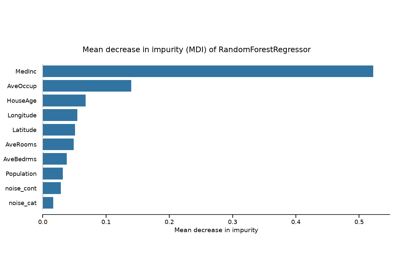
SKD007 - MDI feature importance is biased for high-cardinality features