

Note
Go to the end to download the full example code.
Skore: getting started#
This guide illustrates how to use skore through a complete machine learning workflow for binary classification:
Set up a proper experiment with training and test data
Develop and evaluate multiple models using cross-validation
Compare models to select the best one
Validate the final model on held-out data
Track and organize your machine learning results
Throughout this guide, we will see how skore helps you:
Avoid common pitfalls with smart diagnostics
Quickly get rich insights into model performance
Organize and track your experiments
Storing reports in Skore Hub#
At the end of this example, we send the reports in Skore Hub (https://skore.probabl.ai/) that is a platform for storing, sharing and exploring your machine learning reports.
To run this example and push in your own Skore Hub workspace and project, you can run this example with the following command:
WORKSPACE=<workspace> PROJECT=<project> python plot_getting_started.py
In this gallery, we are going to push the different reports into a public workspace.
Setting up our classification problem#
Let’s start by loading the “toxicity” dataset, a classification problem where we classify tweets as “toxic” or “not toxic”.
from skrub import TableReport, datasets

toxicity = datasets.fetch_toxicity()
X, y = toxicity.X, toxicity.y
TableReport(toxicity.toxicity)
Downloading 'toxicity_v1' from https://github.com/skrub-data/skrub-data-files/raw/refs/heads/main/toxicity_v1.zip (attempt 1/3)
| text | is_toxic | |
|---|---|---|
| 0 | Two-Minute Mysteries by Donald J. Sobol? I read those in middle school. Might be a different think though. | Not Toxic |
| 1 | Are you feeling it now, mr mark? | Not Toxic |
| 2 | Can we get some pro environment conspiracy theories going? What about the gay frogs?! Surely this substance will threaten male virility! | Not Toxic |
| 3 | so many haters on the internet . dident get what so bad about this video.... i think u just jealous logan paul.... fuck humens | Toxic |
| 4 | I do this with store-bought breaded shrimp all the time. The way you are better than be is that the seasoning is IN the batter, not dusted on top. Play! Experiment! You'll do something wonderful if you are already putting in that effort. | Not Toxic |
| 995 | ILLEGITIMATE INCOMPETENT TYRANT TALIBIDEN | Toxic |
| 996 | From the theories I’ve read I’m pretty sure you’re right and he’s singed | Not Toxic |
| 997 | I can't bear how nice this is. I guess its bearnessities. I'll see my self out | Not Toxic |
| 998 | I’m 70 and I agree. | Not Toxic |
| 999 | Especially Today's Politicians #traderjoe #delouse #fuckliberals #wethepewple #iwillnotcomply #defiant #fafo #hardinasoftworld #hellandback #irrepressible #shepherdoffire ⌖ #america #freedom #2A #shallnotbeinfringed #noquarter #nosurrender #molonlabe #letfreedomring #keepthepowderdry #patriot #veteran #warrior | Toxic |
text
ObjectDType- Null values
- 0 (0.0%)
- Unique values
-
999 (99.9%)
This column has a high cardinality (> 40).
Most frequent values
is_toxic
ObjectDType- Null values
- 0 (0.0%)
- Unique values
- 2 (0.2%)
Most frequent values
No columns match the selected filter: . You can change the column filter in the dropdown menu above.
| Column | Column name | dtype | Is sorted | Null values | Unique values | Mean | Std | Min | Median | Max |
|---|---|---|---|---|---|---|---|---|---|---|
| 0 | text | ObjectDType | False | 0 (0.0%) | 999 (99.9%) | |||||
| 1 | is_toxic | ObjectDType | False | 0 (0.0%) | 2 (0.2%) |
No columns match the selected filter: . You can change the column filter in the dropdown menu above.
text
ObjectDType- Null values
- 0 (0.0%)
- Unique values
-
999 (99.9%)
This column has a high cardinality (> 40).
Most frequent values
is_toxic
ObjectDType- Null values
- 0 (0.0%)
- Unique values
- 2 (0.2%)
Most frequent values
No columns match the selected filter: . You can change the column filter in the dropdown menu above.
| Column 1 | Column 2 | Cramér's V | Pearson's Correlation |
|---|---|---|---|
| text | is_toxic | 0.100 |
Please enable javascript
The skrub table reports need javascript to display correctly. If you are displaying a report in a Jupyter notebook and you see this message, you may need to re-execute the cell or to trust the notebook (button on the top right or "File > Trust notebook").
We create a held-out test set to evaluate our final model once we are done experimenting.
from sklearn.model_selection import train_test_split

X_experiment, X_holdout, y_experiment, y_holdout = train_test_split(
    X, y, random_state=0
)
Model development with cross-validation#
We will investigate two different families of models using cross-validation.
A
LogisticRegressionwhich is a linear modelA
RandomForestClassifierwhich is a more powerful model.
In both cases, we rely on skrub.tabular_pipeline() to choose the proper
preprocessing depending on the kind of model.
Cross-validation is necessary to get a more reliable estimate of model performance.
skore makes it easy through skore.CrossValidationReport.
Model no. 1: logistic regression with preprocessing#
Our first model will be a linear model, with automatic preprocessing of the text feature.
Under the hood, skrub’s TableVectorizer will adapt the
preprocessing based on our choice to use a linear model.
from sklearn.linear_model import LogisticRegression
from skrub import tabular_pipeline

logistic_regression = tabular_pipeline(LogisticRegression())
logistic_regression
We now evaluate our model with cross-validation, using evaluate()
with splitter=5 to perform 5-fold cross-validation.
This returns a CrossValidationReport object, which can be used to
access the performance metrics and other information about the model.
from skore import evaluate
logreg_cv_report = evaluate(
logistic_regression, X_experiment, y_experiment, pos_label="Toxic", splitter=5
)
logreg_cv_report
| Metric | mean | std |
|---|---|---|
| Accuracy | 0.824000 | 0.030037 |
| Precision | 0.828123 | 0.033517 |
| Recall | 0.822737 | 0.053981 |
| ROC AUC | 0.902248 | 0.033588 |
| Log loss | 0.392171 | 0.051722 |
| Brier score | 0.125730 | 0.019832 |
| Fit time (s) | 0.140587 | 0.003542 |
| Predict time (s) | 0.023063 | 0.000799 |
No issues were detected in your report.
- [SKD005] Underrepresented classes. ML task is not multiclass classification. Got binary-classification.
- [SKD007] MDI biased for high-cardinality features. Estimator is not a tree-based model: it does not have a `feature_importances_` attribute.
- [SKD013] Train-test overlap in time series. No datetime column found.
- [SKD014] Hyperparameters at search edge. Estimator is not a BaseSearchCV instance. Got Pipeline.
- [SKD015] Hyperparameters worth tuning. Estimator is not a BaseSearchCV instance. Got Pipeline.
No checks were muted.
Fast mode is on: expensive checks are skipped unless already cached.
Mute a check by passing its code to ignore, e.g. .checks.summarize(ignore=['SKD001']).
Pipeline(steps=[('tablevectorizer',
                 TableVectorizer(datetime=DatetimeEncoder(periodic_encoding='spline'))),
                ('simpleimputer', SimpleImputer(add_indicator=True)),
                ('squashingscaler', SquashingScaler(max_absolute_value=5)),
('logisticregression', LogisticRegression())])In a Jupyter environment, please rerun this cell to show the HTML representation or trust the notebook. On GitHub, the HTML representation is unable to render, please try loading this page with nbviewer.org.
Parameters
Parameters
Parameters
Parameters
Parameters
Parameters
Parameters
Parameters
Parameters
| text | is_toxic | |
|---|---|---|
| 253 | RACIST , EVIL INHUMAN POST ! WHERE ARE THE QUEENS BANNING THIS SHITE ? | Toxic |
| 667 | Gorgeous! Are you the artist? Do you have a website or Instagram I can follow? | Not Toxic |
| 85 | Yeah I’m interested in the potential of this story. How could a BBEG trick a party into reviving them instead of a teammate? | Not Toxic |
| 969 | i would agree. we will see continuously more adds, until people start paying upfront / it al goes into subscription services. | Not Toxic |
| 75 | Smite jinx... int or pentakill? Both. | Not Toxic |
| 835 | https://www.reddit.com/r/anime/comments/qkcuk6/comment/hivx9j6/?utm_source=share&utm_medium=web2x&context=3 | Not Toxic |
| 192 | MSNBC and CNN anchors are a bunch of freaks elitist that ride a high horse and look down on everyone else it's overdue for true Americans to do something about this evil trash | Toxic |
| 629 | Biden the biggest douch bag in presidential history! | Toxic |
| 559 | So super cute! 🖤 | Not Toxic |
| 684 | His presidency isn't dead, his brain is. It's a Weekend at Bernie's president. FJB! LGB! | Toxic |
text
ObjectDType- Null values
- 0 (0.0%)
- Unique values
-
750 (100.0%)
This column has a high cardinality (> 40).
is_toxic
ObjectDType- Null values
- 0 (0.0%)
- Unique values
- 2 (0.3%)
No columns match the selected filter: . You can change the column filter in the dropdown menu above.
| Column | Column name | dtype | Is sorted | Null values | Unique values | Mean | Std | Min | Median | Max |
|---|---|---|---|---|---|---|---|---|---|---|
| 0 | text | ObjectDType | False | 0 (0.0%) | 750 (100.0%) | |||||
| 1 | is_toxic | ObjectDType | False | 0 (0.0%) | 2 (0.3%) |
No columns match the selected filter: . You can change the column filter in the dropdown menu above.
Please enable javascript
The skrub table reports need javascript to display correctly. If you are displaying a report in a Jupyter notebook and you see this message, you may need to re-execute the cell or to trust the notebook (button on the top right or "File > Trust notebook").
A report will quickly show important information regarding the performance of the model, the dataset used and the architecture of the model. This information is only a quick overview and one can dig deeper into the report to get more information.
Indeed, Skore reports allow to structure the statistical information
we look for when experimenting with predictive models. First, the
help() method shows us all its available methods
and attributes, with the knowledge that our model was trained for classification:
For example, we can examine the training data, which excludes the held-out data:
logreg_cv_report.data.summarize()
| text | is_toxic | |
|---|---|---|
| 253 | RACIST , EVIL INHUMAN POST ! WHERE ARE THE QUEENS BANNING THIS SHITE ? | Toxic |
| 667 | Gorgeous! Are you the artist? Do you have a website or Instagram I can follow? | Not Toxic |
| 85 | Yeah I’m interested in the potential of this story. How could a BBEG trick a party into reviving them instead of a teammate? | Not Toxic |
| 969 | i would agree. we will see continuously more adds, until people start paying upfront / it al goes into subscription services. | Not Toxic |
| 75 | Smite jinx... int or pentakill? Both. | Not Toxic |
| 835 | https://www.reddit.com/r/anime/comments/qkcuk6/comment/hivx9j6/?utm_source=share&utm_medium=web2x&context=3 | Not Toxic |
| 192 | MSNBC and CNN anchors are a bunch of freaks elitist that ride a high horse and look down on everyone else it's overdue for true Americans to do something about this evil trash | Toxic |
| 629 | Biden the biggest douch bag in presidential history! | Toxic |
| 559 | So super cute! 🖤 | Not Toxic |
| 684 | His presidency isn't dead, his brain is. It's a Weekend at Bernie's president. FJB! LGB! | Toxic |
text
ObjectDType- Null values
- 0 (0.0%)
- Unique values
-
750 (100.0%)
This column has a high cardinality (> 40).
Most frequent values
is_toxic
ObjectDType- Null values
- 0 (0.0%)
- Unique values
- 2 (0.3%)
Most frequent values
No columns match the selected filter: . You can change the column filter in the dropdown menu above.
| Column | Column name | dtype | Is sorted | Null values | Unique values | Mean | Std | Min | Median | Max |
|---|---|---|---|---|---|---|---|---|---|---|
| 0 | text | ObjectDType | False | 0 (0.0%) | 750 (100.0%) | |||||
| 1 | is_toxic | ObjectDType | False | 0 (0.0%) | 2 (0.3%) |
No columns match the selected filter: . You can change the column filter in the dropdown menu above.
text
ObjectDType- Null values
- 0 (0.0%)
- Unique values
-
750 (100.0%)
This column has a high cardinality (> 40).
Most frequent values
is_toxic
ObjectDType- Null values
- 0 (0.0%)
- Unique values
- 2 (0.3%)
Most frequent values
No columns match the selected filter: . You can change the column filter in the dropdown menu above.
| Column 1 | Column 2 | Cramér's V | Pearson's Correlation |
|---|---|---|---|
| text | is_toxic | 0.109 |
Please enable javascript
The skrub table reports need javascript to display correctly. If you are displaying a report in a Jupyter notebook and you see this message, you may need to re-execute the cell or to trust the notebook (button on the top right or "File > Trust notebook").
Additionally we can run automatic checks on the model and get a summary of the findings:
logreg_cv_report.checks.summarize()
But we can also quickly get an overview of the performance of our model,
using summarize():
logreg_metrics = logreg_cv_report.metrics.summarize()
logreg_metrics.frame(favorability=True)
Note
favorability=True adds a column showing whether higher or lower metric values
are better.
In addition to the summary of metrics, skore provides more advanced statistical information such as the precision-recall curve:
Note
The output of precision_recall() is a
Display object. This is a common pattern in skore which allows us
to access the information in several ways.
We can visualize the critical information as a plot, with only a few lines of code:
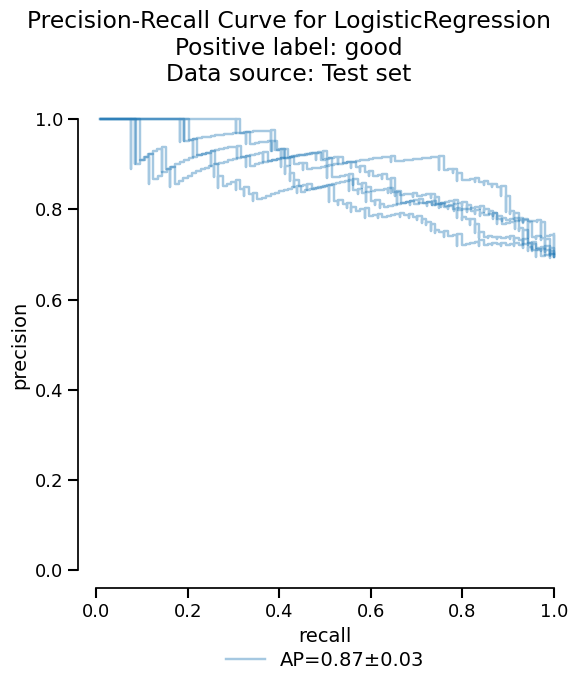
Or we can access the raw information as a dataframe if additional analysis is needed:
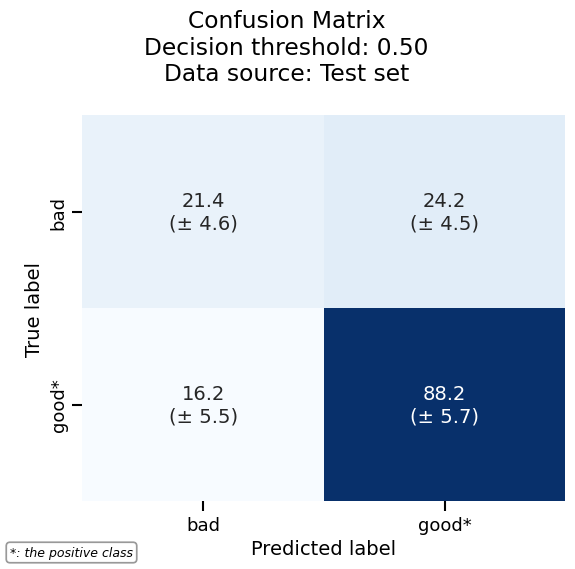
As another example, we can plot the confusion matrix with the same consistent API:
confusion_matrix = logreg_cv_report.metrics.confusion_matrix()
_ = confusion_matrix.plot()
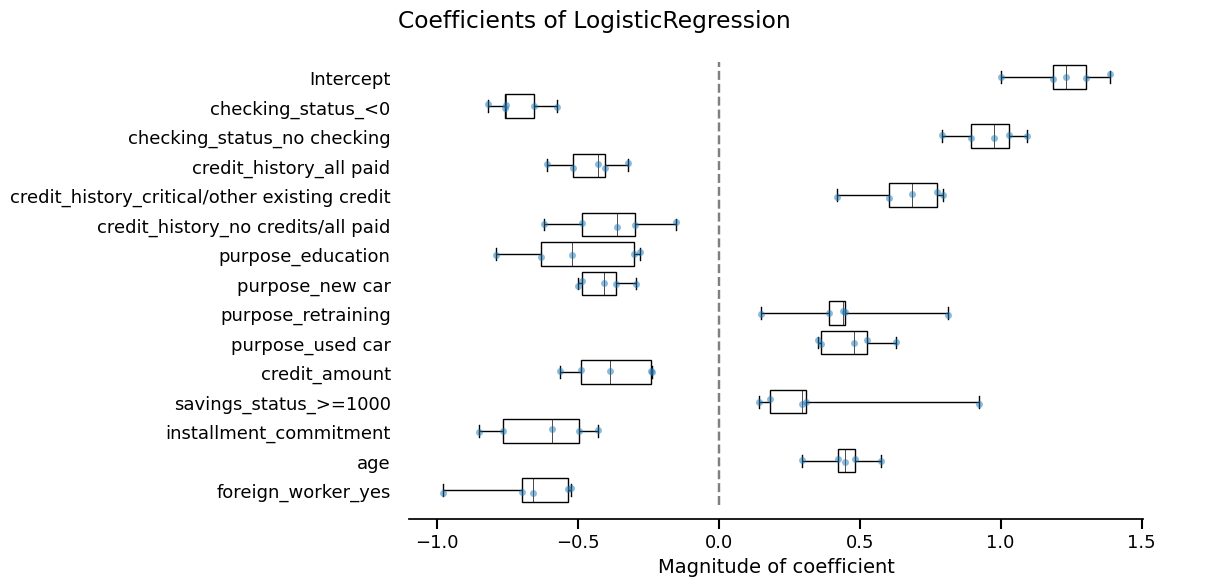
Skore also provides utilities to inspect models. Since our model is a linear model, we can study the importance that it gives to each feature:
coefficients = logreg_cv_report.inspection.coefficients()
coefficients.frame()
_ = coefficients.plot(select_k=15)
Model no. 2: Random forest#
Now, we cross-validate a more powerful model using
RandomForestClassifier. Again, we rely on
tabular_pipeline() to perform the appropriate preprocessing to use with
this model.
from sklearn.ensemble import RandomForestClassifier
random_forest = tabular_pipeline(RandomForestClassifier(random_state=0))
random_forest
rf_cv_report = evaluate(
random_forest, X_experiment, y_experiment, pos_label="Toxic", splitter=5
)
rf_cv_report
| Metric | mean | std |
|---|---|---|
| Accuracy | 0.800000 | 0.040825 |
| Precision | 0.831201 | 0.044069 |
| Recall | 0.756561 | 0.044799 |
| ROC AUC | 0.874370 | 0.041519 |
| Log loss | 0.459521 | 0.050149 |
| Brier score | 0.146900 | 0.020172 |
| Fit time (s) | 0.327937 | 0.004277 |
| Predict time (s) | 0.030796 | 0.000432 |
- [SKD001] Potential overfitting. Significant train/test gaps were found for 6/6 default predictive metrics.
- [SKD007] MDI biased for high-cardinality features. High-cardinality features detected: text_00, text_01, text_02 (and 27 more). Mean Decrease in Impurity (MDI) importance is biased toward such features. Consider using permutation importance for a more robust alternative.
- [SKD016] Estimator not tuned. Estimator(s) left at default settings; consider tuning: ['max_features', 'min_samples_leaf'] for RandomForestClassifier.
- [SKD005] Underrepresented classes. ML task is not multiclass classification. Got binary-classification.
- [SKD006] Coefficient interpretation. Estimator is not a linear model: it does not have a `coef_` attribute.
- [SKD013] Train-test overlap in time series. No datetime column found.
- [SKD014] Hyperparameters at search edge. Estimator is not a BaseSearchCV instance. Got Pipeline.
- [SKD015] Hyperparameters worth tuning. Estimator is not a BaseSearchCV instance. Got Pipeline.
No checks were muted.
Fast mode is on: expensive checks are skipped unless already cached.
Mute a check by passing its code to ignore, e.g. .checks.summarize(ignore=['SKD001']).
Pipeline(steps=[('tablevectorizer',
TableVectorizer(low_cardinality=OrdinalEncoder(handle_unknown='use_encoded_value',
unknown_value=-1))),
('randomforestclassifier',
RandomForestClassifier(random_state=0))])In a Jupyter environment, please rerun this cell to show the HTML representation or trust the notebook. On GitHub, the HTML representation is unable to render, please try loading this page with nbviewer.org.
Parameters
Parameters
Parameters
Parameters
Parameters
Parameters
Parameters
| text | is_toxic | |
|---|---|---|
| 253 | RACIST , EVIL INHUMAN POST ! WHERE ARE THE QUEENS BANNING THIS SHITE ? | Toxic |
| 667 | Gorgeous! Are you the artist? Do you have a website or Instagram I can follow? | Not Toxic |
| 85 | Yeah I’m interested in the potential of this story. How could a BBEG trick a party into reviving them instead of a teammate? | Not Toxic |
| 969 | i would agree. we will see continuously more adds, until people start paying upfront / it al goes into subscription services. | Not Toxic |
| 75 | Smite jinx... int or pentakill? Both. | Not Toxic |
| 835 | https://www.reddit.com/r/anime/comments/qkcuk6/comment/hivx9j6/?utm_source=share&utm_medium=web2x&context=3 | Not Toxic |
| 192 | MSNBC and CNN anchors are a bunch of freaks elitist that ride a high horse and look down on everyone else it's overdue for true Americans to do something about this evil trash | Toxic |
| 629 | Biden the biggest douch bag in presidential history! | Toxic |
| 559 | So super cute! 🖤 | Not Toxic |
| 684 | His presidency isn't dead, his brain is. It's a Weekend at Bernie's president. FJB! LGB! | Toxic |
text
ObjectDType- Null values
- 0 (0.0%)
- Unique values
-
750 (100.0%)
This column has a high cardinality (> 40).
is_toxic
ObjectDType- Null values
- 0 (0.0%)
- Unique values
- 2 (0.3%)
No columns match the selected filter: . You can change the column filter in the dropdown menu above.
| Column | Column name | dtype | Is sorted | Null values | Unique values | Mean | Std | Min | Median | Max |
|---|---|---|---|---|---|---|---|---|---|---|
| 0 | text | ObjectDType | False | 0 (0.0%) | 750 (100.0%) | |||||
| 1 | is_toxic | ObjectDType | False | 0 (0.0%) | 2 (0.3%) |
No columns match the selected filter: . You can change the column filter in the dropdown menu above.
Please enable javascript
The skrub table reports need javascript to display correctly. If you are displaying a report in a Jupyter notebook and you see this message, you may need to re-execute the cell or to trust the notebook (button on the top right or "File > Trust notebook").
rf_cv_report.checks.summarize()
We will now compare this new model with the previous one.
Comparing our models#
Now that we have our two models, we need to decide which one should go into
production. We can compare them with the compare() function that returns a
ComparisonReport:
from skore import compare
comparison = compare(
{
"logistic regression": logreg_cv_report,
"random forest": rf_cv_report,
},
)
comparison
| Metric | logistic regression | random forest | logistic regression | random forest |
|---|---|---|---|---|
| mean | mean | std | std | |
| Accuracy | 0.824000 | 0.800000 | 0.030037 | 0.040825 |
| Precision | 0.828123 | 0.831201 | 0.033517 | 0.044069 |
| Recall | 0.822737 | 0.756561 | 0.053981 | 0.044799 |
| ROC AUC | 0.902248 | 0.874370 | 0.033588 | 0.041519 |
| Log loss | 0.392171 | 0.459521 | 0.051722 | 0.050149 |
| Brier score | 0.125730 | 0.146900 | 0.019832 | 0.020172 |
| Fit time (s) | 0.140587 | 0.327937 | 0.003542 | 0.004277 |
| Predict time (s) | 0.023063 | 0.030796 | 0.000799 | 0.000432 |
No issues were detected in your report.
- [SKD006] Coefficient interpretation. Features are not on the same scale: coefficient magnitudes are not directly comparable as feature importance.
- [SKD009] Model performance vs. HistGradientBoosting baseline. Your model is on par with or better than a HistGradientBoosting baseline. Baseline performance on the test set, for reference: Accuracy=0.78, Brier score=0.165, Log loss=0.561, Precision=0.79, ROC AUC=0.866, Recall=0.77.
- [SKD016] Estimator not tuned. Estimator(s) left at default settings; consider tuning: ['C'] for LogisticRegression.
- [SKD005] Underrepresented classes. ML task is not multiclass classification. Got binary-classification.
- [SKD007] MDI biased for high-cardinality features. Estimator is not a tree-based model: it does not have a `feature_importances_` attribute.
- [SKD013] Train-test overlap in time series. No datetime column found.
- [SKD014] Hyperparameters at search edge. Estimator is not a BaseSearchCV instance. Got Pipeline.
- [SKD015] Hyperparameters worth tuning. Estimator is not a BaseSearchCV instance. Got Pipeline.
No checks were skipped in fast mode.
No checks were muted.
Fast mode is on: expensive checks are skipped unless already cached.
Mute a check by passing its code to ignore, e.g. .checks.summarize(ignore=['SKD001']).
- [SKD001] Potential overfitting. Significant train/test gaps were found for 6/6 default predictive metrics.
- [SKD007] MDI biased for high-cardinality features. High-cardinality features detected: text_00, text_01, text_02 (and 27 more). Mean Decrease in Impurity (MDI) importance is biased toward such features. Consider using permutation importance for a more robust alternative.
- [SKD009] Model performance vs. HistGradientBoosting baseline. Your model is on par with or better than a HistGradientBoosting baseline. Baseline performance on the test set, for reference: Accuracy=0.783, Brier score=0.161, Log loss=0.539, Precision=0.785, ROC AUC=0.867, Recall=0.786.
- [SKD016] Estimator not tuned. Estimator(s) left at default settings; consider tuning: ['max_features', 'min_samples_leaf'] for RandomForestClassifier.
- [SKD005] Underrepresented classes. ML task is not multiclass classification. Got binary-classification.
- [SKD006] Coefficient interpretation. Estimator is not a linear model: it does not have a `coef_` attribute.
- [SKD013] Train-test overlap in time series. No datetime column found.
- [SKD014] Hyperparameters at search edge. Estimator is not a BaseSearchCV instance. Got Pipeline.
- [SKD015] Hyperparameters worth tuning. Estimator is not a BaseSearchCV instance. Got Pipeline.
No checks were skipped in fast mode.
No checks were muted.
Fast mode is on: expensive checks are skipped unless already cached.
Mute a check by passing its code to ignore, e.g. .checks.summarize(ignore=['SKD001']).
Pipeline(steps=[('tablevectorizer',
                 TableVectorizer(datetime=DatetimeEncoder(periodic_encoding='spline'))),
                ('simpleimputer', SimpleImputer(add_indicator=True)),
                ('squashingscaler', SquashingScaler(max_absolute_value=5)),
('logisticregression', LogisticRegression())])In a Jupyter environment, please rerun this cell to show the HTML representation or trust the notebook. On GitHub, the HTML representation is unable to render, please try loading this page with nbviewer.org.
Parameters
Parameters
Parameters
Parameters
Parameters
Parameters
Parameters
Parameters
Parameters
| text | is_toxic | |
|---|---|---|
| 253 | RACIST , EVIL INHUMAN POST ! WHERE ARE THE QUEENS BANNING THIS SHITE ? | Toxic |
| 667 | Gorgeous! Are you the artist? Do you have a website or Instagram I can follow? | Not Toxic |
| 85 | Yeah I’m interested in the potential of this story. How could a BBEG trick a party into reviving them instead of a teammate? | Not Toxic |
| 969 | i would agree. we will see continuously more adds, until people start paying upfront / it al goes into subscription services. | Not Toxic |
| 75 | Smite jinx... int or pentakill? Both. | Not Toxic |
| 835 | https://www.reddit.com/r/anime/comments/qkcuk6/comment/hivx9j6/?utm_source=share&utm_medium=web2x&context=3 | Not Toxic |
| 192 | MSNBC and CNN anchors are a bunch of freaks elitist that ride a high horse and look down on everyone else it's overdue for true Americans to do something about this evil trash | Toxic |
| 629 | Biden the biggest douch bag in presidential history! | Toxic |
| 559 | So super cute! 🖤 | Not Toxic |
| 684 | His presidency isn't dead, his brain is. It's a Weekend at Bernie's president. FJB! LGB! | Toxic |
text
ObjectDType- Null values
- 0 (0.0%)
- Unique values
-
750 (100.0%)
This column has a high cardinality (> 40).
is_toxic
ObjectDType- Null values
- 0 (0.0%)
- Unique values
- 2 (0.3%)
No columns match the selected filter: . You can change the column filter in the dropdown menu above.
| Column | Column name | dtype | Is sorted | Null values | Unique values | Mean | Std | Min | Median | Max |
|---|---|---|---|---|---|---|---|---|---|---|
| 0 | text | ObjectDType | False | 0 (0.0%) | 750 (100.0%) | |||||
| 1 | is_toxic | ObjectDType | False | 0 (0.0%) | 2 (0.3%) |
No columns match the selected filter: . You can change the column filter in the dropdown menu above.
Please enable javascript
The skrub table reports need javascript to display correctly. If you are displaying a report in a Jupyter notebook and you see this message, you may need to re-execute the cell or to trust the notebook (button on the top right or "File > Trust notebook").
Pipeline(steps=[('tablevectorizer',
                 TableVectorizer(low_cardinality=OrdinalEncoder(handle_unknown='use_encoded_value',
                                                                unknown_value=-1))),
                ('randomforestclassifier',
RandomForestClassifier(random_state=0))])In a Jupyter environment, please rerun this cell to show the HTML representation or trust the notebook. On GitHub, the HTML representation is unable to render, please try loading this page with nbviewer.org.
Parameters
Parameters
Parameters
Parameters
Parameters
Parameters
Parameters
| text | is_toxic | |
|---|---|---|
| 253 | RACIST , EVIL INHUMAN POST ! WHERE ARE THE QUEENS BANNING THIS SHITE ? | Toxic |
| 667 | Gorgeous! Are you the artist? Do you have a website or Instagram I can follow? | Not Toxic |
| 85 | Yeah I’m interested in the potential of this story. How could a BBEG trick a party into reviving them instead of a teammate? | Not Toxic |
| 969 | i would agree. we will see continuously more adds, until people start paying upfront / it al goes into subscription services. | Not Toxic |
| 75 | Smite jinx... int or pentakill? Both. | Not Toxic |
| 835 | https://www.reddit.com/r/anime/comments/qkcuk6/comment/hivx9j6/?utm_source=share&utm_medium=web2x&context=3 | Not Toxic |
| 192 | MSNBC and CNN anchors are a bunch of freaks elitist that ride a high horse and look down on everyone else it's overdue for true Americans to do something about this evil trash | Toxic |
| 629 | Biden the biggest douch bag in presidential history! | Toxic |
| 559 | So super cute! 🖤 | Not Toxic |
| 684 | His presidency isn't dead, his brain is. It's a Weekend at Bernie's president. FJB! LGB! | Toxic |
text
ObjectDType- Null values
- 0 (0.0%)
- Unique values
-
750 (100.0%)
This column has a high cardinality (> 40).
is_toxic
ObjectDType- Null values
- 0 (0.0%)
- Unique values
- 2 (0.3%)
No columns match the selected filter: . You can change the column filter in the dropdown menu above.
| Column | Column name | dtype | Is sorted | Null values | Unique values | Mean | Std | Min | Median | Max |
|---|---|---|---|---|---|---|---|---|---|---|
| 0 | text | ObjectDType | False | 0 (0.0%) | 750 (100.0%) | |||||
| 1 | is_toxic | ObjectDType | False | 0 (0.0%) | 2 (0.3%) |
No columns match the selected filter: . You can change the column filter in the dropdown menu above.
Please enable javascript
The skrub table reports need javascript to display correctly. If you are displaying a report in a Jupyter notebook and you see this message, you may need to re-execute the cell or to trust the notebook (button on the top right or "File > Trust notebook").
This report follows the same API as CrossValidationReport:
We have access to the same tools to perform statistical analysis and compare both models:
comparison_metrics = comparison.metrics.summarize()
comparison_metrics.frame(favorability=True)
_ = comparison.metrics.precision_recall().plot()
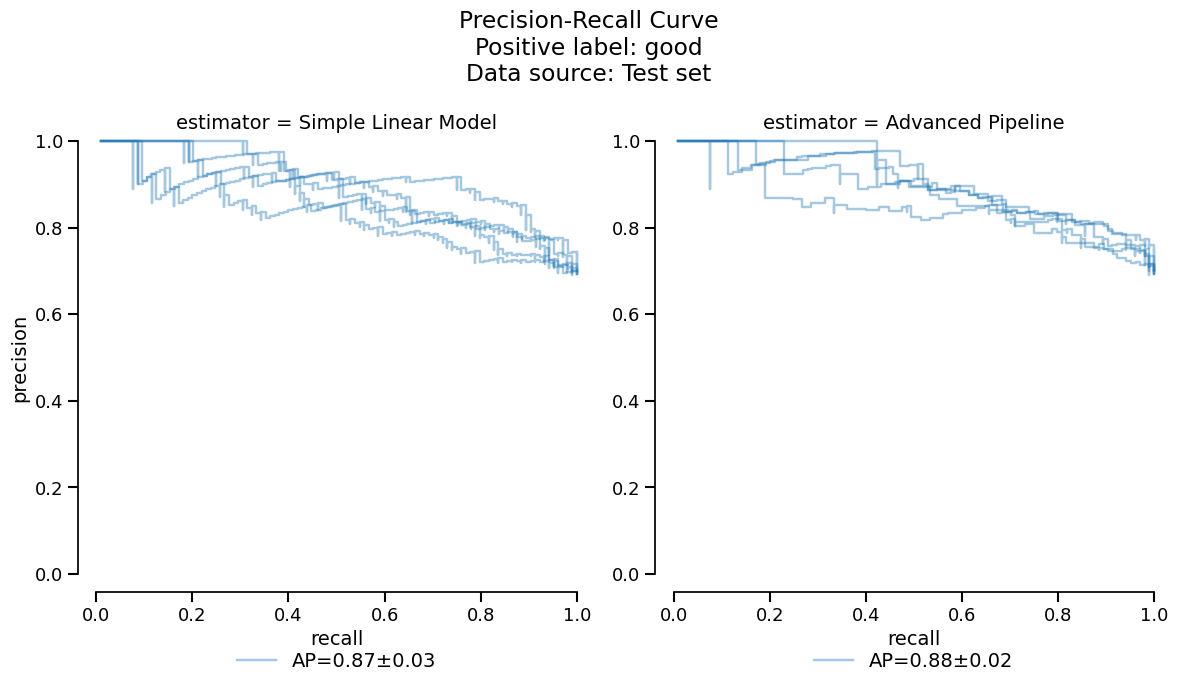
Based on the previous tables and plots, it seems that the
RandomForestClassifier model has slightly worse
performance due to overfitting on this small dataset. We make the choice
to deploy the linear model to make a comparison with the coefficients study shown
earlier.
Final model evaluation on held-out data#
Now that we have chosen to deploy the linear model, we will train it on the full
experiment set and evaluate it on our held-out data: training on more data should help
performance and we can also validate that our model generalizes well to new data. This
can be done in one step with create_estimator_report().
final_report = comparison.create_estimator_report(
report_key="logistic regression", X_test=X_holdout, y_test=y_holdout
)
final_report
| Metric | LogisticRegression |
|---|---|
| Accuracy | 0.812000 |
| Precision | 0.811475 |
| Recall | 0.804878 |
| ROC AUC | 0.911785 |
| Log loss | 0.365293 |
| Brier score | 0.118511 |
| Fit time (s) | 0.172728 |
| Predict time (s) | 0.031819 |
No issues were detected in your report.
- [SKD003] Inconsistent performance across splits. Not applicable to estimator reports.
- [SKD005] Underrepresented classes. ML task is not multiclass classification. Got binary-classification.
- [SKD007] MDI biased for high-cardinality features. Estimator is not a tree-based model: it does not have a `feature_importances_` attribute.
- [SKD013] Train-test overlap in time series. No datetime column found.
- [SKD014] Hyperparameters at search edge. Estimator is not a BaseSearchCV instance. Got Pipeline.
- [SKD015] Hyperparameters worth tuning. Estimator is not a BaseSearchCV instance. Got Pipeline.
No checks were muted.
Fast mode is on: expensive checks are skipped unless already cached.
Mute a check by passing its code to ignore, e.g. .checks.summarize(ignore=['SKD001']).
Pipeline(steps=[('tablevectorizer',
                 TableVectorizer(datetime=DatetimeEncoder(periodic_encoding='spline'))),
                ('simpleimputer', SimpleImputer(add_indicator=True)),
                ('squashingscaler', SquashingScaler(max_absolute_value=5)),
('logisticregression', LogisticRegression())])In a Jupyter environment, please rerun this cell to show the HTML representation or trust the notebook. On GitHub, the HTML representation is unable to render, please try loading this page with nbviewer.org.
Parameters
Fitted attributes
Parameters
Fitted attributes
Parameters
Parameters
Parameters
['text']
Parameters
30 features
| text_00 |
| text_01 |
| text_02 |
| text_03 |
| text_04 |
| text_05 |
| text_06 |
| text_07 |
| text_08 |
| text_09 |
| text_10 |
| text_11 |
| text_12 |
| text_13 |
| text_14 |
| text_15 |
| text_16 |
| text_17 |
| text_18 |
| text_19 |
| text_20 |
| text_21 |
| text_22 |
| text_23 |
| text_24 |
| text_25 |
| text_26 |
| text_27 |
| text_28 |
| text_29 |
Parameters
Fitted attributes
| Name | Type | Value |
|---|---|---|
|
feature_names_in_
feature_names_in_: ndarray of shape (`n_features_in_`,) Names of features seen during :term:`fit`. Defined only when `X` has feature names that are all strings. .. versionadded:: 1.0 |
ndarray[object](30,) | ['text_00','text_01','text_02',...,'text_27','text_28','text_29'] |
|
indicator_
indicator_: :class:`~sklearn.impute.MissingIndicator` Indicator used to add binary indicators for missing values. `None` if `add_indicator=False`. |
MissingIndicator | MissingIndica..._on_new=False) |
|
n_features_in_
n_features_in_: int Number of features seen during :term:`fit`. .. versionadded:: 0.24 |
int | 30 |
|
statistics_
statistics_: array of shape (n_features,) The imputation fill value for each feature. Computing statistics can result in `np.nan` values. During :meth:`transform`, features corresponding to `np.nan` statistics will be discarded. |
ndarray[float64](30,) | [ 0.54,-0. ,-0.01,...,-0. , 0. ,-0. ] |
30 features
| text_00 |
| text_01 |
| text_02 |
| text_03 |
| text_04 |
| text_05 |
| text_06 |
| text_07 |
| text_08 |
| text_09 |
| text_10 |
| text_11 |
| text_12 |
| text_13 |
| text_14 |
| text_15 |
| text_16 |
| text_17 |
| text_18 |
| text_19 |
| text_20 |
| text_21 |
| text_22 |
| text_23 |
| text_24 |
| text_25 |
| text_26 |
| text_27 |
| text_28 |
| text_29 |
Parameters
Fitted attributes
| Name | Type | Value |
|---|---|---|
| minmax_cols_ | ndarray[bool](30,) | [False,False,False,...,False,False,False] |
| minmax_scaler_ | NoneType | None |
| n_features_in_ | int | 30 |
| robust_cols_ | ndarray[bool](30,) | [ True, True, True,..., True, True, True] |
| robust_scaler_ | RobustScaler | RobustScaler() |
| zero_cols_ | ndarray[bool](30,) | [False,False,False,...,False,False,False] |
30 features
| x0 |
| x1 |
| x2 |
| x3 |
| x4 |
| x5 |
| x6 |
| x7 |
| x8 |
| x9 |
| x10 |
| x11 |
| x12 |
| x13 |
| x14 |
| x15 |
| x16 |
| x17 |
| x18 |
| x19 |
| x20 |
| x21 |
| x22 |
| x23 |
| x24 |
| x25 |
| x26 |
| x27 |
| x28 |
| x29 |
Parameters
Fitted attributes
| text | is_toxic | |
|---|---|---|
| 0 | RACIST , EVIL INHUMAN POST ! WHERE ARE THE QUEENS BANNING THIS SHITE ? | Toxic |
| 1 | Gorgeous! Are you the artist? Do you have a website or Instagram I can follow? | Not Toxic |
| 2 | Yeah I’m interested in the potential of this story. How could a BBEG trick a party into reviving them instead of a teammate? | Not Toxic |
| 3 | i would agree. we will see continuously more adds, until people start paying upfront / it al goes into subscription services. | Not Toxic |
| 4 | Smite jinx... int or pentakill? Both. | Not Toxic |
| 995 | Fantastic! Get rid of these bums. Half of these antivaxxers plotted to overthrow the government per the QAnon Russian planted propaganda they believe. They don’t deserve a job cleaning toilets for a private company let alone living on decent Americans’ tax dollars. Fire them all. | Toxic |
| 996 | I love how you can clearly see he says wow and how amazed he is | Not Toxic |
| 997 | Can we get some pro environment conspiracy theories going? What about the gay frogs?! Surely this substance will threaten male virility! | Not Toxic |
| 998 | I NEVER thought Biden is a unifier! Let's Go Brandon!!! FJB!!! | Toxic |
| 999 | Extremely deadly, yes, but not with a 100% fatality rate. He only survived after several hours of surgery, and still suffers constant pain that makes it difficult for him to move around, get up and sit down. More importantly, Odom fired 12 times, with only six shots hitting the pastor, mostly in his left shoulder, lower back, and hip. The bullet that actually hit Remington in the head was found to have ricochetted of the door of the car he was next to. | Not Toxic |
text
ObjectDType- Null values
- 0 (0.0%)
- Unique values
-
999 (99.9%)
This column has a high cardinality (> 40).
is_toxic
ObjectDType- Null values
- 0 (0.0%)
- Unique values
- 2 (0.2%)
No columns match the selected filter: . You can change the column filter in the dropdown menu above.
| Column | Column name | dtype | Is sorted | Null values | Unique values | Mean | Std | Min | Median | Max |
|---|---|---|---|---|---|---|---|---|---|---|
| 0 | text | ObjectDType | False | 0 (0.0%) | 999 (99.9%) | |||||
| 1 | is_toxic | ObjectDType | False | 0 (0.0%) | 2 (0.2%) |
No columns match the selected filter: . You can change the column filter in the dropdown menu above.
Please enable javascript
The skrub table reports need javascript to display correctly. If you are displaying a report in a Jupyter notebook and you see this message, you may need to re-execute the cell or to trust the notebook (button on the top right or "File > Trust notebook").
This returns a EstimatorReport which has a similar API to the other
report classes:
final_metrics = final_report.metrics.summarize()
final_metrics.frame()
metric
accuracy        0.812000
precision       0.811475
recall          0.804878
roc_auc         0.911785
log_loss        0.365293
brier_score     0.118511
fit_time        0.172728
predict_time    0.031819
Name: LogisticRegression, dtype: float64
_ = final_report.metrics.confusion_matrix().plot()
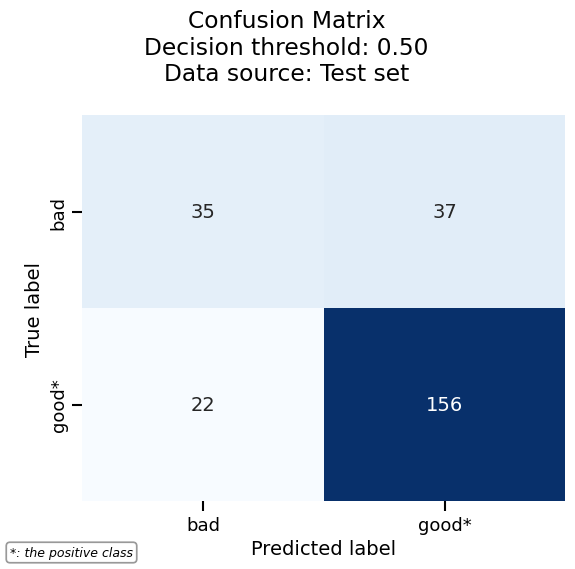
We can easily combine the results of the previous cross-validation together with the evaluation on the held-out dataset, since the two are accessible as tables. This way, we can check if our chosen model meets the expectations we set during the experiment phase.
final_frame = final_metrics.frame().to_frame()
cv_frame = logreg_cv_report.metrics.summarize().frame()
final_frame.merge(cv_frame, on="metric", how="outer")
As expected, our final model gets better performance, likely thanks to the larger training set.
Our final sanity check is to compare the features considered most impactful between our final model and the cross-validation:
final_coefficients = final_report.inspection.coefficients()
cv_coefficients = logreg_cv_report.inspection.coefficients()

features_final_coefficients = final_coefficients.frame(select_k=15)["feature"]
features_cv_coefficients = cv_coefficients.frame(select_k=15)["feature"]

print(
    f"Most important features available in both models: "
    f"{set(features_final_coefficients).intersection(set(features_cv_coefficients))}"
)

print(
    f"Most important features available in final model but not in cross-validation: "
    f"{set(features_final_coefficients).difference(set(features_cv_coefficients))}"
)
Most important features available in both models: {'text_01', 'text_00', 'text_04', 'text_12', 'text_02', 'text_03', 'text_08', 'text_06', 'text_09'}
Most important features available in final model but not in cross-validation: {'Intercept', 'text_29', 'text_27', 'text_26', 'text_20', 'text_16'}
We can further check if there is a drastic difference in the ordering by plotting those features with the largest absolute coefficients.
final_coefficients.plot(select_k=15, sorting_order="descending")
_ = cv_coefficients.plot(select_k=15, sorting_order="descending")
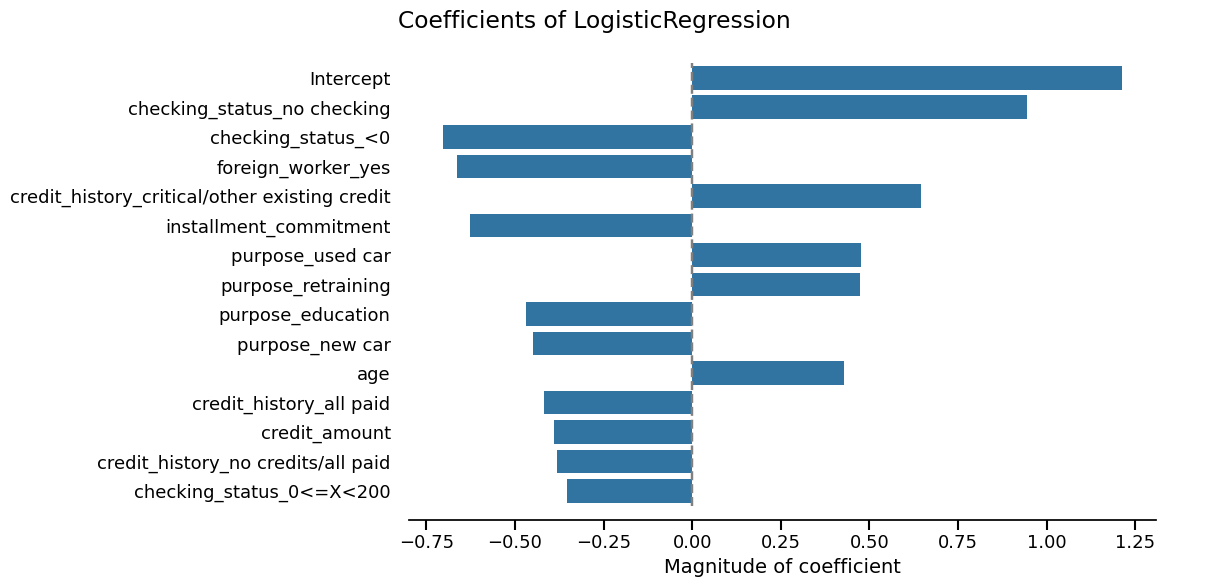
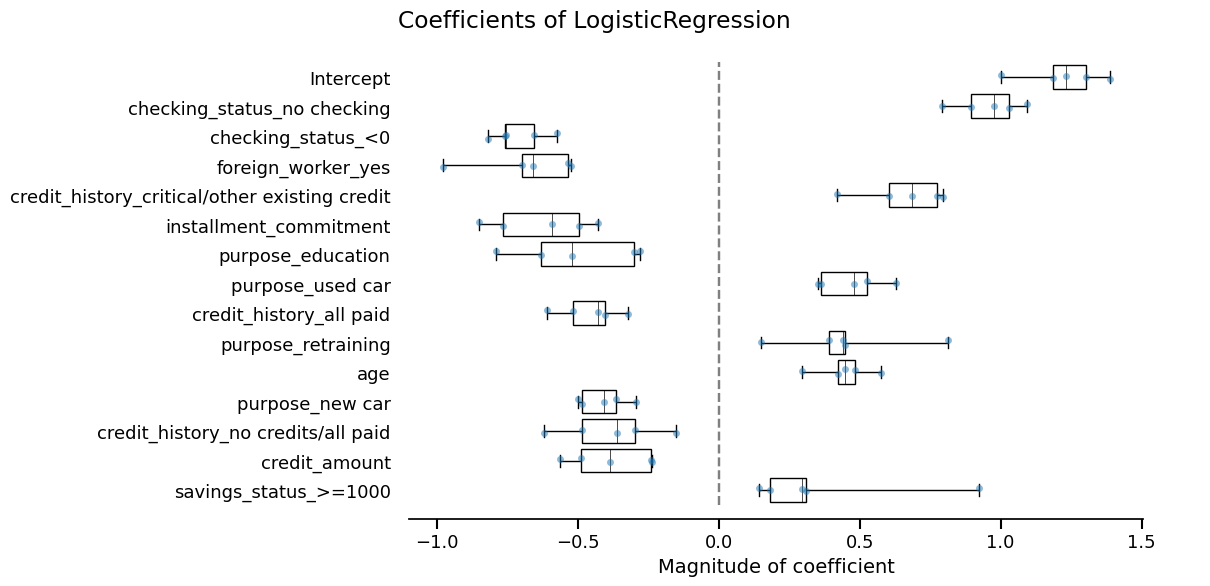
They seem very similar, so we are done!
Tracking our work with a skore Project#
Now that we have completed our modeling workflow, we should store our models in a safe place for future work. Indeed, if this research notebook were modified, we would no longer be able to relate the current production model to the code that generated it.
We can use a skore.Project to keep track of our experiments.
This makes it easy to organize, retrieve, and compare models over time.
Usually this would be done as you go along the model development, but in the interest of simplicity we kept this until the end.
We are using Skore Hub (https://skore.probabl.ai/) to store and review our reports.
Note
Here, we are using Skore Hub to store and analyze the reports that we computed.
Note that you can store reports as well locally using mode="local" when creating
or loading projects via skore.Project.
╭───────────────────────────────── Login to Skore Hub ─────────────────────────────────╮
│                                                                                      │
│                        Successfully logged in, using API key.                        │
│                                                                                      │
╰──────────────────────────────────────────────────────────────────────────────────────╯
We load or create a hub project:
We store our reports with descriptive keys:
project.put("logreg_cv", logreg_cv_report)
/home/runner/work/skore/skore/skore/venv/lib/python3.14/site-packages/skore/_plugins/hub/artifact/environment.py:48: UserWarning: Package matplotlib_skore_scraper seems to be an editable or local install (loaded from outside site-packages). It will not be recorded in the inferred requirements.
  for requirement in infer()

/home/runner/work/skore/skore/skore/venv/lib/python3.14/site-packages/skore/_plugins/hub/artifact/environment.py:48: UserWarning: Package matplotlib_skore_scraper seems to be an editable or local install (loaded from outside site-packages). It will not be recorded in the inferred requirements.
  for requirement in infer()

/home/runner/work/skore/skore/skore/venv/lib/python3.14/site-packages/skore/_plugins/hub/artifact/environment.py:48: UserWarning: Package matplotlib_skore_scraper seems to be an editable or local install (loaded from outside site-packages). It will not be recorded in the inferred requirements.
  for requirement in infer()

/home/runner/work/skore/skore/skore/venv/lib/python3.14/site-packages/skore/_plugins/hub/artifact/environment.py:48: UserWarning: Package matplotlib_skore_scraper seems to be an editable or local install (loaded from outside site-packages). It will not be recorded in the inferred requirements.
  for requirement in infer()

/home/runner/work/skore/skore/skore/venv/lib/python3.14/site-packages/skore/_plugins/hub/artifact/environment.py:48: UserWarning: Package matplotlib_skore_scraper seems to be an editable or local install (loaded from outside site-packages). It will not be recorded in the inferred requirements.
  for requirement in infer()
  Putting logreg_cv 0:01:53
Consult your report at
https://skore.probabl.ai/skore/example-getting-started-0.26/cross-validations/40932
project.put("rf_cv", rf_cv_report)
/home/runner/work/skore/skore/skore/venv/lib/python3.14/site-packages/skore/_plugins/hub/artifact/environment.py:48: UserWarning: Package matplotlib_skore_scraper seems to be an editable or local install (loaded from outside site-packages). It will not be recorded in the inferred requirements.
  for requirement in infer()

/home/runner/work/skore/skore/skore/venv/lib/python3.14/site-packages/skore/_plugins/hub/artifact/environment.py:48: UserWarning: Package matplotlib_skore_scraper seems to be an editable or local install (loaded from outside site-packages). It will not be recorded in the inferred requirements.
  for requirement in infer()

/home/runner/work/skore/skore/skore/venv/lib/python3.14/site-packages/skore/_plugins/hub/artifact/environment.py:48: UserWarning: Package matplotlib_skore_scraper seems to be an editable or local install (loaded from outside site-packages). It will not be recorded in the inferred requirements.
  for requirement in infer()

/home/runner/work/skore/skore/skore/venv/lib/python3.14/site-packages/skore/_plugins/hub/artifact/environment.py:48: UserWarning: Package matplotlib_skore_scraper seems to be an editable or local install (loaded from outside site-packages). It will not be recorded in the inferred requirements.
  for requirement in infer()

/home/runner/work/skore/skore/skore/venv/lib/python3.14/site-packages/skore/_plugins/hub/artifact/environment.py:48: UserWarning: Package matplotlib_skore_scraper seems to be an editable or local install (loaded from outside site-packages). It will not be recorded in the inferred requirements.
  for requirement in infer()
  Putting rf_cv 0:01:42
Consult your report at
https://skore.probabl.ai/skore/example-getting-started-0.26/cross-validations/40938
In this example, we created a read-only Skore Hub project that you can visit by clicking on the link above and explore the reports.
Now we can retrieve a summary of our stored reports:
Note
summarize() returns a Summary object. In a
Jupyter environment it renders as an interactive table where you can filter rows
and pick reports across the different views; the selection produces a query string
ready to pass to query() so you can recover exactly those
reports.
Once you filtered the summary (e.g. to keep only the cross-validation reports), if
you now call compare(), you get only the
CrossValidationReport objects, which
you can directly put in the form of a ComparisonReport:
new_report = summary.query('report_type == "cross-validation"').compare(
    return_as="report"
)
new_report