

Note
Go to the end to download the full example code.
EstimatorReport: Get insights from any scikit-learn estimator#
This example shows how the skore.EstimatorReport class can be used to
quickly get insights from any scikit-learn estimator.
Loading our dataset and defining our estimator#
First, we load a dataset from skrub. Our goal is to predict whether an online shopping basket is fraudulent, so that the payment can be reviewed before money leaves the account.
Baskets and products live in two tables, so we aggregate product-level information (including the cash amount of the basket) into one feature matrix with pandas. Using a skrub DataOp to keep those joins inside the estimator (and replay them on unseen data) is shown in Tracking all the data processing.
from skrub.datasets import fetch_credit_fraud

dataset = fetch_credit_fraud(split="train")
baskets = dataset.baskets
products = dataset.products

basket_features = (
    products.groupby("basket_ID")
    .agg(
        basket_amount=("cash_price", "sum"),
        n_items=("cash_price", "count"),
        mean_item_price=("cash_price", "mean"),
        max_item_price=("cash_price", "max"),
        n_makes=("make", "nunique"),
        n_item_types=("item", "nunique"),
    )
    .reset_index()
)
top_product = (
    products.sort_values("cash_price", ascending=False)
    .groupby("basket_ID", as_index=False)
    .first()[["basket_ID", "make", "item"]]
    .rename(columns={"make": "top_make", "item": "top_item"})
)

df = (
    baskets.merge(basket_features, left_on="ID", right_on="basket_ID")
    .merge(top_product, on="basket_ID")
    .drop(columns=["ID", "basket_ID"])
)
y = df.pop("fraud_flag")
from skrub import TableReport

TableReport(df)
| basket_amount | n_items | mean_item_price | max_item_price | n_makes | n_item_types | top_make | top_item | |
|---|---|---|---|---|---|---|---|---|
| 0 | 409 | 1 | 409. | 409 | 1 | 1 | APPLE | COMPUTER PERIPHERALS ACCESSORIES |
| 1 | 1,187 | 1 | 1.19e+03 | 1,187 | 1 | 1 | APPLE | COMPUTERS |
| 2 | 898 | 1 | 898. | 898 | 1 | 1 | APPLE | COMPUTERS |
| 3 | 379 | 1 | 379. | 379 | 1 | 1 | APPLE | COMPUTER PERIPHERALS ACCESSORIES |
| 4 | 1,899 | 1 | 1.90e+03 | 1,899 | 1 | 1 | APPLE | COMPUTERS |
| 61,236 | 306 | 2 | 153. | 299 | 2 | 2 | SAMSUNG | COMPUTER PERIPHERALS ACCESSORIES |
| 61,237 | 898 | 1 | 898. | 898 | 1 | 1 | APPLE | COMPUTERS |
| 61,238 | 1,727 | 3 | 576. | 949 | 2 | 2 | LG OUTDOOR | OUTDOOR FURNITURE |
| 61,239 | 3,198 | 2 | 1.60e+03 | 2,099 | 1 | 1 | APPLE | COMPUTERS |
| 61,240 | 799 | 1 | 799. | 799 | 1 | 1 | LG | TELEVISIONS HOME CINEMA |
basket_amount
Int64DType- Null values
- 0 (0.0%)
- Unique values
-
2,955 (4.8%)
This column has a high cardinality (> 40).
- Mean ± Std
- 1.20e+03 ± 738.
- Median ± IQR
- 1,069 ± 653
- Min | Max
- 219 | 18,349
n_items
Int64DType- Null values
- 0 (0.0%)
- Unique values
- 24 (< 0.1%)
- Mean ± Std
- 1.79 ± 1.35
- Median ± IQR
- 2 ± 1
- Min | Max
- 1 | 24
mean_item_price
Float64DType- Null values
- 0 (0.0%)
- Unique values
-
4,972 (8.1%)
This column has a high cardinality (> 40).
- Mean ± Std
- 824. ± 599.
- Median ± IQR
- 668. ± 690.
- Min | Max
- 29.2 | 1.83e+04
max_item_price
Int64DType- Null values
- 0 (0.0%)
- Unique values
-
992 (1.6%)
This column has a high cardinality (> 40).
- Mean ± Std
- 1.11e+03 ± 661.
- Median ± IQR
- 967 ± 600
- Min | Max
- 80 | 18,349
n_makes
Int64DType- Null values
- 0 (0.0%)
- Unique values
- 16 (< 0.1%)
- Mean ± Std
- 1.43 ± 0.691
- Median ± IQR
- 1 ± 1
- Min | Max
- 0 | 18
n_item_types
Int64DType- Null values
- 0 (0.0%)
- Unique values
- 13 (< 0.1%)
- Mean ± Std
- 1.63 ± 0.849
- Median ± IQR
- 1 ± 1
- Min | Max
- 1 | 13
top_make
ObjectDType- Null values
- 685 (1.1%)
- Unique values
-
161 (0.3%)
This column has a high cardinality (> 40).
Most frequent values
top_item
ObjectDType- Null values
- 0 (0.0%)
- Unique values
-
57 (< 0.1%)
This column has a high cardinality (> 40).
Most frequent values
No columns match the selected filter: . You can change the column filter in the dropdown menu above.
| Column | Column name | dtype | Is sorted | Null values | Unique values | Mean | Std | Min | Median | Max |
|---|---|---|---|---|---|---|---|---|---|---|
| 0 | basket_amount | Int64DType | False | 0 (0.0%) | 2955 (4.8%) | 1.20e+03 | 738. | 219 | 1,069 | 18,349 |
| 1 | n_items | Int64DType | False | 0 (0.0%) | 24 (< 0.1%) | 1.79 | 1.35 | 1 | 2 | 24 |
| 2 | mean_item_price | Float64DType | False | 0 (0.0%) | 4972 (8.1%) | 824. | 599. | 29.2 | 668. | 1.83e+04 |
| 3 | max_item_price | Int64DType | False | 0 (0.0%) | 992 (1.6%) | 1.11e+03 | 661. | 80 | 967 | 18,349 |
| 4 | n_makes | Int64DType | False | 0 (0.0%) | 16 (< 0.1%) | 1.43 | 0.691 | 0 | 1 | 18 |
| 5 | n_item_types | Int64DType | False | 0 (0.0%) | 13 (< 0.1%) | 1.63 | 0.849 | 1 | 1 | 13 |
| 6 | top_make | ObjectDType | False | 685 (1.1%) | 161 (0.3%) | |||||
| 7 | top_item | ObjectDType | False | 0 (0.0%) | 57 (< 0.1%) |
No columns match the selected filter: . You can change the column filter in the dropdown menu above.
basket_amount
Int64DType- Null values
- 0 (0.0%)
- Unique values
-
2,955 (4.8%)
This column has a high cardinality (> 40).
- Mean ± Std
- 1.20e+03 ± 738.
- Median ± IQR
- 1,069 ± 653
- Min | Max
- 219 | 18,349
n_items
Int64DType- Null values
- 0 (0.0%)
- Unique values
- 24 (< 0.1%)
- Mean ± Std
- 1.79 ± 1.35
- Median ± IQR
- 2 ± 1
- Min | Max
- 1 | 24
mean_item_price
Float64DType- Null values
- 0 (0.0%)
- Unique values
-
4,972 (8.1%)
This column has a high cardinality (> 40).
- Mean ± Std
- 824. ± 599.
- Median ± IQR
- 668. ± 690.
- Min | Max
- 29.2 | 1.83e+04
max_item_price
Int64DType- Null values
- 0 (0.0%)
- Unique values
-
992 (1.6%)
This column has a high cardinality (> 40).
- Mean ± Std
- 1.11e+03 ± 661.
- Median ± IQR
- 967 ± 600
- Min | Max
- 80 | 18,349
n_makes
Int64DType- Null values
- 0 (0.0%)
- Unique values
- 16 (< 0.1%)
- Mean ± Std
- 1.43 ± 0.691
- Median ± IQR
- 1 ± 1
- Min | Max
- 0 | 18
n_item_types
Int64DType- Null values
- 0 (0.0%)
- Unique values
- 13 (< 0.1%)
- Mean ± Std
- 1.63 ± 0.849
- Median ± IQR
- 1 ± 1
- Min | Max
- 1 | 13
top_make
ObjectDType- Null values
- 685 (1.1%)
- Unique values
-
161 (0.3%)
This column has a high cardinality (> 40).
Most frequent values
top_item
ObjectDType- Null values
- 0 (0.0%)
- Unique values
-
57 (< 0.1%)
This column has a high cardinality (> 40).
Most frequent values
No columns match the selected filter: . You can change the column filter in the dropdown menu above.
| Column 1 | Column 2 | Cramér's V | Pearson's Correlation |
|---|---|---|---|
| basket_amount | max_item_price | 0.885 | 0.932 |
| mean_item_price | max_item_price | 0.767 | 0.819 |
| basket_amount | mean_item_price | 0.714 | 0.722 |
| n_items | n_item_types | 0.604 | 0.848 |
| n_makes | n_item_types | 0.545 | 0.756 |
| top_make | top_item | 0.472 | |
| n_items | n_makes | 0.425 | 0.682 |
| n_makes | top_make | 0.360 | |
| mean_item_price | top_make | 0.191 | |
| basket_amount | top_item | 0.189 | |
| max_item_price | top_make | 0.184 | |
| max_item_price | top_item | 0.184 | |
| basket_amount | top_make | 0.177 | |
| mean_item_price | top_item | 0.171 | |
| n_items | top_item | 0.157 | |
| n_items | top_make | 0.155 | |
| mean_item_price | n_item_types | 0.150 | -0.425 |
| n_items | mean_item_price | 0.149 | -0.342 |
| n_item_types | top_make | 0.133 | |
| n_item_types | top_item | 0.127 | |
| n_makes | top_item | 0.126 | |
| mean_item_price | n_makes | 0.121 | -0.349 |
| basket_amount | n_items | 0.0869 | 0.161 |
| basket_amount | n_item_types | 0.0555 | 0.103 |
| basket_amount | n_makes | 0.0450 | 0.0520 |
| n_items | max_item_price | 0.0434 | -0.0419 |
| max_item_price | n_item_types | 0.0274 | -0.0134 |
| max_item_price | n_makes | 0.0249 | -0.0123 |
Please enable javascript
The skrub table reports need javascript to display correctly. If you are displaying a report in a Jupyter notebook and you see this message, you may need to re-execute the cell or to trust the notebook (button on the top right or "File > Trust notebook").
Looking at the distributions of the target, we observe that this classification task is quite imbalanced. This means that we have to be careful when selecting a set of statistical metrics to evaluate the classification performance of our predictive model. In addition, we see that the class labels are specified by an integer 0 or 1.
For our application, the label of interest is 1 (fraudulent).
Let’s create a predictive model. Thankfully, skrub provides a convenient
function (skrub.tabular_pipeline()) when it comes to getting strong baseline
predictive models with a single line of code. As its feature engineering is generic,
it does not provide some handcrafted and tailored feature engineering but still
provides a good starting point.
So let’s create a classifier for our task.
from skrub import tabular_pipeline

estimator = tabular_pipeline("classifier")
estimator
Introducing the EstimatorReport#
Let’s gather some insights from our predictive model.
We can use skore.evaluate() for this: the function will perform a train-test
split and create a EstimatorReport containing the model fitted on
the training data, ready to investigate.
| Metric | HistGradientBoostingClassifier |
|---|---|
| Accuracy | 0.986856 |
| Precision | 0.416667 |
| Recall | 0.031447 |
| ROC AUC | 0.854874 |
| Log loss | 0.056231 |
| Brier score | 0.012130 |
| Fit time (s) | 2.171997 |
| Predict time (s) | 0.273078 |
- [SKD004] High class imbalance. Class [0] represents more than 80% of the dataset samples. Accuracy should not be used alone to assess model performance as it may be misleading by ignoring poor performance on the underrepresented class.
- [SKD008] Highly correlated input features. 9 pair(s) of features have a Spearman correlation above 0.9. Highly correlated features can destabilize linear model coefficients and feature-importance estimates, and may cause collinearity-induced numerical issues.Dropping redundant features may also improve model performance.
- [SKD016] Estimator not tuned. Estimator(s) left at default settings; consider tuning: ['learning_rate', 'max_leaf_nodes'] for HistGradientBoostingClassifier.
- [SKD003] Inconsistent performance across splits. Not applicable to estimator reports.
- [SKD005] Underrepresented classes. ML task is not multiclass classification. Got binary-classification.
- [SKD006] Coefficient interpretation. Estimator is not a linear model: it does not have a `coef_` attribute.
- [SKD007] MDI biased for high-cardinality features. Estimator is not a tree-based model: it does not have a `feature_importances_` attribute.
- [SKD013] Train-test overlap in time series. No datetime column found.
- [SKD014] Hyperparameters at search edge. Estimator is not a BaseSearchCV instance. Got Pipeline.
- [SKD015] Hyperparameters worth tuning. Estimator is not a BaseSearchCV instance. Got Pipeline.
No checks were muted.
Fast mode is on: expensive checks are skipped unless already cached.
Mute a check by passing its code to ignore, e.g. .checks.summarize(ignore=['SKD001']).
Pipeline(steps=[('tablevectorizer',
                 TableVectorizer(low_cardinality=ToCategorical())),
                ('histgradientboostingclassifier',
HistGradientBoostingClassifier())])In a Jupyter environment, please rerun this cell to show the HTML representation or trust the notebook. On GitHub, the HTML representation is unable to render, please try loading this page with nbviewer.org.
Parameters
Fitted attributes
Parameters
Fitted attributes
['basket_amount', 'n_items', 'mean_item_price', 'max_item_price', 'n_makes', 'n_item_types']
Parameters
Parameters
Parameters
['top_make', 'top_item']
Parameters
66 features
| basket_amount |
| n_items |
| mean_item_price |
| max_item_price |
| n_makes |
| n_item_types |
| top_make_00 |
| top_make_01 |
| top_make_02 |
| top_make_03 |
| top_make_04 |
| top_make_05 |
| top_make_06 |
| top_make_07 |
| top_make_08 |
| top_make_09 |
| top_make_10 |
| top_make_11 |
| top_make_12 |
| top_make_13 |
| top_make_14 |
| top_make_15 |
| top_make_16 |
| top_make_17 |
| top_make_18 |
| top_make_19 |
| top_make_20 |
| top_make_21 |
| top_make_22 |
| top_make_23 |
| top_make_24 |
| top_make_25 |
| top_make_26 |
| top_make_27 |
| top_make_28 |
| top_make_29 |
| top_item_00 |
| top_item_01 |
| top_item_02 |
| top_item_03 |
| top_item_04 |
| top_item_05 |
| top_item_06 |
| top_item_07 |
| top_item_08 |
| top_item_09 |
| top_item_10 |
| top_item_11 |
| top_item_12 |
| top_item_13 |
| top_item_14 |
| top_item_15 |
| top_item_16 |
| top_item_17 |
| top_item_18 |
| top_item_19 |
| top_item_20 |
| top_item_21 |
| top_item_22 |
| top_item_23 |
| top_item_24 |
| top_item_25 |
| top_item_26 |
| top_item_27 |
| top_item_28 |
| top_item_29 |
Parameters
Fitted attributes
| basket_amount | n_items | mean_item_price | max_item_price | n_makes | n_item_types | top_make | top_item | fraud_flag | |
|---|---|---|---|---|---|---|---|---|---|
| 0 | 1,349 | 1 | 1.35e+03 | 1,349 | 1 | 1 | APPLE | COMPUTERS | 0 |
| 1 | 999 | 1 | 999. | 999 | 1 | 1 | LG | TELEVISIONS HOME CINEMA | 0 |
| 2 | 1,910 | 2 | 955. | 1,899 | 2 | 2 | APPLE | COMPUTERS | 0 |
| 3 | 1,156 | 2 | 578. | 1,149 | 2 | 2 | APPLE | COMPUTERS | 0 |
| 4 | 2,696 | 3 | 899. | 2,599 | 2 | 3 | APPLE | COMPUTERS | 0 |
| 61,236 | 559 | 2 | 280. | 559 | 2 | 2 | APPLE | COMPUTERS | 0 |
| 61,237 | 1,489 | 2 | 744. | 1,489 | 2 | 2 | LG | TELEVISIONS HOME CINEMA | 0 |
| 61,238 | 700 | 1 | 700. | 700 | 1 | 1 | SAMSUNG | TELEPHONES FAX MACHINES TWO-WAY RADIOS | 0 |
| 61,239 | 1,448 | 3 | 483. | 724 | 2 | 2 | APPLE | TELEPHONES, FAX MACHINES & TWO-WAY RADIOS | 0 |
| 61,240 | 1,148 | 1 | 1.15e+03 | 1,148 | 1 | 1 | APPLE | COMPUTERS | 0 |
basket_amount
Int64DType- Null values
- 0 (0.0%)
- Unique values
-
2,955 (4.8%)
This column has a high cardinality (> 40).
- Mean ± Std
- 1.20e+03 ± 738.
- Median ± IQR
- 1,069 ± 653
- Min | Max
- 219 | 18,349
n_items
Int64DType- Null values
- 0 (0.0%)
- Unique values
- 24 (< 0.1%)
- Mean ± Std
- 1.79 ± 1.35
- Median ± IQR
- 2 ± 1
- Min | Max
- 1 | 24
mean_item_price
Float64DType- Null values
- 0 (0.0%)
- Unique values
-
4,972 (8.1%)
This column has a high cardinality (> 40).
- Mean ± Std
- 824. ± 599.
- Median ± IQR
- 668. ± 690.
- Min | Max
- 29.2 | 1.83e+04
max_item_price
Int64DType- Null values
- 0 (0.0%)
- Unique values
-
992 (1.6%)
This column has a high cardinality (> 40).
- Mean ± Std
- 1.11e+03 ± 661.
- Median ± IQR
- 967 ± 600
- Min | Max
- 80 | 18,349
n_makes
Int64DType- Null values
- 0 (0.0%)
- Unique values
- 16 (< 0.1%)
- Mean ± Std
- 1.43 ± 0.691
- Median ± IQR
- 1 ± 1
- Min | Max
- 0 | 18
n_item_types
Int64DType- Null values
- 0 (0.0%)
- Unique values
- 13 (< 0.1%)
- Mean ± Std
- 1.63 ± 0.849
- Median ± IQR
- 1 ± 1
- Min | Max
- 1 | 13
top_make
ObjectDType- Null values
- 685 (1.1%)
- Unique values
-
161 (0.3%)
This column has a high cardinality (> 40).
top_item
ObjectDType- Null values
- 0 (0.0%)
- Unique values
-
57 (< 0.1%)
This column has a high cardinality (> 40).
fraud_flag
Int64DType- Null values
- 0 (0.0%)
- Unique values
- 2 (< 0.1%)
- Mean ± Std
- 0.0130 ± 0.113
- Median ± IQR
- 0 ± 0
- Min | Max
- 0 | 1
No columns match the selected filter: . You can change the column filter in the dropdown menu above.
| Column | Column name | dtype | Is sorted | Null values | Unique values | Mean | Std | Min | Median | Max |
|---|---|---|---|---|---|---|---|---|---|---|
| 0 | basket_amount | Int64DType | False | 0 (0.0%) | 2955 (4.8%) | 1.20e+03 | 738. | 219 | 1,069 | 18,349 |
| 1 | n_items | Int64DType | False | 0 (0.0%) | 24 (< 0.1%) | 1.79 | 1.35 | 1 | 2 | 24 |
| 2 | mean_item_price | Float64DType | False | 0 (0.0%) | 4972 (8.1%) | 824. | 599. | 29.2 | 668. | 1.83e+04 |
| 3 | max_item_price | Int64DType | False | 0 (0.0%) | 992 (1.6%) | 1.11e+03 | 661. | 80 | 967 | 18,349 |
| 4 | n_makes | Int64DType | False | 0 (0.0%) | 16 (< 0.1%) | 1.43 | 0.691 | 0 | 1 | 18 |
| 5 | n_item_types | Int64DType | False | 0 (0.0%) | 13 (< 0.1%) | 1.63 | 0.849 | 1 | 1 | 13 |
| 6 | top_make | ObjectDType | False | 685 (1.1%) | 161 (0.3%) | |||||
| 7 | top_item | ObjectDType | False | 0 (0.0%) | 57 (< 0.1%) | |||||
| 8 | fraud_flag | Int64DType | False | 0 (0.0%) | 2 (< 0.1%) | 0.0130 | 0.113 | 0 | 0 | 1 |
No columns match the selected filter: . You can change the column filter in the dropdown menu above.
Please enable javascript
The skrub table reports need javascript to display correctly. If you are displaying a report in a Jupyter notebook and you see this message, you may need to re-execute the cell or to trust the notebook (button on the top right or "File > Trust notebook").
Once the report is created, we get some information regarding the available tools
allowing us to get some insights on our model by calling the
help() method.
Be aware that we can access the help for each individual sub-accessor. For instance:
report.metrics.help()
Measuring model performance#
Let’s have a first look at the statistical performance of our model. skore knows
that we are doing classification, and can give us an array of classic ML metrics,
all at once, with summarize():
import time

start = time.time()
metric_report = report.metrics.summarize().frame()
end = time.time()
metric_report
metric
accuracy        0.986856
precision       0.416667
recall          0.031447
roc_auc         0.854874
log_loss        0.056231
brier_score     0.012130
fit_time        2.171997
predict_time    0.273078
Name: HistGradientBoostingClassifier, dtype: float64
Time taken to compute the metrics: 0.00 seconds
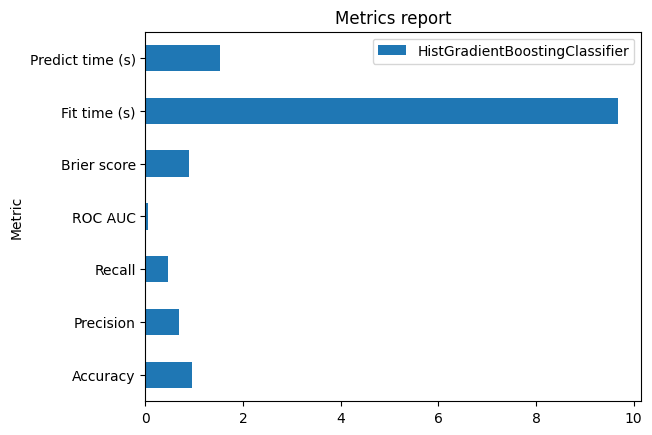
Since the output is a pandas dataframe, we can also use the plotting interface of pandas.
ax = metric_report.plot.barh()
_ = ax.set_title("Metrics report")
An interesting feature of the skore.EstimatorReport is its caching mechanism.
Indeed, when we have a large enough dataset, computing the predictions for a model can
be expensive. To amortize this cost, the report will cache the predictions when
it is first created; this way, calculations that need the model predictions can get
them from the cache and save a lot of time. This is why the metrics computation above
is so fast.
When the model is fitted or the predictions are computed, we additionally store the time the operation took:
report.metrics.timings()
{'fit_time': 2.171997186999988, 'predict_time_train': 1.0120602800000142, 'predict_time_test': 0.2730781250000405}
By default, the metrics are computed on the test set only, but we can also compute them on the train set:
report.metrics.log_loss(data_source="train")
0.04843329204253648
Defining custom metrics#
skore can compute user-defined metrics as well. It accepts metrics in the form of
scikit-learn scorers, i.e. functions taking estimator, X and y (and optional
keyword arguments). Let’s take a look at an example.
def operational_decision_gain(y_true, y_pred, *, amount):
    """The monetary gain we obtain depending on our predictions.

    May be negative, in which case our predictions actually *cost* us money.
    """
    mask_true_positive = (y_true == pos_label) & (y_pred == pos_label)
    mask_true_negative = (y_true == neg_label) & (y_pred == neg_label)
    mask_false_positive = (y_true == neg_label) & (y_pred == pos_label)
    mask_false_negative = (y_true == pos_label) & (y_pred == neg_label)

    REVIEW_COST = -20
    REPUTATION_COST = -30
    MARGIN = 0.02

    # Fraud correctly flagged: we pay the review costs, but do not incur
    # more cost
    fraudulent_refuse = mask_true_positive.sum() * REVIEW_COST

    # Fraud missed: the payment goes through and we lose the full basket amount
    fraudulent_accept = -amount[mask_false_negative].sum()

    # Legitimate basket wrongly flagged: we pay the review costs, but we also annoy
    # the customer and risk losing them, so it is penalized compared to a correct
    # refusal
    legitimate_refuse = mask_false_positive.sum() * (REVIEW_COST + REPUTATION_COST)

    # Legitimate basket correctly accepted: we earn a margin on the sale
    legitimate_accept = (amount[mask_true_negative] * MARGIN).sum()

    return fraudulent_refuse + fraudulent_accept + legitimate_refuse + legitimate_accept
In our example use case, each classification decision has a different monetary gain. The function above models this by translating the confusion matrix into a gain (payoff) matrix that depends on the basket cash value. Let’s test adding this metric to our report.
from sklearn.metrics import make_scorer

amount = report.X_test["basket_amount"]

# We use `make_scorer` to convert the metric to the right format (a function
# that takes `estimator`, `X`, `y`)
report.metrics.add(metric=make_scorer(operational_decision_gain, amount=amount))
Our custom metric is now registered in the report, and will be shown in the summary.
In fact, since the underlying metric function takes y_pred as input, skore can use
the cached predictions again to speed up the computation.
# The metric name is derived from the function name unless it is explicitly given
report.metrics.summarize().frame()
metric
operational_decision_gain    67946.700000
accuracy                         0.986856
precision                        0.416667
recall                           0.031447
roc_auc                          0.854874
log_loss                         0.056231
brier_score                      0.012130
fit_time                         2.171997
predict_time                     0.273078
Name: HistGradientBoostingClassifier, dtype: float64
Effortless one-liner plotting#
The skore.EstimatorReport class also implements a number of the most common
data science plots.
As for the metrics, we only provide the meaningful set of plots for the provided
estimator.
report.metrics.help()
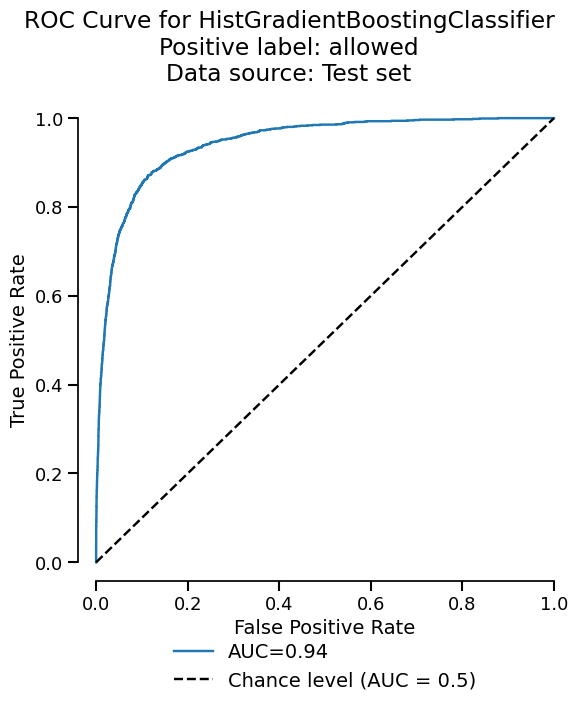
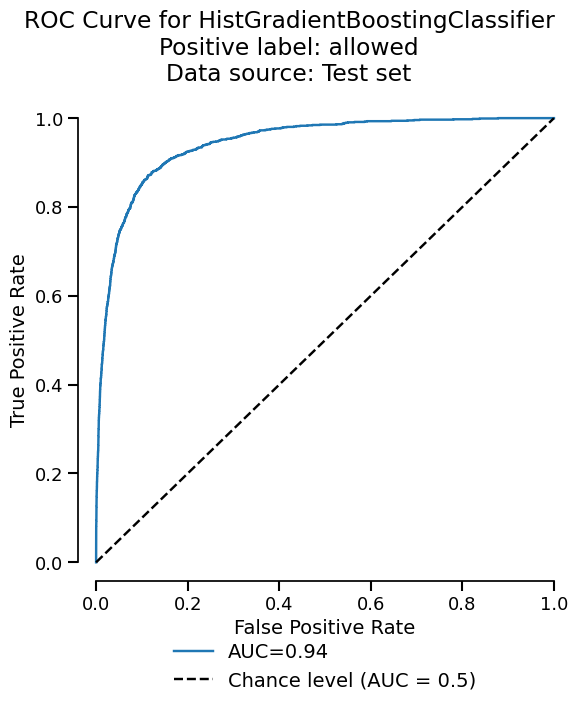
Let’s plot the ROC curve for our binary classification task.
display = report.metrics.roc()
display.plot()
<Figure size 600x750 with 1 Axes>
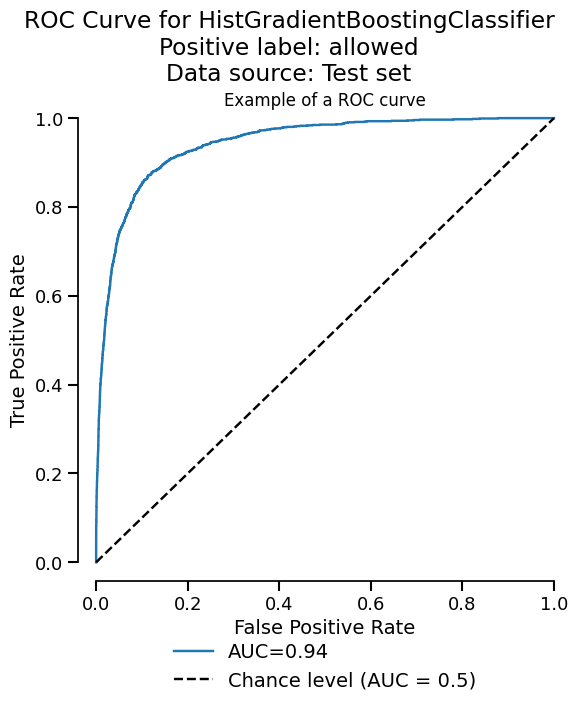
The plot functionality is built upon the scikit-learn Display objects. We return
those Display objects (slightly modified to improve the UI) in case we want to tweak some
of the plot properties. We can have a quick look at the available attributes and
methods by calling the help method.
fig = display.plot()
fig.axes[0].set_title("Example of a ROC curve")
fig
<Figure size 600x750 with 1 Axes>
Similarly to the metrics, the cache allows us to avoid recomputing the model predictions, which speeds up the display generation.
Time taken to compute the ROC curve: 0.08 seconds
You can learn more about the cache system in the corresponding example: Cache mechanism.
Visualizing the confusion matrix#
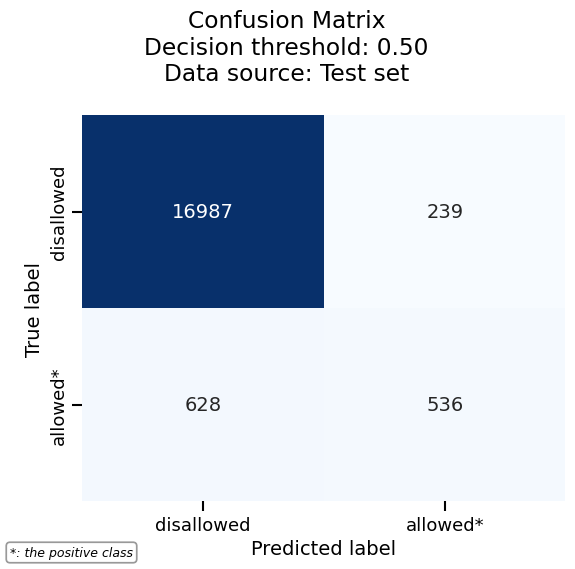
Another useful visualization for classification tasks is the confusion matrix, which shows the counts of correct and incorrect predictions for each class.
Let’s start with a basic confusion matrix:
cm_display = report.metrics.confusion_matrix()
cm_display.plot()
<Figure size 600x600 with 1 Axes>
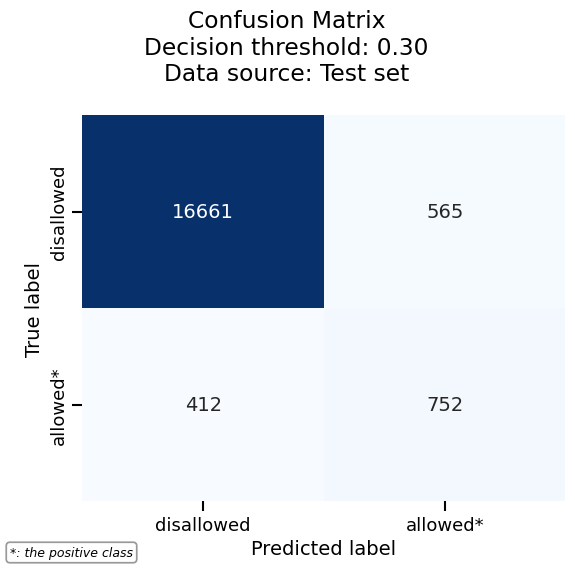
In binary classification, a confusion matrix depends on the decision threshold used to convert predicted probabilities into class labels. By default, skore uses a threshold of 0.5, but confusion matrices are actually computed at every threshold internally.
To visualize the confusion matrix at a different threshold, use the
threshold_value parameter. For example, a threshold of 0.1 will classify
more samples as positive:
cm_display.plot(threshold_value=0.1)
<Figure size 600x600 with 1 Axes>
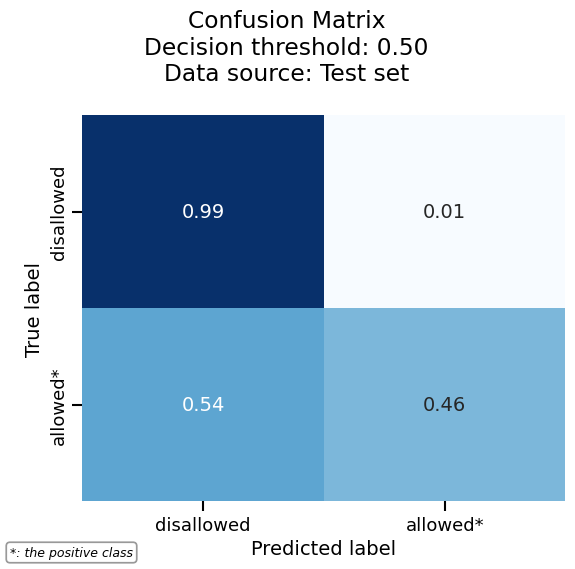
We can normalize the confusion matrix to get percentages instead of raw counts. Here we normalize by true labels (rows):
cm_display.plot(normalize="true")
<Figure size 600x600 with 1 Axes>
More plotting options are available via heatmap_kwargs, which are passed to
seaborn’s heatmap. For example, we can customize the colormap and number format:
cm_display.set_style(heatmap_kwargs={"cmap": "Greens", "fmt": ".2e"})
cm_display.plot()
<Figure size 600x600 with 1 Axes>
Finally, the confusion matrix can also be exported as a pandas DataFrame for further analysis:
See also
For using the EstimatorReport to inspect your models,
see EstimatorReport: Inspecting your models with the feature importance.
Total running time of the script: (0 minutes 8.697 seconds)