

Note
Go to the end to download the full example code.
The skore API#
Skore has three types of reports: EstimatorReport
(single train-test evaluation), CrossValidationReport
(cross-validation), and ComparisonReport (comparing several
estimators). All three are created via evaluate() by passing an
estimator (or a list or dict of named estimators for comparison), the data X
and y, and a splitter that controls the evaluation strategy.
This example showcases the unified API shared by these reports: they expose
the same accessors (data, metrics, inspection). Methods that
produce a visualization return a Display object with plot(), frame(),
set_style(), and help().
Three report types, one API#
evaluate() returns one of three report types depending on its
splitter argument: an EstimatorReport when splitter is a
float or "prefit", a CrossValidationReport when splitter is
an integer or a scikit-learn cross-validator (e.g. KFold, StratifiedKFold),
or a ComparisonReport when passing a list or dict of estimators.
All three respect the same accessor layout where applicable:
data: dataset analysis
metrics: performance metrics and related displays (e.g. ROC, confusion matrix)
inspection: model inspection (e.g. coefficients, feature importance)
The data accessor is not available on ComparisonReport because compared
models may use different input data; you can still inspect each underlying report.
Methods on these accessors return Display objects with a common interface.
First report: single train-test split#
We call evaluate() with the default splitter=0.2 to get an
EstimatorReport. The accessors and display API shown below
are the same for the other report types.
from sklearn.datasets import load_breast_cancer
from sklearn.ensemble import RandomForestClassifier
from sklearn.linear_model import LogisticRegression
from skore import compare, evaluate
from skrub import tabular_pipeline

X, y = load_breast_cancer(return_X_y=True, as_frame=True)
estimator = tabular_pipeline(LogisticRegression())

report = evaluate(estimator, X, y, splitter=0.2)
Data accessor: report.data.summarize() returns a display#
The data accessor provides dataset summaries. Its summarize() method
returns a TableReportDisplay.
data_display = report.data.summarize()
data_display.help()
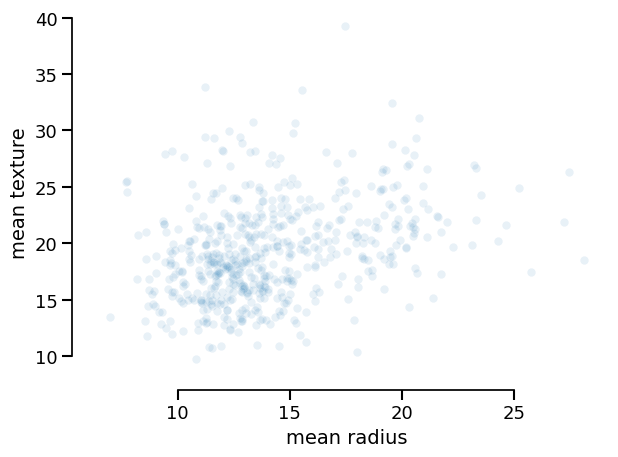
Every display implements the same API. You can:
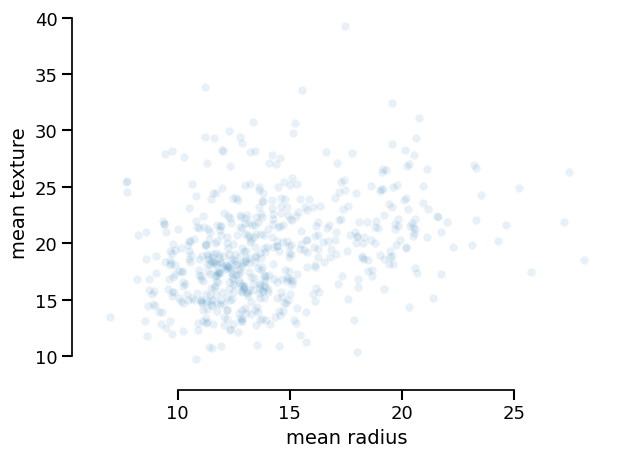
Plot it (with optional backend and style):
data_display.plot(kind="dist", x="mean radius", y="mean texture")
<Figure size 640x480 with 1 Axes>
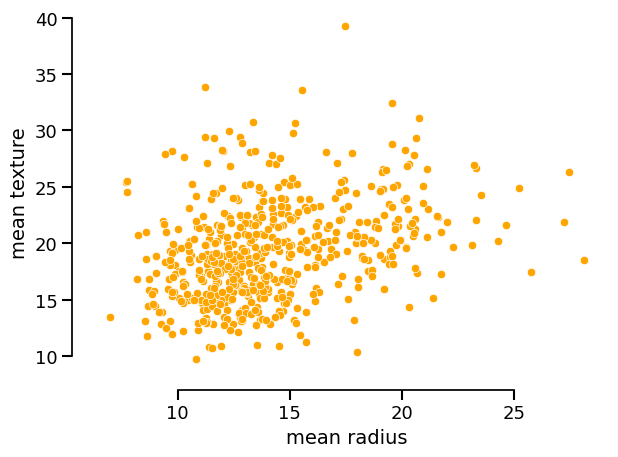
You can set the style of the plot via set_style() and then call plot():
data_display.set_style(scatterplot_kwargs={"color": "orange", "alpha": 1.0})
data_display.plot(kind="dist", x="mean radius", y="mean texture")
<Figure size 640x480 with 1 Axes>
Export the underlying data as pandas objects:
| mean radius | mean texture | mean perimeter | mean area | mean smoothness | mean compactness | mean concavity | mean concave points | mean symmetry | mean fractal dimension | radius error | texture error | perimeter error | area error | smoothness error | compactness error | concavity error | concave points error | symmetry error | fractal dimension error | worst radius | worst texture | worst perimeter | worst area | worst smoothness | worst compactness | worst concavity | worst concave points | worst symmetry | worst fractal dimension | target | |
|---|---|---|---|---|---|---|---|---|---|---|---|---|---|---|---|---|---|---|---|---|---|---|---|---|---|---|---|---|---|---|---|
| 0 | 10.05 | 17.53 | 64.41 | 310.8 | 0.10070 | 0.07326 | 0.02511 | 0.01775 | 0.1890 | 0.06331 | 0.2619 | 2.0150 | 1.778 | 16.85 | 0.007803 | 0.01449 | 0.01690 | 0.008043 | 0.02100 | 0.002778 | 11.16 | 26.84 | 71.98 | 384.0 | 0.1402 | 0.14020 | 0.1055 | 0.06499 | 0.2894 | 0.07664 | 1 |
| 1 | 10.80 | 21.98 | 68.79 | 359.9 | 0.08801 | 0.05743 | 0.03614 | 0.01404 | 0.2016 | 0.05977 | 0.3077 | 1.6210 | 2.240 | 20.20 | 0.006543 | 0.02148 | 0.02991 | 0.010450 | 0.01844 | 0.002690 | 12.76 | 32.04 | 83.69 | 489.5 | 0.1303 | 0.16960 | 0.1927 | 0.07485 | 0.2965 | 0.07662 | 1 |
| 2 | 16.14 | 14.86 | 104.30 | 800.0 | 0.09495 | 0.08501 | 0.05500 | 0.04528 | 0.1735 | 0.05875 | 0.2387 | 0.6372 | 1.729 | 21.83 | 0.003958 | 0.01246 | 0.01831 | 0.008747 | 0.01500 | 0.001621 | 17.71 | 19.58 | 115.90 | 947.9 | 0.1206 | 0.17220 | 0.2310 | 0.11290 | 0.2778 | 0.07012 | 1 |
| 3 | 12.18 | 17.84 | 77.79 | 451.1 | 0.10450 | 0.07057 | 0.02490 | 0.02941 | 0.1900 | 0.06635 | 0.3661 | 1.5110 | 2.410 | 24.44 | 0.005433 | 0.01179 | 0.01131 | 0.015190 | 0.02220 | 0.003408 | 12.83 | 20.92 | 82.14 | 495.2 | 0.1140 | 0.09358 | 0.0498 | 0.05882 | 0.2227 | 0.07376 | 1 |
| 4 | 12.25 | 22.44 | 78.18 | 466.5 | 0.08192 | 0.05200 | 0.01714 | 0.01261 | 0.1544 | 0.05976 | 0.2239 | 1.1390 | 1.577 | 18.04 | 0.005096 | 0.01205 | 0.00941 | 0.004551 | 0.01608 | 0.002399 | 14.17 | 31.99 | 92.74 | 622.9 | 0.1256 | 0.18040 | 0.1230 | 0.06335 | 0.3100 | 0.08203 | 1 |
| ... | ... | ... | ... | ... | ... | ... | ... | ... | ... | ... | ... | ... | ... | ... | ... | ... | ... | ... | ... | ... | ... | ... | ... | ... | ... | ... | ... | ... | ... | ... | ... |
| 564 | 17.42 | 25.56 | 114.50 | 948.0 | 0.10060 | 0.11460 | 0.16820 | 0.06597 | 0.1308 | 0.05866 | 0.5296 | 1.6670 | 3.767 | 58.53 | 0.031130 | 0.08555 | 0.14380 | 0.039270 | 0.02175 | 0.012560 | 18.07 | 28.07 | 120.40 | 1021.0 | 0.1243 | 0.17930 | 0.2803 | 0.10990 | 0.1603 | 0.06818 | 0 |
| 565 | 12.75 | 16.70 | 82.51 | 493.8 | 0.11250 | 0.11170 | 0.03880 | 0.02995 | 0.2120 | 0.06623 | 0.3834 | 1.0030 | 2.495 | 28.62 | 0.007509 | 0.01561 | 0.01977 | 0.009199 | 0.01805 | 0.003629 | 14.45 | 21.74 | 93.63 | 624.1 | 0.1475 | 0.19790 | 0.1423 | 0.08045 | 0.3071 | 0.08557 | 1 |
| 566 | 20.18 | 19.54 | 133.80 | 1250.0 | 0.11330 | 0.14890 | 0.21330 | 0.12590 | 0.1724 | 0.06053 | 0.4331 | 1.0010 | 3.008 | 52.49 | 0.009087 | 0.02715 | 0.05546 | 0.019100 | 0.02451 | 0.004005 | 22.03 | 25.07 | 146.00 | 1479.0 | 0.1665 | 0.29420 | 0.5308 | 0.21730 | 0.3032 | 0.08075 | 0 |
| 567 | 18.31 | 20.58 | 120.80 | 1052.0 | 0.10680 | 0.12480 | 0.15690 | 0.09451 | 0.1860 | 0.05941 | 0.5449 | 0.9225 | 3.218 | 67.36 | 0.006176 | 0.01877 | 0.02913 | 0.010460 | 0.01559 | 0.002725 | 21.86 | 26.20 | 142.20 | 1493.0 | 0.1492 | 0.25360 | 0.3759 | 0.15100 | 0.3074 | 0.07863 | 0 |
| 568 | 15.04 | 16.74 | 98.73 | 689.4 | 0.09883 | 0.13640 | 0.07721 | 0.06142 | 0.1668 | 0.06869 | 0.3720 | 0.8423 | 2.304 | 34.84 | 0.004123 | 0.01819 | 0.01996 | 0.010040 | 0.01055 | 0.003237 | 16.76 | 20.43 | 109.70 | 856.9 | 0.1135 | 0.21760 | 0.1856 | 0.10180 | 0.2177 | 0.08549 | 1 |
569 rows × 31 columns
Metrics accessor: same idea, same display API#
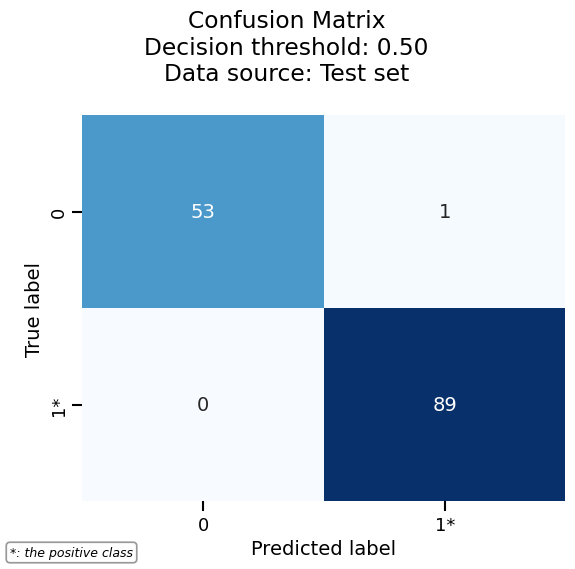
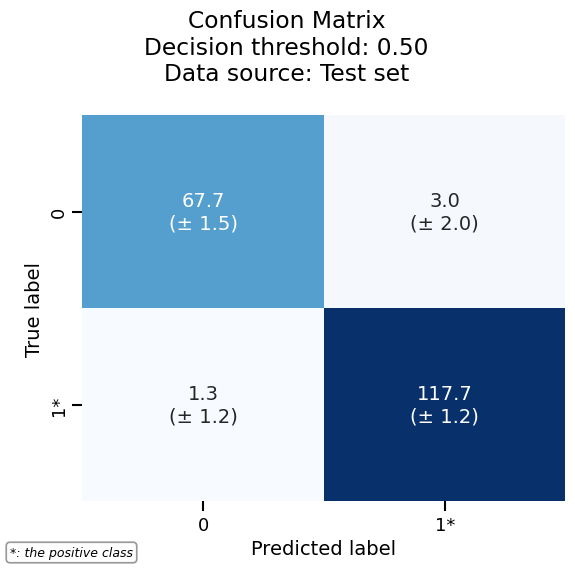
The metrics accessor exposes methods such as confusion_matrix(),
roc_curve(), precision_recall(), and prediction_error(). Each
returns a display (e.g. ConfusionMatrixDisplay) with the
same interface: plot(), frame(), set_style(), help().
metrics_display = report.metrics.confusion_matrix()
metrics_display.help()
| true_label | predicted_label | value | |
|---|---|---|---|
| 0 | 0 | 0 | 45 |
| 1 | 0 | 1 | 2 |
| 2 | 1 | 0 | 2 |
| 3 | 1 | 1 | 65 |
Draw the confusion matrix by calling plot():
Inspection accessor#
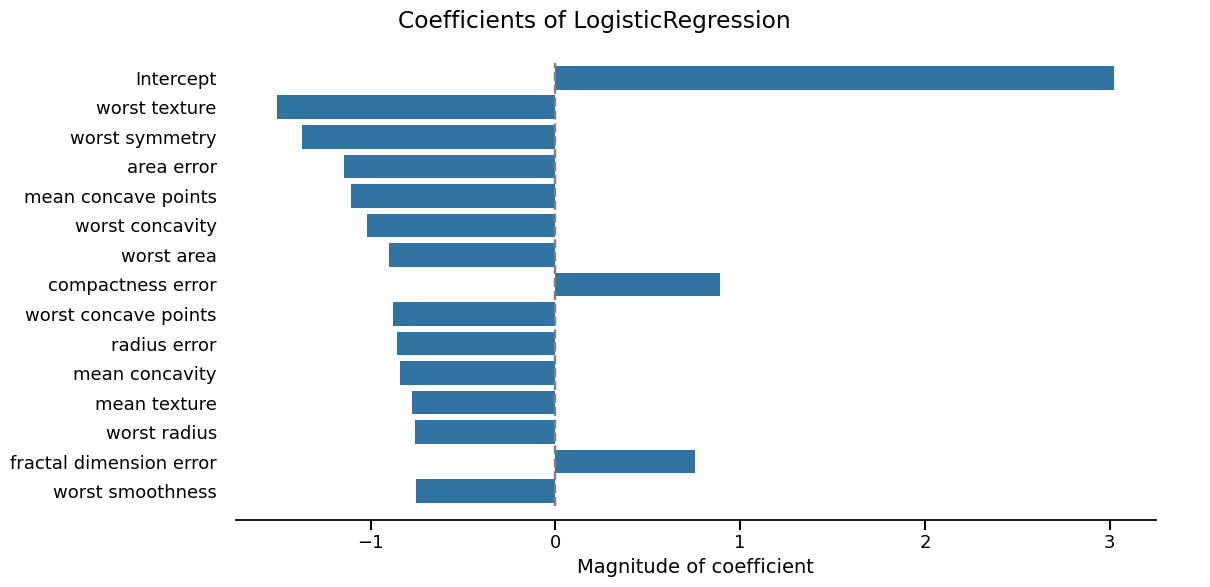
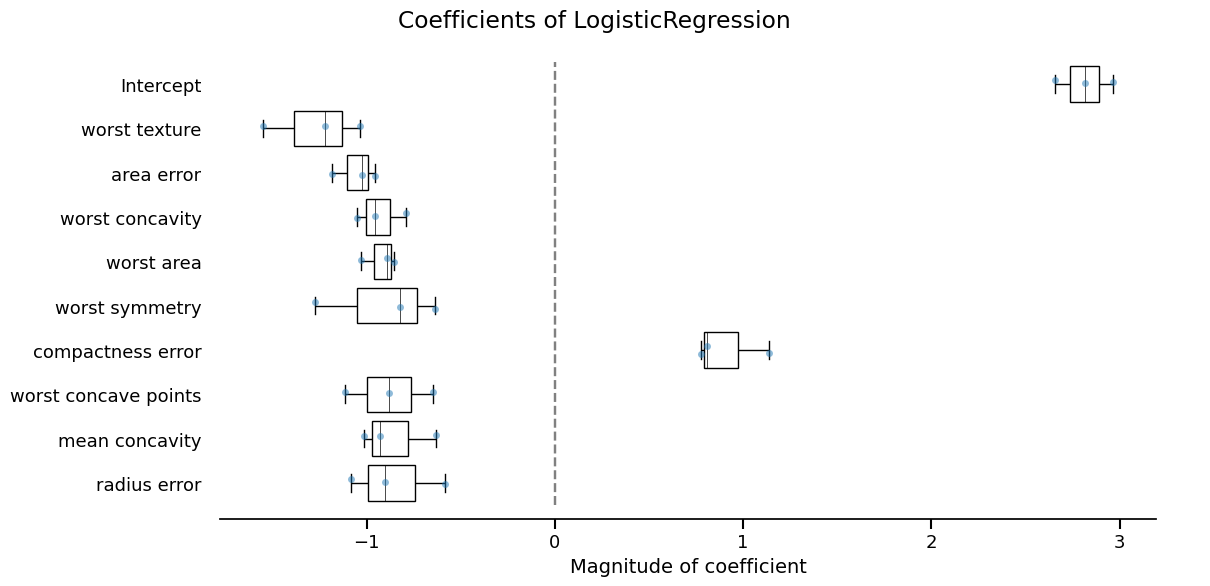
The inspection accessor exposes model-specific displays (e.g.
coefficients() for linear models, impurity_decrease() for trees).
These also return Display objects with the same plot(), frame(),
set_style(), and help() methods.
inspection_display = report.inspection.coefficients()
_ = inspection_display.plot(select_k=15, sorting_order="descending")
Second report type: cross-validation#
Using the same evaluate() with an integer splitter returns a
CrossValidationReport. The same accessors and display API
apply; only the way the report was built changes.
Again: data, metrics, and inspection return displays with
plot(), frame(), and set_style().
<Figure size 640x480 with 1 Axes>
Third report type: comparison#
Skore makes it possible to compare several estimators side by side with a
ComparisonReport. Pass a list or dict of estimators to
evaluate() along with a single X and y; each model is
evaluated on the same data. The resulting report exposes the same
metrics and inspection accessors as the other report types (there is
no data accessor, because compared models may rely on different inputs).
Methods on these accessors still return Display objects, so the display
API is unchanged.
comparison_report = evaluate(
    [
        tabular_pipeline(LogisticRegression()),
        tabular_pipeline(RandomForestClassifier()),
    ],
    X,
    y,
    splitter=0.2,
)
comparison_report
| Metric | Label | LogisticRegression | RandomForestClassifier |
|---|---|---|---|
| Accuracy | 0.964912 | 0.973684 | |
| Precision | 0 | 0.957447 | 0.978261 |
| Precision | 1 | 0.970149 | 0.970588 |
| Recall | 0 | 0.957447 | 0.957447 |
| Recall | 1 | 0.970149 | 0.985075 |
| ROC AUC | 0.995554 | 0.995872 | |
| Log loss | 0.080457 | 0.096319 | |
| Brier score | 0.025149 | 0.026669 | |
| Fit time (s) | 0.158268 | 0.420678 | |
| Predict time (s) | 0.089212 | 0.107086 |
- [SKD008] Highly correlated input features. 24 pair(s) of features have a Spearman correlation above 0.9. Highly correlated features can destabilize linear model coefficients and feature-importance estimates, and may cause collinearity-induced numerical issues.Dropping redundant features may also improve model performance.
- [SKD003] Inconsistent performance across splits. Not applicable to estimator reports.
- [SKD005] Underrepresented classes. ML task is not multiclass classification. Got binary-classification.
- [SKD007] MDI biased for high-cardinality features. Estimator is not a tree-based model: it does not have a `feature_importances_` attribute.
- [SKD013] Train-test overlap in time series. No datetime column found.
- [SKD014] Hyperparameters at search edge. Estimator is not a BaseSearchCV instance. Got Pipeline.
- [SKD015] Hyperparameters worth tuning. Estimator is not a BaseSearchCV instance. Got Pipeline.
No checks were muted.
Fast mode is on: expensive checks are skipped unless already cached.
Mute a check by passing its code to ignore, e.g. .checks.summarize(ignore=['SKD001']).
- [SKD008] Highly correlated input features. 24 pair(s) of features have a Spearman correlation above 0.9. Highly correlated features can destabilize linear model coefficients and feature-importance estimates, and may cause collinearity-induced numerical issues.Dropping redundant features may also improve model performance.
- [SKD007] MDI biased for high-cardinality features. High-cardinality features detected: mean radius, mean texture, mean perimeter (and 27 more). Mean Decrease in Impurity (MDI) importance is biased toward such features. Consider using permutation importance for a more robust alternative.
- [SKD016] Estimator not tuned. Estimator(s) left at default settings; consider tuning: ['max_features', 'min_samples_leaf'] for RandomForestClassifier.
- [SKD003] Inconsistent performance across splits. Not applicable to estimator reports.
- [SKD005] Underrepresented classes. ML task is not multiclass classification. Got binary-classification.
- [SKD006] Coefficient interpretation. Estimator is not a linear model: it does not have a `coef_` attribute.
- [SKD013] Train-test overlap in time series. No datetime column found.
- [SKD014] Hyperparameters at search edge. Estimator is not a BaseSearchCV instance. Got Pipeline.
- [SKD015] Hyperparameters worth tuning. Estimator is not a BaseSearchCV instance. Got Pipeline.
No checks were muted.
Fast mode is on: expensive checks are skipped unless already cached.
Mute a check by passing its code to ignore, e.g. .checks.summarize(ignore=['SKD001']).
Pipeline(steps=[('tablevectorizer',
                 TableVectorizer(datetime=DatetimeEncoder(periodic_encoding='spline'))),
                ('simpleimputer', SimpleImputer(add_indicator=True)),
                ('squashingscaler', SquashingScaler(max_absolute_value=5)),
                ('logisticregression', LogisticRegression())])
In a Jupyter environment, please rerun this cell to show the HTML representation or trust the notebook. On GitHub, the HTML representation is unable to render, please try loading this page with nbviewer.org.
Parameters
Fitted attributes
Parameters
Fitted attributes
['mean radius', 'mean texture', 'mean perimeter', 'mean area', 'mean smoothness', 'mean compactness', 'mean concavity', 'mean concave points', 'mean symmetry', 'mean fractal dimension', 'radius error', 'texture error', 'perimeter error', 'area error', 'smoothness error', 'compactness error', 'concavity error', 'concave points error', 'symmetry error', 'fractal dimension error', 'worst radius', 'worst texture', 'worst perimeter', 'worst area', 'worst smoothness', 'worst compactness', 'worst concavity', 'worst concave points', 'worst symmetry', 'worst fractal dimension']
Parameters
Parameters
Parameters
Parameters
30 features
| mean radius |
| mean texture |
| mean perimeter |
| mean area |
| mean smoothness |
| mean compactness |
| mean concavity |
| mean concave points |
| mean symmetry |
| mean fractal dimension |
| radius error |
| texture error |
| perimeter error |
| area error |
| smoothness error |
| compactness error |
| concavity error |
| concave points error |
| symmetry error |
| fractal dimension error |
| worst radius |
| worst texture |
| worst perimeter |
| worst area |
| worst smoothness |
| worst compactness |
| worst concavity |
| worst concave points |
| worst symmetry |
| worst fractal dimension |
Parameters
Fitted attributes
| Name | Type | Value |
|---|---|---|
|
feature_names_in_
feature_names_in_: ndarray of shape (`n_features_in_`,) Names of features seen during :term:`fit`. Defined only when `X` has feature names that are all strings. .. versionadded:: 1.0 |
ndarray[object](30,) | ['mean radius','mean texture','mean perimeter',...,'worst concave points', 'worst symmetry','worst fractal dimension'] |
|
indicator_
indicator_: :class:`~sklearn.impute.MissingIndicator` Indicator used to add binary indicators for missing values. `None` if `add_indicator=False`. |
MissingIndicator | MissingIndica..._on_new=False) |
|
n_features_in_
n_features_in_: int Number of features seen during :term:`fit`. .. versionadded:: 0.24 |
int | 30 |
|
statistics_
statistics_: array of shape (n_features,) The imputation fill value for each feature. Computing statistics can result in `np.nan` values. During :meth:`transform`, features corresponding to `np.nan` statistics will be discarded. |
ndarray[float64](30,) | [14.11,19.15,91.82,..., 0.11, 0.29, 0.08] |
30 features
| mean radius |
| mean texture |
| mean perimeter |
| mean area |
| mean smoothness |
| mean compactness |
| mean concavity |
| mean concave points |
| mean symmetry |
| mean fractal dimension |
| radius error |
| texture error |
| perimeter error |
| area error |
| smoothness error |
| compactness error |
| concavity error |
| concave points error |
| symmetry error |
| fractal dimension error |
| worst radius |
| worst texture |
| worst perimeter |
| worst area |
| worst smoothness |
| worst compactness |
| worst concavity |
| worst concave points |
| worst symmetry |
| worst fractal dimension |
Parameters
Fitted attributes
| Name | Type | Value |
|---|---|---|
| minmax_cols_ | ndarray[bool](30,) | [False,False,False,...,False,False,False] |
| minmax_scaler_ | NoneType | None |
| n_features_in_ | int | 30 |
| robust_cols_ | ndarray[bool](30,) | [ True, True, True,..., True, True, True] |
| robust_scaler_ | RobustScaler | RobustScaler() |
| zero_cols_ | ndarray[bool](30,) | [False,False,False,...,False,False,False] |
30 features
| x0 |
| x1 |
| x2 |
| x3 |
| x4 |
| x5 |
| x6 |
| x7 |
| x8 |
| x9 |
| x10 |
| x11 |
| x12 |
| x13 |
| x14 |
| x15 |
| x16 |
| x17 |
| x18 |
| x19 |
| x20 |
| x21 |
| x22 |
| x23 |
| x24 |
| x25 |
| x26 |
| x27 |
| x28 |
| x29 |
Parameters
Fitted attributes
| mean radius | mean texture | mean perimeter | mean area | mean smoothness | mean compactness | mean concavity | mean concave points | mean symmetry | mean fractal dimension | radius error | texture error | perimeter error | area error | smoothness error | compactness error | concavity error | concave points error | symmetry error | fractal dimension error | worst radius | worst texture | worst perimeter | worst area | worst smoothness | worst compactness | worst concavity | worst concave points | worst symmetry | worst fractal dimension | target | |
|---|---|---|---|---|---|---|---|---|---|---|---|---|---|---|---|---|---|---|---|---|---|---|---|---|---|---|---|---|---|---|---|
| 0 | 10.1 | 17.5 | 64.4 | 311. | 0.101 | 0.0733 | 0.0251 | 0.0177 | 0.189 | 0.0633 | 0.262 | 2.02 | 1.78 | 16.9 | 0.00780 | 0.0145 | 0.0169 | 0.00804 | 0.0210 | 0.00278 | 11.2 | 26.8 | 72.0 | 384. | 0.140 | 0.140 | 0.105 | 0.0650 | 0.289 | 0.0766 | 1 |
| 1 | 10.8 | 22.0 | 68.8 | 360. | 0.0880 | 0.0574 | 0.0361 | 0.0140 | 0.202 | 0.0598 | 0.308 | 1.62 | 2.24 | 20.2 | 0.00654 | 0.0215 | 0.0299 | 0.0104 | 0.0184 | 0.00269 | 12.8 | 32.0 | 83.7 | 490. | 0.130 | 0.170 | 0.193 | 0.0748 | 0.296 | 0.0766 | 1 |
| 2 | 16.1 | 14.9 | 104. | 800. | 0.0950 | 0.0850 | 0.0550 | 0.0453 | 0.173 | 0.0587 | 0.239 | 0.637 | 1.73 | 21.8 | 0.00396 | 0.0125 | 0.0183 | 0.00875 | 0.0150 | 0.00162 | 17.7 | 19.6 | 116. | 948. | 0.121 | 0.172 | 0.231 | 0.113 | 0.278 | 0.0701 | 1 |
| 3 | 12.2 | 17.8 | 77.8 | 451. | 0.104 | 0.0706 | 0.0249 | 0.0294 | 0.190 | 0.0664 | 0.366 | 1.51 | 2.41 | 24.4 | 0.00543 | 0.0118 | 0.0113 | 0.0152 | 0.0222 | 0.00341 | 12.8 | 20.9 | 82.1 | 495. | 0.114 | 0.0936 | 0.0498 | 0.0588 | 0.223 | 0.0738 | 1 |
| 4 | 12.2 | 22.4 | 78.2 | 466. | 0.0819 | 0.0520 | 0.0171 | 0.0126 | 0.154 | 0.0598 | 0.224 | 1.14 | 1.58 | 18.0 | 0.00510 | 0.0120 | 0.00941 | 0.00455 | 0.0161 | 0.00240 | 14.2 | 32.0 | 92.7 | 623. | 0.126 | 0.180 | 0.123 | 0.0634 | 0.310 | 0.0820 | 1 |
| 564 | 17.4 | 25.6 | 114. | 948. | 0.101 | 0.115 | 0.168 | 0.0660 | 0.131 | 0.0587 | 0.530 | 1.67 | 3.77 | 58.5 | 0.0311 | 0.0856 | 0.144 | 0.0393 | 0.0217 | 0.0126 | 18.1 | 28.1 | 120. | 1.02e+03 | 0.124 | 0.179 | 0.280 | 0.110 | 0.160 | 0.0682 | 0 |
| 565 | 12.8 | 16.7 | 82.5 | 494. | 0.113 | 0.112 | 0.0388 | 0.0300 | 0.212 | 0.0662 | 0.383 | 1.00 | 2.50 | 28.6 | 0.00751 | 0.0156 | 0.0198 | 0.00920 | 0.0181 | 0.00363 | 14.4 | 21.7 | 93.6 | 624. | 0.147 | 0.198 | 0.142 | 0.0804 | 0.307 | 0.0856 | 1 |
| 566 | 20.2 | 19.5 | 134. | 1.25e+03 | 0.113 | 0.149 | 0.213 | 0.126 | 0.172 | 0.0605 | 0.433 | 1.00 | 3.01 | 52.5 | 0.00909 | 0.0272 | 0.0555 | 0.0191 | 0.0245 | 0.00400 | 22.0 | 25.1 | 146. | 1.48e+03 | 0.167 | 0.294 | 0.531 | 0.217 | 0.303 | 0.0808 | 0 |
| 567 | 18.3 | 20.6 | 121. | 1.05e+03 | 0.107 | 0.125 | 0.157 | 0.0945 | 0.186 | 0.0594 | 0.545 | 0.922 | 3.22 | 67.4 | 0.00618 | 0.0188 | 0.0291 | 0.0105 | 0.0156 | 0.00272 | 21.9 | 26.2 | 142. | 1.49e+03 | 0.149 | 0.254 | 0.376 | 0.151 | 0.307 | 0.0786 | 0 |
| 568 | 15.0 | 16.7 | 98.7 | 689. | 0.0988 | 0.136 | 0.0772 | 0.0614 | 0.167 | 0.0687 | 0.372 | 0.842 | 2.30 | 34.8 | 0.00412 | 0.0182 | 0.0200 | 0.0100 | 0.0106 | 0.00324 | 16.8 | 20.4 | 110. | 857. | 0.114 | 0.218 | 0.186 | 0.102 | 0.218 | 0.0855 | 1 |
mean radius
Float64DType- Null values
- 0 (0.0%)
- Unique values
-
456 (80.1%)
This column has a high cardinality (> 40).
- Mean ± Std
- 14.1 ± 3.52
- Median ± IQR
- 13.4 ± 4.08
- Min | Max
- 6.98 | 28.1
mean texture
Float64DType- Null values
- 0 (0.0%)
- Unique values
-
479 (84.2%)
This column has a high cardinality (> 40).
- Mean ± Std
- 19.3 ± 4.30
- Median ± IQR
- 18.8 ± 5.63
- Min | Max
- 9.71 | 39.3
mean perimeter
Float64DType- Null values
- 0 (0.0%)
- Unique values
-
522 (91.7%)
This column has a high cardinality (> 40).
- Mean ± Std
- 92.0 ± 24.3
- Median ± IQR
- 86.2 ± 28.9
- Min | Max
- 43.8 | 188.
mean area
Float64DType- Null values
- 0 (0.0%)
- Unique values
-
539 (94.7%)
This column has a high cardinality (> 40).
- Mean ± Std
- 655. ± 352.
- Median ± IQR
- 551. ± 362.
- Min | Max
- 144. | 2.50e+03
mean smoothness
Float64DType- Null values
- 0 (0.0%)
- Unique values
-
474 (83.3%)
This column has a high cardinality (> 40).
- Mean ± Std
- 0.0964 ± 0.0141
- Median ± IQR
- 0.0959 ± 0.0189
- Min | Max
- 0.0526 | 0.163
mean compactness
Float64DType- Null values
- 0 (0.0%)
- Unique values
-
537 (94.4%)
This column has a high cardinality (> 40).
- Mean ± Std
- 0.104 ± 0.0528
- Median ± IQR
- 0.0926 ± 0.0655
- Min | Max
- 0.0194 | 0.345
mean concavity
Float64DType- Null values
- 0 (0.0%)
- Unique values
-
537 (94.4%)
This column has a high cardinality (> 40).
- Mean ± Std
- 0.0888 ± 0.0797
- Median ± IQR
- 0.0615 ± 0.101
- Min | Max
- 0.00 | 0.427
mean concave points
Float64DType- Null values
- 0 (0.0%)
- Unique values
-
542 (95.3%)
This column has a high cardinality (> 40).
- Mean ± Std
- 0.0489 ± 0.0388
- Median ± IQR
- 0.0335 ± 0.0537
- Min | Max
- 0.00 | 0.201
mean symmetry
Float64DType- Null values
- 0 (0.0%)
- Unique values
-
432 (75.9%)
This column has a high cardinality (> 40).
- Mean ± Std
- 0.181 ± 0.0274
- Median ± IQR
- 0.179 ± 0.0338
- Min | Max
- 0.106 | 0.304
mean fractal dimension
Float64DType- Null values
- 0 (0.0%)
- Unique values
-
499 (87.7%)
This column has a high cardinality (> 40).
- Mean ± Std
- 0.0628 ± 0.00706
- Median ± IQR
- 0.0615 ± 0.00842
- Min | Max
- 0.0500 | 0.0974
radius error
Float64DType- Null values
- 0 (0.0%)
- Unique values
-
540 (94.9%)
This column has a high cardinality (> 40).
- Mean ± Std
- 0.405 ± 0.277
- Median ± IQR
- 0.324 ± 0.246
- Min | Max
- 0.112 | 2.87
texture error
Float64DType- Null values
- 0 (0.0%)
- Unique values
-
519 (91.2%)
This column has a high cardinality (> 40).
- Mean ± Std
- 1.22 ± 0.552
- Median ± IQR
- 1.11 ± 0.640
- Min | Max
- 0.360 | 4.88
perimeter error
Float64DType- Null values
- 0 (0.0%)
- Unique values
-
533 (93.7%)
This column has a high cardinality (> 40).
- Mean ± Std
- 2.87 ± 2.02
- Median ± IQR
- 2.29 ± 1.75
- Min | Max
- 0.757 | 22.0
area error
Float64DType- Null values
- 0 (0.0%)
- Unique values
-
528 (92.8%)
This column has a high cardinality (> 40).
- Mean ± Std
- 40.3 ± 45.5
- Median ± IQR
- 24.5 ± 27.3
- Min | Max
- 6.80 | 542.
smoothness error
Float64DType- Null values
- 0 (0.0%)
- Unique values
-
547 (96.1%)
This column has a high cardinality (> 40).
- Mean ± Std
- 0.00704 ± 0.00300
- Median ± IQR
- 0.00638 ± 0.00298
- Min | Max
- 0.00171 | 0.0311
compactness error
Float64DType- Null values
- 0 (0.0%)
- Unique values
-
541 (95.1%)
This column has a high cardinality (> 40).
- Mean ± Std
- 0.0255 ± 0.0179
- Median ± IQR
- 0.0204 ± 0.0194
- Min | Max
- 0.00225 | 0.135
concavity error
Float64DType- Null values
- 0 (0.0%)
- Unique values
-
533 (93.7%)
This column has a high cardinality (> 40).
- Mean ± Std
- 0.0319 ± 0.0302
- Median ± IQR
- 0.0259 ± 0.0270
- Min | Max
- 0.00 | 0.396
concave points error
Float64DType- Null values
- 0 (0.0%)
- Unique values
-
507 (89.1%)
This column has a high cardinality (> 40).
- Mean ± Std
- 0.0118 ± 0.00617
- Median ± IQR
- 0.0109 ± 0.00707
- Min | Max
- 0.00 | 0.0528
symmetry error
Float64DType- Null values
- 0 (0.0%)
- Unique values
-
498 (87.5%)
This column has a high cardinality (> 40).
- Mean ± Std
- 0.0205 ± 0.00827
- Median ± IQR
- 0.0187 ± 0.00832
- Min | Max
- 0.00788 | 0.0790
fractal dimension error
Float64DType- Null values
- 0 (0.0%)
- Unique values
-
545 (95.8%)
This column has a high cardinality (> 40).
- Mean ± Std
- 0.00379 ± 0.00265
- Median ± IQR
- 0.00319 ± 0.00231
- Min | Max
- 0.000895 | 0.0298
worst radius
Float64DType- Null values
- 0 (0.0%)
- Unique values
-
457 (80.3%)
This column has a high cardinality (> 40).
- Mean ± Std
- 16.3 ± 4.83
- Median ± IQR
- 15.0 ± 5.78
- Min | Max
- 7.93 | 36.0
worst texture
Float64DType- Null values
- 0 (0.0%)
- Unique values
-
511 (89.8%)
This column has a high cardinality (> 40).
- Mean ± Std
- 25.7 ± 6.15
- Median ± IQR
- 25.4 ± 8.64
- Min | Max
- 12.0 | 49.5
worst perimeter
Float64DType- Null values
- 0 (0.0%)
- Unique values
-
514 (90.3%)
This column has a high cardinality (> 40).
- Mean ± Std
- 107. ± 33.6
- Median ± IQR
- 97.7 ± 41.3
- Min | Max
- 50.4 | 251.
worst area
Float64DType- Null values
- 0 (0.0%)
- Unique values
-
544 (95.6%)
This column has a high cardinality (> 40).
- Mean ± Std
- 881. ± 569.
- Median ± IQR
- 686. ± 569.
- Min | Max
- 185. | 4.25e+03
worst smoothness
Float64DType- Null values
- 0 (0.0%)
- Unique values
-
411 (72.2%)
This column has a high cardinality (> 40).
- Mean ± Std
- 0.132 ± 0.0228
- Median ± IQR
- 0.131 ± 0.0294
- Min | Max
- 0.0712 | 0.223
worst compactness
Float64DType- Null values
- 0 (0.0%)
- Unique values
-
529 (93.0%)
This column has a high cardinality (> 40).
- Mean ± Std
- 0.254 ± 0.157
- Median ± IQR
- 0.212 ± 0.192
- Min | Max
- 0.0273 | 1.06
worst concavity
Float64DType- Null values
- 0 (0.0%)
- Unique values
-
539 (94.7%)
This column has a high cardinality (> 40).
- Mean ± Std
- 0.272 ± 0.209
- Median ± IQR
- 0.227 ± 0.268
- Min | Max
- 0.00 | 1.25
worst concave points
Float64DType- Null values
- 0 (0.0%)
- Unique values
-
492 (86.5%)
This column has a high cardinality (> 40).
- Mean ± Std
- 0.115 ± 0.0657
- Median ± IQR
- 0.0999 ± 0.0965
- Min | Max
- 0.00 | 0.291
worst symmetry
Float64DType- Null values
- 0 (0.0%)
- Unique values
-
500 (87.9%)
This column has a high cardinality (> 40).
- Mean ± Std
- 0.290 ± 0.0619
- Median ± IQR
- 0.282 ± 0.0675
- Min | Max
- 0.157 | 0.664
worst fractal dimension
Float64DType- Null values
- 0 (0.0%)
- Unique values
-
535 (94.0%)
This column has a high cardinality (> 40).
- Mean ± Std
- 0.0839 ± 0.0181
- Median ± IQR
- 0.0800 ± 0.0206
- Min | Max
- 0.0550 | 0.207
target
Int64DType- Null values
- 0 (0.0%)
- Unique values
- 2 (0.4%)
- Mean ± Std
- 0.627 ± 0.484
- Median ± IQR
- 1 ± 1
- Min | Max
- 0 | 1
No columns match the selected filter: . You can change the column filter in the dropdown menu above.
|
Column
|
Column name
|
dtype
|
Is sorted
|
Null values
|
Unique values
|
Mean
|
Std
|
Min
|
Median
|
Max
|
|---|---|---|---|---|---|---|---|---|---|---|
| 0 | mean radius | Float64DType | False | 0 (0.0%) | 456 (80.1%) | 14.1 | 3.52 | 6.98 | 13.4 | 28.1 |
| 1 | mean texture | Float64DType | False | 0 (0.0%) | 479 (84.2%) | 19.3 | 4.30 | 9.71 | 18.8 | 39.3 |
| 2 | mean perimeter | Float64DType | False | 0 (0.0%) | 522 (91.7%) | 92.0 | 24.3 | 43.8 | 86.2 | 188. |
| 3 | mean area | Float64DType | False | 0 (0.0%) | 539 (94.7%) | 655. | 352. | 144. | 551. | 2.50e+03 |
| 4 | mean smoothness | Float64DType | False | 0 (0.0%) | 474 (83.3%) | 0.0964 | 0.0141 | 0.0526 | 0.0959 | 0.163 |
| 5 | mean compactness | Float64DType | False | 0 (0.0%) | 537 (94.4%) | 0.104 | 0.0528 | 0.0194 | 0.0926 | 0.345 |
| 6 | mean concavity | Float64DType | False | 0 (0.0%) | 537 (94.4%) | 0.0888 | 0.0797 | 0.00 | 0.0615 | 0.427 |
| 7 | mean concave points | Float64DType | False | 0 (0.0%) | 542 (95.3%) | 0.0489 | 0.0388 | 0.00 | 0.0335 | 0.201 |
| 8 | mean symmetry | Float64DType | False | 0 (0.0%) | 432 (75.9%) | 0.181 | 0.0274 | 0.106 | 0.179 | 0.304 |
| 9 | mean fractal dimension | Float64DType | False | 0 (0.0%) | 499 (87.7%) | 0.0628 | 0.00706 | 0.0500 | 0.0615 | 0.0974 |
| 10 | radius error | Float64DType | False | 0 (0.0%) | 540 (94.9%) | 0.405 | 0.277 | 0.112 | 0.324 | 2.87 |
| 11 | texture error | Float64DType | False | 0 (0.0%) | 519 (91.2%) | 1.22 | 0.552 | 0.360 | 1.11 | 4.88 |
| 12 | perimeter error | Float64DType | False | 0 (0.0%) | 533 (93.7%) | 2.87 | 2.02 | 0.757 | 2.29 | 22.0 |
| 13 | area error | Float64DType | False | 0 (0.0%) | 528 (92.8%) | 40.3 | 45.5 | 6.80 | 24.5 | 542. |
| 14 | smoothness error | Float64DType | False | 0 (0.0%) | 547 (96.1%) | 0.00704 | 0.00300 | 0.00171 | 0.00638 | 0.0311 |
| 15 | compactness error | Float64DType | False | 0 (0.0%) | 541 (95.1%) | 0.0255 | 0.0179 | 0.00225 | 0.0204 | 0.135 |
| 16 | concavity error | Float64DType | False | 0 (0.0%) | 533 (93.7%) | 0.0319 | 0.0302 | 0.00 | 0.0259 | 0.396 |
| 17 | concave points error | Float64DType | False | 0 (0.0%) | 507 (89.1%) | 0.0118 | 0.00617 | 0.00 | 0.0109 | 0.0528 |
| 18 | symmetry error | Float64DType | False | 0 (0.0%) | 498 (87.5%) | 0.0205 | 0.00827 | 0.00788 | 0.0187 | 0.0790 |
| 19 | fractal dimension error | Float64DType | False | 0 (0.0%) | 545 (95.8%) | 0.00379 | 0.00265 | 0.000895 | 0.00319 | 0.0298 |
| 20 | worst radius | Float64DType | False | 0 (0.0%) | 457 (80.3%) | 16.3 | 4.83 | 7.93 | 15.0 | 36.0 |
| 21 | worst texture | Float64DType | False | 0 (0.0%) | 511 (89.8%) | 25.7 | 6.15 | 12.0 | 25.4 | 49.5 |
| 22 | worst perimeter | Float64DType | False | 0 (0.0%) | 514 (90.3%) | 107. | 33.6 | 50.4 | 97.7 | 251. |
| 23 | worst area | Float64DType | False | 0 (0.0%) | 544 (95.6%) | 881. | 569. | 185. | 686. | 4.25e+03 |
| 24 | worst smoothness | Float64DType | False | 0 (0.0%) | 411 (72.2%) | 0.132 | 0.0228 | 0.0712 | 0.131 | 0.223 |
| 25 | worst compactness | Float64DType | False | 0 (0.0%) | 529 (93.0%) | 0.254 | 0.157 | 0.0273 | 0.212 | 1.06 |
| 26 | worst concavity | Float64DType | False | 0 (0.0%) | 539 (94.7%) | 0.272 | 0.209 | 0.00 | 0.227 | 1.25 |
| 27 | worst concave points | Float64DType | False | 0 (0.0%) | 492 (86.5%) | 0.115 | 0.0657 | 0.00 | 0.0999 | 0.291 |
| 28 | worst symmetry | Float64DType | False | 0 (0.0%) | 500 (87.9%) | 0.290 | 0.0619 | 0.157 | 0.282 | 0.664 |
| 29 | worst fractal dimension | Float64DType | False | 0 (0.0%) | 535 (94.0%) | 0.0839 | 0.0181 | 0.0550 | 0.0800 | 0.207 |
| 30 | target | Int64DType | False | 0 (0.0%) | 2 (0.4%) | 0.627 | 0.484 | 0 | 1 | 1 |
No columns match the selected filter: . You can change the column filter in the dropdown menu above.
Please enable javascript
The skrub table reports need javascript to display correctly. If you are displaying a report in a Jupyter notebook and you see this message, you may need to re-execute the cell or to trust the notebook (button on the top right or "File > Trust notebook").
Pipeline(steps=[('tablevectorizer',
                 TableVectorizer(low_cardinality=OrdinalEncoder(handle_unknown='use_encoded_value',
                                                                unknown_value=-1))),
('randomforestclassifier', RandomForestClassifier())])In a Jupyter environment, please rerun this cell to show the HTML representation or trust the notebook. On GitHub, the HTML representation is unable to render, please try loading this page with nbviewer.org.
Parameters
Fitted attributes
Parameters
Fitted attributes
['mean radius', 'mean texture', 'mean perimeter', 'mean area', 'mean smoothness', 'mean compactness', 'mean concavity', 'mean concave points', 'mean symmetry', 'mean fractal dimension', 'radius error', 'texture error', 'perimeter error', 'area error', 'smoothness error', 'compactness error', 'concavity error', 'concave points error', 'symmetry error', 'fractal dimension error', 'worst radius', 'worst texture', 'worst perimeter', 'worst area', 'worst smoothness', 'worst compactness', 'worst concavity', 'worst concave points', 'worst symmetry', 'worst fractal dimension']
Parameters
Parameters
Parameters
Parameters
30 features
| mean radius |
| mean texture |
| mean perimeter |
| mean area |
| mean smoothness |
| mean compactness |
| mean concavity |
| mean concave points |
| mean symmetry |
| mean fractal dimension |
| radius error |
| texture error |
| perimeter error |
| area error |
| smoothness error |
| compactness error |
| concavity error |
| concave points error |
| symmetry error |
| fractal dimension error |
| worst radius |
| worst texture |
| worst perimeter |
| worst area |
| worst smoothness |
| worst compactness |
| worst concavity |
| worst concave points |
| worst symmetry |
| worst fractal dimension |
Parameters
Fitted attributes
| mean radius | mean texture | mean perimeter | mean area | mean smoothness | mean compactness | mean concavity | mean concave points | mean symmetry | mean fractal dimension | radius error | texture error | perimeter error | area error | smoothness error | compactness error | concavity error | concave points error | symmetry error | fractal dimension error | worst radius | worst texture | worst perimeter | worst area | worst smoothness | worst compactness | worst concavity | worst concave points | worst symmetry | worst fractal dimension | target | |
|---|---|---|---|---|---|---|---|---|---|---|---|---|---|---|---|---|---|---|---|---|---|---|---|---|---|---|---|---|---|---|---|
| 0 | 10.1 | 17.5 | 64.4 | 311. | 0.101 | 0.0733 | 0.0251 | 0.0177 | 0.189 | 0.0633 | 0.262 | 2.02 | 1.78 | 16.9 | 0.00780 | 0.0145 | 0.0169 | 0.00804 | 0.0210 | 0.00278 | 11.2 | 26.8 | 72.0 | 384. | 0.140 | 0.140 | 0.105 | 0.0650 | 0.289 | 0.0766 | 1 |
| 1 | 10.8 | 22.0 | 68.8 | 360. | 0.0880 | 0.0574 | 0.0361 | 0.0140 | 0.202 | 0.0598 | 0.308 | 1.62 | 2.24 | 20.2 | 0.00654 | 0.0215 | 0.0299 | 0.0104 | 0.0184 | 0.00269 | 12.8 | 32.0 | 83.7 | 490. | 0.130 | 0.170 | 0.193 | 0.0748 | 0.296 | 0.0766 | 1 |
| 2 | 16.1 | 14.9 | 104. | 800. | 0.0950 | 0.0850 | 0.0550 | 0.0453 | 0.173 | 0.0587 | 0.239 | 0.637 | 1.73 | 21.8 | 0.00396 | 0.0125 | 0.0183 | 0.00875 | 0.0150 | 0.00162 | 17.7 | 19.6 | 116. | 948. | 0.121 | 0.172 | 0.231 | 0.113 | 0.278 | 0.0701 | 1 |
| 3 | 12.2 | 17.8 | 77.8 | 451. | 0.104 | 0.0706 | 0.0249 | 0.0294 | 0.190 | 0.0664 | 0.366 | 1.51 | 2.41 | 24.4 | 0.00543 | 0.0118 | 0.0113 | 0.0152 | 0.0222 | 0.00341 | 12.8 | 20.9 | 82.1 | 495. | 0.114 | 0.0936 | 0.0498 | 0.0588 | 0.223 | 0.0738 | 1 |
| 4 | 12.2 | 22.4 | 78.2 | 466. | 0.0819 | 0.0520 | 0.0171 | 0.0126 | 0.154 | 0.0598 | 0.224 | 1.14 | 1.58 | 18.0 | 0.00510 | 0.0120 | 0.00941 | 0.00455 | 0.0161 | 0.00240 | 14.2 | 32.0 | 92.7 | 623. | 0.126 | 0.180 | 0.123 | 0.0634 | 0.310 | 0.0820 | 1 |
| 564 | 17.4 | 25.6 | 114. | 948. | 0.101 | 0.115 | 0.168 | 0.0660 | 0.131 | 0.0587 | 0.530 | 1.67 | 3.77 | 58.5 | 0.0311 | 0.0856 | 0.144 | 0.0393 | 0.0217 | 0.0126 | 18.1 | 28.1 | 120. | 1.02e+03 | 0.124 | 0.179 | 0.280 | 0.110 | 0.160 | 0.0682 | 0 |
| 565 | 12.8 | 16.7 | 82.5 | 494. | 0.113 | 0.112 | 0.0388 | 0.0300 | 0.212 | 0.0662 | 0.383 | 1.00 | 2.50 | 28.6 | 0.00751 | 0.0156 | 0.0198 | 0.00920 | 0.0181 | 0.00363 | 14.4 | 21.7 | 93.6 | 624. | 0.147 | 0.198 | 0.142 | 0.0804 | 0.307 | 0.0856 | 1 |
| 566 | 20.2 | 19.5 | 134. | 1.25e+03 | 0.113 | 0.149 | 0.213 | 0.126 | 0.172 | 0.0605 | 0.433 | 1.00 | 3.01 | 52.5 | 0.00909 | 0.0272 | 0.0555 | 0.0191 | 0.0245 | 0.00400 | 22.0 | 25.1 | 146. | 1.48e+03 | 0.167 | 0.294 | 0.531 | 0.217 | 0.303 | 0.0808 | 0 |
| 567 | 18.3 | 20.6 | 121. | 1.05e+03 | 0.107 | 0.125 | 0.157 | 0.0945 | 0.186 | 0.0594 | 0.545 | 0.922 | 3.22 | 67.4 | 0.00618 | 0.0188 | 0.0291 | 0.0105 | 0.0156 | 0.00272 | 21.9 | 26.2 | 142. | 1.49e+03 | 0.149 | 0.254 | 0.376 | 0.151 | 0.307 | 0.0786 | 0 |
| 568 | 15.0 | 16.7 | 98.7 | 689. | 0.0988 | 0.136 | 0.0772 | 0.0614 | 0.167 | 0.0687 | 0.372 | 0.842 | 2.30 | 34.8 | 0.00412 | 0.0182 | 0.0200 | 0.0100 | 0.0106 | 0.00324 | 16.8 | 20.4 | 110. | 857. | 0.114 | 0.218 | 0.186 | 0.102 | 0.218 | 0.0855 | 1 |
mean radius
Float64DType- Null values
- 0 (0.0%)
- Unique values
-
456 (80.1%)
This column has a high cardinality (> 40).
- Mean ± Std
- 14.1 ± 3.52
- Median ± IQR
- 13.4 ± 4.08
- Min | Max
- 6.98 | 28.1
mean texture
Float64DType- Null values
- 0 (0.0%)
- Unique values
-
479 (84.2%)
This column has a high cardinality (> 40).
- Mean ± Std
- 19.3 ± 4.30
- Median ± IQR
- 18.8 ± 5.63
- Min | Max
- 9.71 | 39.3
mean perimeter
Float64DType- Null values
- 0 (0.0%)
- Unique values
-
522 (91.7%)
This column has a high cardinality (> 40).
- Mean ± Std
- 92.0 ± 24.3
- Median ± IQR
- 86.2 ± 28.9
- Min | Max
- 43.8 | 188.
mean area
Float64DType- Null values
- 0 (0.0%)
- Unique values
-
539 (94.7%)
This column has a high cardinality (> 40).
- Mean ± Std
- 655. ± 352.
- Median ± IQR
- 551. ± 362.
- Min | Max
- 144. | 2.50e+03
mean smoothness
Float64DType- Null values
- 0 (0.0%)
- Unique values
-
474 (83.3%)
This column has a high cardinality (> 40).
- Mean ± Std
- 0.0964 ± 0.0141
- Median ± IQR
- 0.0959 ± 0.0189
- Min | Max
- 0.0526 | 0.163
mean compactness
Float64DType- Null values
- 0 (0.0%)
- Unique values
-
537 (94.4%)
This column has a high cardinality (> 40).
- Mean ± Std
- 0.104 ± 0.0528
- Median ± IQR
- 0.0926 ± 0.0655
- Min | Max
- 0.0194 | 0.345
mean concavity
Float64DType- Null values
- 0 (0.0%)
- Unique values
-
537 (94.4%)
This column has a high cardinality (> 40).
- Mean ± Std
- 0.0888 ± 0.0797
- Median ± IQR
- 0.0615 ± 0.101
- Min | Max
- 0.00 | 0.427
mean concave points
Float64DType- Null values
- 0 (0.0%)
- Unique values
-
542 (95.3%)
This column has a high cardinality (> 40).
- Mean ± Std
- 0.0489 ± 0.0388
- Median ± IQR
- 0.0335 ± 0.0537
- Min | Max
- 0.00 | 0.201
mean symmetry
Float64DType- Null values
- 0 (0.0%)
- Unique values
-
432 (75.9%)
This column has a high cardinality (> 40).
- Mean ± Std
- 0.181 ± 0.0274
- Median ± IQR
- 0.179 ± 0.0338
- Min | Max
- 0.106 | 0.304
mean fractal dimension
Float64DType- Null values
- 0 (0.0%)
- Unique values
-
499 (87.7%)
This column has a high cardinality (> 40).
- Mean ± Std
- 0.0628 ± 0.00706
- Median ± IQR
- 0.0615 ± 0.00842
- Min | Max
- 0.0500 | 0.0974
radius error
Float64DType- Null values
- 0 (0.0%)
- Unique values
-
540 (94.9%)
This column has a high cardinality (> 40).
- Mean ± Std
- 0.405 ± 0.277
- Median ± IQR
- 0.324 ± 0.246
- Min | Max
- 0.112 | 2.87
texture error
Float64DType- Null values
- 0 (0.0%)
- Unique values
-
519 (91.2%)
This column has a high cardinality (> 40).
- Mean ± Std
- 1.22 ± 0.552
- Median ± IQR
- 1.11 ± 0.640
- Min | Max
- 0.360 | 4.88
perimeter error
Float64DType- Null values
- 0 (0.0%)
- Unique values
-
533 (93.7%)
This column has a high cardinality (> 40).
- Mean ± Std
- 2.87 ± 2.02
- Median ± IQR
- 2.29 ± 1.75
- Min | Max
- 0.757 | 22.0
area error
Float64DType- Null values
- 0 (0.0%)
- Unique values
-
528 (92.8%)
This column has a high cardinality (> 40).
- Mean ± Std
- 40.3 ± 45.5
- Median ± IQR
- 24.5 ± 27.3
- Min | Max
- 6.80 | 542.
smoothness error
Float64DType- Null values
- 0 (0.0%)
- Unique values
-
547 (96.1%)
This column has a high cardinality (> 40).
- Mean ± Std
- 0.00704 ± 0.00300
- Median ± IQR
- 0.00638 ± 0.00298
- Min | Max
- 0.00171 | 0.0311
compactness error
Float64DType- Null values
- 0 (0.0%)
- Unique values
-
541 (95.1%)
This column has a high cardinality (> 40).
- Mean ± Std
- 0.0255 ± 0.0179
- Median ± IQR
- 0.0204 ± 0.0194
- Min | Max
- 0.00225 | 0.135
concavity error
Float64DType- Null values
- 0 (0.0%)
- Unique values
-
533 (93.7%)
This column has a high cardinality (> 40).
- Mean ± Std
- 0.0319 ± 0.0302
- Median ± IQR
- 0.0259 ± 0.0270
- Min | Max
- 0.00 | 0.396
concave points error
Float64DType- Null values
- 0 (0.0%)
- Unique values
-
507 (89.1%)
This column has a high cardinality (> 40).
- Mean ± Std
- 0.0118 ± 0.00617
- Median ± IQR
- 0.0109 ± 0.00707
- Min | Max
- 0.00 | 0.0528
symmetry error
Float64DType- Null values
- 0 (0.0%)
- Unique values
-
498 (87.5%)
This column has a high cardinality (> 40).
- Mean ± Std
- 0.0205 ± 0.00827
- Median ± IQR
- 0.0187 ± 0.00832
- Min | Max
- 0.00788 | 0.0790
fractal dimension error
Float64DType- Null values
- 0 (0.0%)
- Unique values
-
545 (95.8%)
This column has a high cardinality (> 40).
- Mean ± Std
- 0.00379 ± 0.00265
- Median ± IQR
- 0.00319 ± 0.00231
- Min | Max
- 0.000895 | 0.0298
worst radius
Float64DType- Null values
- 0 (0.0%)
- Unique values
-
457 (80.3%)
This column has a high cardinality (> 40).
- Mean ± Std
- 16.3 ± 4.83
- Median ± IQR
- 15.0 ± 5.78
- Min | Max
- 7.93 | 36.0
worst texture
Float64DType- Null values
- 0 (0.0%)
- Unique values
-
511 (89.8%)
This column has a high cardinality (> 40).
- Mean ± Std
- 25.7 ± 6.15
- Median ± IQR
- 25.4 ± 8.64
- Min | Max
- 12.0 | 49.5
worst perimeter
Float64DType- Null values
- 0 (0.0%)
- Unique values
-
514 (90.3%)
This column has a high cardinality (> 40).
- Mean ± Std
- 107. ± 33.6
- Median ± IQR
- 97.7 ± 41.3
- Min | Max
- 50.4 | 251.
worst area
Float64DType- Null values
- 0 (0.0%)
- Unique values
-
544 (95.6%)
This column has a high cardinality (> 40).
- Mean ± Std
- 881. ± 569.
- Median ± IQR
- 686. ± 569.
- Min | Max
- 185. | 4.25e+03
worst smoothness
Float64DType- Null values
- 0 (0.0%)
- Unique values
-
411 (72.2%)
This column has a high cardinality (> 40).
- Mean ± Std
- 0.132 ± 0.0228
- Median ± IQR
- 0.131 ± 0.0294
- Min | Max
- 0.0712 | 0.223
worst compactness
Float64DType- Null values
- 0 (0.0%)
- Unique values
-
529 (93.0%)
This column has a high cardinality (> 40).
- Mean ± Std
- 0.254 ± 0.157
- Median ± IQR
- 0.212 ± 0.192
- Min | Max
- 0.0273 | 1.06
worst concavity
Float64DType- Null values
- 0 (0.0%)
- Unique values
-
539 (94.7%)
This column has a high cardinality (> 40).
- Mean ± Std
- 0.272 ± 0.209
- Median ± IQR
- 0.227 ± 0.268
- Min | Max
- 0.00 | 1.25
worst concave points
Float64DType- Null values
- 0 (0.0%)
- Unique values
-
492 (86.5%)
This column has a high cardinality (> 40).
- Mean ± Std
- 0.115 ± 0.0657
- Median ± IQR
- 0.0999 ± 0.0965
- Min | Max
- 0.00 | 0.291
worst symmetry
Float64DType- Null values
- 0 (0.0%)
- Unique values
-
500 (87.9%)
This column has a high cardinality (> 40).
- Mean ± Std
- 0.290 ± 0.0619
- Median ± IQR
- 0.282 ± 0.0675
- Min | Max
- 0.157 | 0.664
worst fractal dimension
Float64DType- Null values
- 0 (0.0%)
- Unique values
-
535 (94.0%)
This column has a high cardinality (> 40).
- Mean ± Std
- 0.0839 ± 0.0181
- Median ± IQR
- 0.0800 ± 0.0206
- Min | Max
- 0.0550 | 0.207
target
Int64DType- Null values
- 0 (0.0%)
- Unique values
- 2 (0.4%)
- Mean ± Std
- 0.627 ± 0.484
- Median ± IQR
- 1 ± 1
- Min | Max
- 0 | 1
No columns match the selected filter: . You can change the column filter in the dropdown menu above.
|
Column
|
Column name
|
dtype
|
Is sorted
|
Null values
|
Unique values
|
Mean
|
Std
|
Min
|
Median
|
Max
|
|---|---|---|---|---|---|---|---|---|---|---|
| 0 | mean radius | Float64DType | False | 0 (0.0%) | 456 (80.1%) | 14.1 | 3.52 | 6.98 | 13.4 | 28.1 |
| 1 | mean texture | Float64DType | False | 0 (0.0%) | 479 (84.2%) | 19.3 | 4.30 | 9.71 | 18.8 | 39.3 |
| 2 | mean perimeter | Float64DType | False | 0 (0.0%) | 522 (91.7%) | 92.0 | 24.3 | 43.8 | 86.2 | 188. |
| 3 | mean area | Float64DType | False | 0 (0.0%) | 539 (94.7%) | 655. | 352. | 144. | 551. | 2.50e+03 |
| 4 | mean smoothness | Float64DType | False | 0 (0.0%) | 474 (83.3%) | 0.0964 | 0.0141 | 0.0526 | 0.0959 | 0.163 |
| 5 | mean compactness | Float64DType | False | 0 (0.0%) | 537 (94.4%) | 0.104 | 0.0528 | 0.0194 | 0.0926 | 0.345 |
| 6 | mean concavity | Float64DType | False | 0 (0.0%) | 537 (94.4%) | 0.0888 | 0.0797 | 0.00 | 0.0615 | 0.427 |
| 7 | mean concave points | Float64DType | False | 0 (0.0%) | 542 (95.3%) | 0.0489 | 0.0388 | 0.00 | 0.0335 | 0.201 |
| 8 | mean symmetry | Float64DType | False | 0 (0.0%) | 432 (75.9%) | 0.181 | 0.0274 | 0.106 | 0.179 | 0.304 |
| 9 | mean fractal dimension | Float64DType | False | 0 (0.0%) | 499 (87.7%) | 0.0628 | 0.00706 | 0.0500 | 0.0615 | 0.0974 |
| 10 | radius error | Float64DType | False | 0 (0.0%) | 540 (94.9%) | 0.405 | 0.277 | 0.112 | 0.324 | 2.87 |
| 11 | texture error | Float64DType | False | 0 (0.0%) | 519 (91.2%) | 1.22 | 0.552 | 0.360 | 1.11 | 4.88 |
| 12 | perimeter error | Float64DType | False | 0 (0.0%) | 533 (93.7%) | 2.87 | 2.02 | 0.757 | 2.29 | 22.0 |
| 13 | area error | Float64DType | False | 0 (0.0%) | 528 (92.8%) | 40.3 | 45.5 | 6.80 | 24.5 | 542. |
| 14 | smoothness error | Float64DType | False | 0 (0.0%) | 547 (96.1%) | 0.00704 | 0.00300 | 0.00171 | 0.00638 | 0.0311 |
| 15 | compactness error | Float64DType | False | 0 (0.0%) | 541 (95.1%) | 0.0255 | 0.0179 | 0.00225 | 0.0204 | 0.135 |
| 16 | concavity error | Float64DType | False | 0 (0.0%) | 533 (93.7%) | 0.0319 | 0.0302 | 0.00 | 0.0259 | 0.396 |
| 17 | concave points error | Float64DType | False | 0 (0.0%) | 507 (89.1%) | 0.0118 | 0.00617 | 0.00 | 0.0109 | 0.0528 |
| 18 | symmetry error | Float64DType | False | 0 (0.0%) | 498 (87.5%) | 0.0205 | 0.00827 | 0.00788 | 0.0187 | 0.0790 |
| 19 | fractal dimension error | Float64DType | False | 0 (0.0%) | 545 (95.8%) | 0.00379 | 0.00265 | 0.000895 | 0.00319 | 0.0298 |
| 20 | worst radius | Float64DType | False | 0 (0.0%) | 457 (80.3%) | 16.3 | 4.83 | 7.93 | 15.0 | 36.0 |
| 21 | worst texture | Float64DType | False | 0 (0.0%) | 511 (89.8%) | 25.7 | 6.15 | 12.0 | 25.4 | 49.5 |
| 22 | worst perimeter | Float64DType | False | 0 (0.0%) | 514 (90.3%) | 107. | 33.6 | 50.4 | 97.7 | 251. |
| 23 | worst area | Float64DType | False | 0 (0.0%) | 544 (95.6%) | 881. | 569. | 185. | 686. | 4.25e+03 |
| 24 | worst smoothness | Float64DType | False | 0 (0.0%) | 411 (72.2%) | 0.132 | 0.0228 | 0.0712 | 0.131 | 0.223 |
| 25 | worst compactness | Float64DType | False | 0 (0.0%) | 529 (93.0%) | 0.254 | 0.157 | 0.0273 | 0.212 | 1.06 |
| 26 | worst concavity | Float64DType | False | 0 (0.0%) | 539 (94.7%) | 0.272 | 0.209 | 0.00 | 0.227 | 1.25 |
| 27 | worst concave points | Float64DType | False | 0 (0.0%) | 492 (86.5%) | 0.115 | 0.0657 | 0.00 | 0.0999 | 0.291 |
| 28 | worst symmetry | Float64DType | False | 0 (0.0%) | 500 (87.9%) | 0.290 | 0.0619 | 0.157 | 0.282 | 0.664 |
| 29 | worst fractal dimension | Float64DType | False | 0 (0.0%) | 535 (94.0%) | 0.0839 | 0.0181 | 0.0550 | 0.0800 | 0.207 |
| 30 | target | Int64DType | False | 0 (0.0%) | 2 (0.4%) | 0.627 | 0.484 | 0 | 1 | 1 |
No columns match the selected filter: . You can change the column filter in the dropdown menu above.
Please enable javascript
The skrub table reports need javascript to display correctly. If you are displaying a report in a Jupyter notebook and you see this message, you may need to re-execute the cell or to trust the notebook (button on the top right or "File > Trust notebook").
comparison_report.metrics.summarize().frame()
| estimator | LogisticRegression | RandomForestClassifier |
|---|---|---|
| accuracy | 0.964912 | 0.973684 |
| precision_0 | 0.957447 | 0.978261 |
| precision_1 | 0.970149 | 0.970588 |
| recall_0 | 0.957447 | 0.957447 |
| recall_1 | 0.970149 | 0.985075 |
| roc_auc | 0.995554 | 0.995872 |
| log_loss | 0.080457 | 0.096319 |
| brier_score | 0.025149 | 0.026669 |
| fit_time | 0.158268 | 0.420678 |
| predict_time | 0.089212 | 0.107086 |
To compare evaluations on different feature matrices, call
evaluate() once per matrix, then pass the resulting reports to
compare():
X_1 = X.iloc[:, :15]
X_2 = X.iloc[:, 15:]
report_logistic = evaluate(tabular_pipeline(LogisticRegression()), X_1, y, splitter=0.2)
report_forest = evaluate(
    tabular_pipeline(RandomForestClassifier()), X_2, y, splitter=0.2
)
comparison_report = compare([report_logistic, report_forest])
comparison_report.help()
comparison_report.metrics.summarize().frame()
| estimator | LogisticRegression | RandomForestClassifier |
|---|---|---|
| accuracy | 0.938596 | 0.956140 |
| precision_0 | 0.916667 | 0.937500 |
| precision_1 | 0.954545 | 0.969697 |
| recall_0 | 0.936170 | 0.957447 |
| recall_1 | 0.940299 | 0.955224 |
| roc_auc | 0.988885 | 0.994919 |
| log_loss | 0.137672 | 0.103331 |
| brier_score | 0.043119 | 0.030174 |
| fit_time | 0.083046 | 0.333037 |
| predict_time | 0.047689 | 0.065535 |
Summary#
Three report types (
EstimatorReport,CrossValidationReport,ComparisonReport) are all created withevaluate()and share the same accessor layout:report.data,report.metrics,report.inspection(where applicable).Accessor methods that produce figures or tables return Display objects.
Displays share a single, predictable API:
plot(**kwargs)— render the visualizationframe(**kwargs)— return the data as a pandas objectset_style(policy=..., **kwargs)— customize appearancehelp()— show available options
This consistency makes it easy to switch between report types and to reuse the same workflow across data, metrics, and inspection.
Total running time of the script: (0 minutes 15.143 seconds)