

Note
Go to the end to download the full example code.
Using skore with scikit-learn compatible estimators#
This example shows how to use skore with scikit-learn compatible estimators.
Any model that can be used with the scikit-learn API can be used with skore.
Use evaluate() to create a report from any estimator that has a
fit and predict method (or only predict if already fitted).
Note
When computing the ROC AUC or ROC curve for a classification task, the estimator must
have a predict_proba method.
In this example, we showcase a gradient boosting model (XGBoost) and a custom estimator.
Note that this example is not exhaustive; many other scikit-learn compatible models can be used with skore:
More gradient boosting libraries like LightGBM, and CatBoost,
Deep learning frameworks such as Keras and skorch (a wrapper for PyTorch).
etc.
Generate a classification dataset#
To illustrate the compatibility with scikit-learn estimators, we first generate a synthetic binary classification dataset with only 1,000 samples.
import pandas as pd
import skrub
from sklearn.datasets import make_classification

X, y = make_classification(n_samples=1_000, random_state=42)
X = pd.DataFrame(X, columns=[f"Feature_{i}" for i in range(X.shape[1])])
skrub.TableReport(X)
| Feature_0 | Feature_1 | Feature_2 | Feature_3 | Feature_4 | Feature_5 | Feature_6 | Feature_7 | Feature_8 | Feature_9 | Feature_10 | Feature_11 | Feature_12 | Feature_13 | Feature_14 | Feature_15 | Feature_16 | Feature_17 | Feature_18 | Feature_19 | |
|---|---|---|---|---|---|---|---|---|---|---|---|---|---|---|---|---|---|---|---|---|
| 0 | -0.669 | -1.50 | -0.871 | 1.14 | 0.0216 | 1.73 | -1.25 | 0.289 | 0.357 | -0.197 | 0.829 | 0.155 | -0.220 | -0.739 | 1.80 | 1.63 | -0.938 | -1.27 | -1.28 | 1.02 |
| 1 | 0.0934 | 0.786 | 0.106 | 1.27 | -0.846 | -0.979 | 1.26 | 0.264 | 2.41 | -0.960 | 0.543 | 0.200 | 0.289 | 0.732 | -0.872 | -1.65 | -1.13 | -0.123 | 0.693 | 0.911 |
| 2 | -0.906 | -0.608 | 0.295 | 0.944 | 0.0929 | 1.37 | -0.0648 | 0.287 | -0.533 | -0.0325 | -0.550 | -0.510 | -0.869 | -0.598 | 0.0198 | 0.613 | -1.78 | 0.830 | -0.737 | -0.578 |
| 3 | -0.586 | 0.389 | 0.699 | 0.436 | -0.315 | 0.460 | 1.45 | 0.506 | -1.44 | -1.13 | -0.241 | 1.47 | 0.679 | -1.19 | -1.44 | -0.929 | -0.222 | -0.347 | 0.0342 | -1.04 |
| 4 | 1.15 | 0.516 | -1.22 | -0.396 | -1.29 | -0.352 | 0.0713 | 1.24 | 1.01 | -1.48 | -0.696 | -0.918 | 0.604 | 1.07 | -0.882 | 2.30 | -0.973 | 1.26 | 0.360 | 1.92 |
| 995 | 0.519 | 1.87 | 0.0781 | 0.0811 | 0.202 | -2.76 | 0.400 | -1.07 | -0.589 | -1.40 | -1.03 | 0.0461 | 2.54 | -0.481 | -1.63 | -0.0399 | 1.67 | -0.134 | 1.79 | 0.248 |
| 996 | -0.411 | -0.547 | 1.13 | 0.334 | -0.619 | 0.693 | -0.617 | 1.09 | 0.193 | 1.46 | 0.957 | -1.01 | -0.257 | 0.518 | 0.593 | -0.630 | -0.0801 | -0.247 | -0.486 | 2.21 |
| 997 | -0.200 | -1.46 | 1.80 | -0.244 | 0.544 | 1.78 | -2.02 | -0.658 | 0.207 | -0.115 | 0.859 | 0.543 | -0.420 | -0.748 | 1.67 | -1.21 | -1.25 | -1.50 | -1.27 | 1.60 |
| 998 | 0.0394 | 0.249 | -0.475 | -1.14 | 1.94 | -1.30 | -0.803 | 0.451 | -1.45 | -0.679 | -0.451 | 0.154 | 0.637 | 1.24 | 0.780 | 1.56 | 0.264 | 0.0991 | 0.543 | 1.21 |
| 999 | 0.769 | 0.471 | 0.170 | 0.268 | -1.19 | -1.28 | -0.161 | -0.216 | 0.607 | -0.471 | 0.194 | 1.03 | -1.20 | 0.273 | 0.222 | 2.06 | -0.140 | 0.656 | 0.643 | -2.02 |
Feature_0
Float64DType- Null values
- 0 (0.0%)
- Unique values
-
1,000 (100.0%)
This column has a high cardinality (> 40).
- Mean ± Std
- -0.00836 ± 1.02
- Median ± IQR
- 0.0184 ± 1.38
- Min | Max
- -3.69 | 3.53
Feature_1
Float64DType- Null values
- 0 (0.0%)
- Unique values
-
1,000 (100.0%)
This column has a high cardinality (> 40).
- Mean ± Std
- 0.0297 ± 0.859
- Median ± IQR
- 0.0503 ± 1.00
- Min | Max
- -3.28 | 2.87
Feature_2
Float64DType- Null values
- 0 (0.0%)
- Unique values
-
1,000 (100.0%)
This column has a high cardinality (> 40).
- Mean ± Std
- 0.0253 ± 0.987
- Median ± IQR
- 0.0723 ± 1.31
- Min | Max
- -3.23 | 3.93
Feature_3
Float64DType- Null values
- 0 (0.0%)
- Unique values
-
1,000 (100.0%)
This column has a high cardinality (> 40).
- Mean ± Std
- 0.0557 ± 1.02
- Median ± IQR
- 0.0339 ± 1.40
- Min | Max
- -3.33 | 3.11
Feature_4
Float64DType- Null values
- 0 (0.0%)
- Unique values
-
1,000 (100.0%)
This column has a high cardinality (> 40).
- Mean ± Std
- -0.0424 ± 1.01
- Median ± IQR
- -0.0661 ± 1.40
- Min | Max
- -2.99 | 3.11
Feature_5
Float64DType- Null values
- 0 (0.0%)
- Unique values
-
1,000 (100.0%)
This column has a high cardinality (> 40).
- Mean ± Std
- -0.0225 ± 1.40
- Median ± IQR
- -0.196 ± 2.04
- Min | Max
- -4.54 | 4.02
Feature_6
Float64DType- Null values
- 0 (0.0%)
- Unique values
-
1,000 (100.0%)
This column has a high cardinality (> 40).
- Mean ± Std
- -0.00886 ± 1.03
- Median ± IQR
- -0.00836 ± 1.44
- Min | Max
- -2.97 | 3.14
Feature_7
Float64DType- Null values
- 0 (0.0%)
- Unique values
-
1,000 (100.0%)
This column has a high cardinality (> 40).
- Mean ± Std
- 0.0665 ± 1.01
- Median ± IQR
- 0.0985 ± 1.29
- Min | Max
- -3.24 | 3.28
Feature_8
Float64DType- Null values
- 0 (0.0%)
- Unique values
-
1,000 (100.0%)
This column has a high cardinality (> 40).
- Mean ± Std
- -0.0411 ± 0.952
- Median ± IQR
- -0.0532 ± 1.34
- Min | Max
- -3.60 | 2.98
Feature_9
Float64DType- Null values
- 0 (0.0%)
- Unique values
-
1,000 (100.0%)
This column has a high cardinality (> 40).
- Mean ± Std
- 0.00979 ± 0.995
- Median ± IQR
- 0.00180 ± 1.31
- Min | Max
- -3.04 | 3.43
Feature_10
Float64DType- Null values
- 0 (0.0%)
- Unique values
-
1,000 (100.0%)
This column has a high cardinality (> 40).
- Mean ± Std
- -0.0503 ± 1.00
- Median ± IQR
- -0.0953 ± 1.35
- Min | Max
- -3.32 | 2.94
Feature_11
Float64DType- Null values
- 0 (0.0%)
- Unique values
-
1,000 (100.0%)
This column has a high cardinality (> 40).
- Mean ± Std
- 0.0202 ± 0.974
- Median ± IQR
- 0.0216 ± 1.27
- Min | Max
- -3.03 | 4.48
Feature_12
Float64DType- Null values
- 0 (0.0%)
- Unique values
-
1,000 (100.0%)
This column has a high cardinality (> 40).
- Mean ± Std
- -0.00196 ± 0.979
- Median ± IQR
- -0.00391 ± 1.30
- Min | Max
- -2.80 | 3.12
Feature_13
Float64DType- Null values
- 0 (0.0%)
- Unique values
-
1,000 (100.0%)
This column has a high cardinality (> 40).
- Mean ± Std
- -0.0375 ± 0.992
- Median ± IQR
- -0.0681 ± 1.30
- Min | Max
- -3.31 | 3.16
Feature_14
Float64DType- Null values
- 0 (0.0%)
- Unique values
-
1,000 (100.0%)
This column has a high cardinality (> 40).
- Mean ± Std
- -0.0484 ± 1.32
- Median ± IQR
- -0.219 ± 1.99
- Min | Max
- -3.84 | 3.99
Feature_15
Float64DType- Null values
- 0 (0.0%)
- Unique values
-
1,000 (100.0%)
This column has a high cardinality (> 40).
- Mean ± Std
- 0.00509 ± 1.04
- Median ± IQR
- 0.0192 ± 1.36
- Min | Max
- -3.84 | 3.38
Feature_16
Float64DType- Null values
- 0 (0.0%)
- Unique values
-
1,000 (100.0%)
This column has a high cardinality (> 40).
- Mean ± Std
- 0.0383 ± 1.02
- Median ± IQR
- 0.0339 ± 1.36
- Min | Max
- -3.38 | 3.10
Feature_17
Float64DType- Null values
- 0 (0.0%)
- Unique values
-
1,000 (100.0%)
This column has a high cardinality (> 40).
- Mean ± Std
- -0.0202 ± 1.01
- Median ± IQR
- -0.00504 ± 1.36
- Min | Max
- -3.92 | 3.38
Feature_18
Float64DType- Null values
- 0 (0.0%)
- Unique values
-
1,000 (100.0%)
This column has a high cardinality (> 40).
- Mean ± Std
- 0.0215 ± 0.818
- Median ± IQR
- 0.128 ± 1.06
- Min | Max
- -2.79 | 2.82
Feature_19
Float64DType- Null values
- 0 (0.0%)
- Unique values
-
1,000 (100.0%)
This column has a high cardinality (> 40).
- Mean ± Std
- -0.00546 ± 1.02
- Median ± IQR
- 0.0140 ± 1.41
- Min | Max
- -3.25 | 3.15
No columns match the selected filter: . You can change the column filter in the dropdown menu above.
| Column | Column name | dtype | Is sorted | Null values | Unique values | Mean | Std | Min | Median | Max |
|---|---|---|---|---|---|---|---|---|---|---|
| 0 | Feature_0 | Float64DType | False | 0 (0.0%) | 1000 (100.0%) | -0.00836 | 1.02 | -3.69 | 0.0184 | 3.53 |
| 1 | Feature_1 | Float64DType | False | 0 (0.0%) | 1000 (100.0%) | 0.0297 | 0.859 | -3.28 | 0.0503 | 2.87 |
| 2 | Feature_2 | Float64DType | False | 0 (0.0%) | 1000 (100.0%) | 0.0253 | 0.987 | -3.23 | 0.0723 | 3.93 |
| 3 | Feature_3 | Float64DType | False | 0 (0.0%) | 1000 (100.0%) | 0.0557 | 1.02 | -3.33 | 0.0339 | 3.11 |
| 4 | Feature_4 | Float64DType | False | 0 (0.0%) | 1000 (100.0%) | -0.0424 | 1.01 | -2.99 | -0.0661 | 3.11 |
| 5 | Feature_5 | Float64DType | False | 0 (0.0%) | 1000 (100.0%) | -0.0225 | 1.40 | -4.54 | -0.196 | 4.02 |
| 6 | Feature_6 | Float64DType | False | 0 (0.0%) | 1000 (100.0%) | -0.00886 | 1.03 | -2.97 | -0.00836 | 3.14 |
| 7 | Feature_7 | Float64DType | False | 0 (0.0%) | 1000 (100.0%) | 0.0665 | 1.01 | -3.24 | 0.0985 | 3.28 |
| 8 | Feature_8 | Float64DType | False | 0 (0.0%) | 1000 (100.0%) | -0.0411 | 0.952 | -3.60 | -0.0532 | 2.98 |
| 9 | Feature_9 | Float64DType | False | 0 (0.0%) | 1000 (100.0%) | 0.00979 | 0.995 | -3.04 | 0.00180 | 3.43 |
| 10 | Feature_10 | Float64DType | False | 0 (0.0%) | 1000 (100.0%) | -0.0503 | 1.00 | -3.32 | -0.0953 | 2.94 |
| 11 | Feature_11 | Float64DType | False | 0 (0.0%) | 1000 (100.0%) | 0.0202 | 0.974 | -3.03 | 0.0216 | 4.48 |
| 12 | Feature_12 | Float64DType | False | 0 (0.0%) | 1000 (100.0%) | -0.00196 | 0.979 | -2.80 | -0.00391 | 3.12 |
| 13 | Feature_13 | Float64DType | False | 0 (0.0%) | 1000 (100.0%) | -0.0375 | 0.992 | -3.31 | -0.0681 | 3.16 |
| 14 | Feature_14 | Float64DType | False | 0 (0.0%) | 1000 (100.0%) | -0.0484 | 1.32 | -3.84 | -0.219 | 3.99 |
| 15 | Feature_15 | Float64DType | False | 0 (0.0%) | 1000 (100.0%) | 0.00509 | 1.04 | -3.84 | 0.0192 | 3.38 |
| 16 | Feature_16 | Float64DType | False | 0 (0.0%) | 1000 (100.0%) | 0.0383 | 1.02 | -3.38 | 0.0339 | 3.10 |
| 17 | Feature_17 | Float64DType | False | 0 (0.0%) | 1000 (100.0%) | -0.0202 | 1.01 | -3.92 | -0.00504 | 3.38 |
| 18 | Feature_18 | Float64DType | False | 0 (0.0%) | 1000 (100.0%) | 0.0215 | 0.818 | -2.79 | 0.128 | 2.82 |
| 19 | Feature_19 | Float64DType | False | 0 (0.0%) | 1000 (100.0%) | -0.00546 | 1.02 | -3.25 | 0.0140 | 3.15 |
No columns match the selected filter: . You can change the column filter in the dropdown menu above.
Feature_0
Float64DType- Null values
- 0 (0.0%)
- Unique values
-
1,000 (100.0%)
This column has a high cardinality (> 40).
- Mean ± Std
- -0.00836 ± 1.02
- Median ± IQR
- 0.0184 ± 1.38
- Min | Max
- -3.69 | 3.53
Feature_1
Float64DType- Null values
- 0 (0.0%)
- Unique values
-
1,000 (100.0%)
This column has a high cardinality (> 40).
- Mean ± Std
- 0.0297 ± 0.859
- Median ± IQR
- 0.0503 ± 1.00
- Min | Max
- -3.28 | 2.87
Feature_2
Float64DType- Null values
- 0 (0.0%)
- Unique values
-
1,000 (100.0%)
This column has a high cardinality (> 40).
- Mean ± Std
- 0.0253 ± 0.987
- Median ± IQR
- 0.0723 ± 1.31
- Min | Max
- -3.23 | 3.93
Feature_3
Float64DType- Null values
- 0 (0.0%)
- Unique values
-
1,000 (100.0%)
This column has a high cardinality (> 40).
- Mean ± Std
- 0.0557 ± 1.02
- Median ± IQR
- 0.0339 ± 1.40
- Min | Max
- -3.33 | 3.11
Feature_4
Float64DType- Null values
- 0 (0.0%)
- Unique values
-
1,000 (100.0%)
This column has a high cardinality (> 40).
- Mean ± Std
- -0.0424 ± 1.01
- Median ± IQR
- -0.0661 ± 1.40
- Min | Max
- -2.99 | 3.11
Feature_5
Float64DType- Null values
- 0 (0.0%)
- Unique values
-
1,000 (100.0%)
This column has a high cardinality (> 40).
- Mean ± Std
- -0.0225 ± 1.40
- Median ± IQR
- -0.196 ± 2.04
- Min | Max
- -4.54 | 4.02
Feature_6
Float64DType- Null values
- 0 (0.0%)
- Unique values
-
1,000 (100.0%)
This column has a high cardinality (> 40).
- Mean ± Std
- -0.00886 ± 1.03
- Median ± IQR
- -0.00836 ± 1.44
- Min | Max
- -2.97 | 3.14
Feature_7
Float64DType- Null values
- 0 (0.0%)
- Unique values
-
1,000 (100.0%)
This column has a high cardinality (> 40).
- Mean ± Std
- 0.0665 ± 1.01
- Median ± IQR
- 0.0985 ± 1.29
- Min | Max
- -3.24 | 3.28
Feature_8
Float64DType- Null values
- 0 (0.0%)
- Unique values
-
1,000 (100.0%)
This column has a high cardinality (> 40).
- Mean ± Std
- -0.0411 ± 0.952
- Median ± IQR
- -0.0532 ± 1.34
- Min | Max
- -3.60 | 2.98
Feature_9
Float64DType- Null values
- 0 (0.0%)
- Unique values
-
1,000 (100.0%)
This column has a high cardinality (> 40).
- Mean ± Std
- 0.00979 ± 0.995
- Median ± IQR
- 0.00180 ± 1.31
- Min | Max
- -3.04 | 3.43
Feature_10
Float64DType- Null values
- 0 (0.0%)
- Unique values
-
1,000 (100.0%)
This column has a high cardinality (> 40).
- Mean ± Std
- -0.0503 ± 1.00
- Median ± IQR
- -0.0953 ± 1.35
- Min | Max
- -3.32 | 2.94
Feature_11
Float64DType- Null values
- 0 (0.0%)
- Unique values
-
1,000 (100.0%)
This column has a high cardinality (> 40).
- Mean ± Std
- 0.0202 ± 0.974
- Median ± IQR
- 0.0216 ± 1.27
- Min | Max
- -3.03 | 4.48
Feature_12
Float64DType- Null values
- 0 (0.0%)
- Unique values
-
1,000 (100.0%)
This column has a high cardinality (> 40).
- Mean ± Std
- -0.00196 ± 0.979
- Median ± IQR
- -0.00391 ± 1.30
- Min | Max
- -2.80 | 3.12
Feature_13
Float64DType- Null values
- 0 (0.0%)
- Unique values
-
1,000 (100.0%)
This column has a high cardinality (> 40).
- Mean ± Std
- -0.0375 ± 0.992
- Median ± IQR
- -0.0681 ± 1.30
- Min | Max
- -3.31 | 3.16
Feature_14
Float64DType- Null values
- 0 (0.0%)
- Unique values
-
1,000 (100.0%)
This column has a high cardinality (> 40).
- Mean ± Std
- -0.0484 ± 1.32
- Median ± IQR
- -0.219 ± 1.99
- Min | Max
- -3.84 | 3.99
Feature_15
Float64DType- Null values
- 0 (0.0%)
- Unique values
-
1,000 (100.0%)
This column has a high cardinality (> 40).
- Mean ± Std
- 0.00509 ± 1.04
- Median ± IQR
- 0.0192 ± 1.36
- Min | Max
- -3.84 | 3.38
Feature_16
Float64DType- Null values
- 0 (0.0%)
- Unique values
-
1,000 (100.0%)
This column has a high cardinality (> 40).
- Mean ± Std
- 0.0383 ± 1.02
- Median ± IQR
- 0.0339 ± 1.36
- Min | Max
- -3.38 | 3.10
Feature_17
Float64DType- Null values
- 0 (0.0%)
- Unique values
-
1,000 (100.0%)
This column has a high cardinality (> 40).
- Mean ± Std
- -0.0202 ± 1.01
- Median ± IQR
- -0.00504 ± 1.36
- Min | Max
- -3.92 | 3.38
Feature_18
Float64DType- Null values
- 0 (0.0%)
- Unique values
-
1,000 (100.0%)
This column has a high cardinality (> 40).
- Mean ± Std
- 0.0215 ± 0.818
- Median ± IQR
- 0.128 ± 1.06
- Min | Max
- -2.79 | 2.82
Feature_19
Float64DType- Null values
- 0 (0.0%)
- Unique values
-
1,000 (100.0%)
This column has a high cardinality (> 40).
- Mean ± Std
- -0.00546 ± 1.02
- Median ± IQR
- 0.0140 ± 1.41
- Min | Max
- -3.25 | 3.15
No columns match the selected filter: . You can change the column filter in the dropdown menu above.
| Column 1 | Column 2 | Cramér's V | Pearson's Correlation |
|---|---|---|---|
| Feature_1 | Feature_18 | 0.713 | 0.936 |
| Feature_5 | Feature_18 | 0.684 | -0.950 |
| Feature_1 | Feature_5 | 0.566 | -0.779 |
| Feature_1 | Feature_14 | 0.477 | -0.702 |
| Feature_14 | Feature_18 | 0.406 | -0.406 |
| Feature_5 | Feature_14 | 0.324 | 0.100 |
| Feature_5 | Feature_13 | 0.145 | -0.0449 |
| Feature_13 | Feature_18 | 0.141 | 0.0583 |
| Feature_8 | Feature_14 | 0.140 | -0.0142 |
| Feature_1 | Feature_13 | 0.135 | 0.0664 |
| Feature_1 | Feature_6 | 0.119 | -0.0212 |
| Feature_15 | Feature_16 | 0.116 | -0.0738 |
| Feature_0 | Feature_7 | 0.115 | -0.0349 |
| Feature_3 | Feature_16 | 0.114 | -0.0358 |
| Feature_6 | Feature_18 | 0.110 | -0.00905 |
| Feature_4 | Feature_5 | 0.108 | 0.0523 |
| Feature_6 | Feature_14 | 0.107 | 0.0366 |
| Feature_0 | Feature_14 | 0.107 | -0.0252 |
| Feature_0 | Feature_13 | 0.105 | 0.0437 |
| Feature_5 | Feature_6 | 0.104 | -0.00265 |
| Feature_8 | Feature_9 | 0.103 | -0.0573 |
| Feature_0 | Feature_12 | 0.103 | -0.0148 |
| Feature_3 | Feature_5 | 0.102 | -0.0574 |
| Feature_9 | Feature_11 | 0.101 | 0.0129 |
| Feature_12 | Feature_18 | 0.0997 | 0.0201 |
| Feature_6 | Feature_10 | 0.0997 | 0.0293 |
| Feature_2 | Feature_7 | 0.0993 | -0.0231 |
| Feature_7 | Feature_19 | 0.0990 | -0.0226 |
| Feature_2 | Feature_15 | 0.0989 | -0.0117 |
| Feature_3 | Feature_14 | 0.0985 | 0.0407 |
| Feature_7 | Feature_17 | 0.0983 | -0.0170 |
| Feature_2 | Feature_19 | 0.0983 | -0.0194 |
| Feature_3 | Feature_9 | 0.0979 | 0.0145 |
| Feature_13 | Feature_16 | 0.0972 | 0.0187 |
| Feature_5 | Feature_12 | 0.0971 | -0.0157 |
| Feature_2 | Feature_17 | 0.0970 | 0.0429 |
| Feature_1 | Feature_15 | 0.0967 | 0.00437 |
| Feature_13 | Feature_17 | 0.0966 | 0.0118 |
| Feature_5 | Feature_8 | 0.0964 | 0.0113 |
| Feature_15 | Feature_19 | 0.0961 | -0.0225 |
| Feature_0 | Feature_11 | 0.0957 | -0.0225 |
| Feature_16 | Feature_19 | 0.0957 | 0.0366 |
| Feature_0 | Feature_19 | 0.0955 | 0.0224 |
| Feature_6 | Feature_11 | 0.0955 | -0.0575 |
| Feature_1 | Feature_4 | 0.0955 | -0.0390 |
| Feature_10 | Feature_12 | 0.0954 | -0.0821 |
| Feature_4 | Feature_18 | 0.0949 | -0.0488 |
| Feature_6 | Feature_9 | 0.0949 | -0.0352 |
| Feature_13 | Feature_19 | 0.0946 | -0.0529 |
| Feature_13 | Feature_14 | 0.0946 | -0.0543 |
| Feature_11 | Feature_17 | 0.0945 | 0.0254 |
| Feature_4 | Feature_12 | 0.0943 | -0.0233 |
| Feature_2 | Feature_6 | 0.0941 | -0.0518 |
| Feature_4 | Feature_19 | 0.0937 | -0.0351 |
| Feature_13 | Feature_15 | 0.0936 | -0.0383 |
| Feature_3 | Feature_12 | 0.0934 | -0.00856 |
| Feature_6 | Feature_17 | 0.0932 | 0.0251 |
| Feature_3 | Feature_4 | 0.0932 | -0.0113 |
| Feature_5 | Feature_15 | 0.0932 | -0.0177 |
| Feature_5 | Feature_7 | 0.0931 | -0.0154 |
| Feature_14 | Feature_16 | 0.0929 | -0.0126 |
| Feature_6 | Feature_8 | 0.0926 | 0.0129 |
| Feature_3 | Feature_15 | 0.0925 | -0.0137 |
| Feature_12 | Feature_15 | 0.0924 | -0.0376 |
| Feature_4 | Feature_17 | 0.0921 | -0.0553 |
| Feature_2 | Feature_4 | 0.0920 | 0.0367 |
| Feature_1 | Feature_3 | 0.0919 | 0.0154 |
| Feature_2 | Feature_10 | 0.0917 | 0.0598 |
| Feature_3 | Feature_17 | 0.0916 | 0.0232 |
| Feature_3 | Feature_18 | 0.0913 | 0.0399 |
| Feature_4 | Feature_7 | 0.0912 | -0.0589 |
| Feature_1 | Feature_10 | 0.0911 | -0.0348 |
| Feature_9 | Feature_10 | 0.0910 | 0.0264 |
| Feature_4 | Feature_10 | 0.0907 | -0.00368 |
| Feature_8 | Feature_12 | 0.0907 | -0.00688 |
| Feature_3 | Feature_19 | 0.0907 | -0.0182 |
| Feature_0 | Feature_8 | 0.0905 | 0.0257 |
| Feature_6 | Feature_16 | 0.0903 | -0.0358 |
| Feature_4 | Feature_6 | 0.0901 | -0.0215 |
| Feature_10 | Feature_18 | 0.0900 | -0.0329 |
| Feature_0 | Feature_2 | 0.0900 | -0.00624 |
| Feature_1 | Feature_8 | 0.0899 | 0.000848 |
| Feature_9 | Feature_13 | 0.0894 | 0.00420 |
| Feature_9 | Feature_17 | 0.0894 | -0.0381 |
| Feature_2 | Feature_12 | 0.0894 | -0.0352 |
| Feature_7 | Feature_13 | 0.0893 | -0.0151 |
| Feature_0 | Feature_17 | 0.0892 | 0.00994 |
| Feature_0 | Feature_4 | 0.0891 | -0.0518 |
| Feature_1 | Feature_11 | 0.0890 | 0.0302 |
| Feature_10 | Feature_16 | 0.0890 | 0.00826 |
| Feature_6 | Feature_15 | 0.0888 | 0.00244 |
| Feature_9 | Feature_14 | 0.0887 | 0.0469 |
| Feature_0 | Feature_10 | 0.0885 | 0.0396 |
| Feature_7 | Feature_12 | 0.0882 | 0.00530 |
| Feature_1 | Feature_12 | 0.0880 | 0.0226 |
| Feature_12 | Feature_14 | 0.0876 | -0.0180 |
| Feature_10 | Feature_15 | 0.0872 | -0.0712 |
| Feature_2 | Feature_9 | 0.0871 | -0.0369 |
| Feature_1 | Feature_9 | 0.0867 | -0.0259 |
| Feature_14 | Feature_17 | 0.0866 | -0.0607 |
| Feature_4 | Feature_9 | 0.0863 | 0.0288 |
| Feature_0 | Feature_5 | 0.0861 | 0.0134 |
| Feature_14 | Feature_19 | 0.0860 | -0.00473 |
| Feature_10 | Feature_13 | 0.0860 | -0.00839 |
| Feature_8 | Feature_13 | 0.0860 | -0.0350 |
| Feature_8 | Feature_18 | 0.0860 | -0.00595 |
| Feature_15 | Feature_18 | 0.0858 | 0.0121 |
| Feature_6 | Feature_13 | 0.0857 | 0.0132 |
| Feature_7 | Feature_10 | 0.0857 | -0.0313 |
| Feature_11 | Feature_18 | 0.0851 | 0.0373 |
| Feature_8 | Feature_10 | 0.0850 | -0.00722 |
| Feature_4 | Feature_13 | 0.0850 | -0.00486 |
| Feature_10 | Feature_17 | 0.0848 | -0.0374 |
| Feature_3 | Feature_13 | 0.0846 | 0.0329 |
| Feature_17 | Feature_19 | 0.0844 | 0.0105 |
| Feature_12 | Feature_19 | 0.0844 | 0.0718 |
| Feature_9 | Feature_16 | 0.0843 | 0.00610 |
| Feature_16 | Feature_17 | 0.0841 | -0.0264 |
| Feature_4 | Feature_11 | 0.0839 | 0.00273 |
| Feature_7 | Feature_8 | 0.0837 | 0.0104 |
| Feature_11 | Feature_13 | 0.0836 | -0.0480 |
| Feature_3 | Feature_6 | 0.0836 | -0.0370 |
| Feature_9 | Feature_19 | 0.0836 | 0.0174 |
| Feature_5 | Feature_16 | 0.0835 | -0.0118 |
| Feature_5 | Feature_9 | 0.0834 | -0.00521 |
| Feature_3 | Feature_10 | 0.0834 | 0.0550 |
| Feature_11 | Feature_14 | 0.0833 | -0.00302 |
| Feature_6 | Feature_12 | 0.0832 | -0.00706 |
| Feature_0 | Feature_6 | 0.0830 | -0.0113 |
| Feature_0 | Feature_16 | 0.0830 | 0.0255 |
| Feature_7 | Feature_18 | 0.0827 | 0.0182 |
| Feature_2 | Feature_13 | 0.0826 | -0.0483 |
| Feature_3 | Feature_7 | 0.0826 | 0.00953 |
| Feature_12 | Feature_16 | 0.0825 | -0.00325 |
| Feature_11 | Feature_16 | 0.0823 | 0.00315 |
| Feature_4 | Feature_16 | 0.0823 | 0.0279 |
| Feature_16 | Feature_18 | 0.0822 | 0.0148 |
| Feature_7 | Feature_16 | 0.0822 | 0.00528 |
| Feature_9 | Feature_18 | 0.0819 | -0.00996 |
| Feature_2 | Feature_18 | 0.0819 | 0.0275 |
| Feature_0 | Feature_1 | 0.0819 | 0.00633 |
| Feature_8 | Feature_17 | 0.0818 | -0.0221 |
| Feature_1 | Feature_16 | 0.0817 | 0.0164 |
| Feature_11 | Feature_19 | 0.0816 | -0.00667 |
| Feature_0 | Feature_9 | 0.0814 | -0.0568 |
| Feature_7 | Feature_15 | 0.0814 | 0.0409 |
| Feature_12 | Feature_17 | 0.0814 | 0.0226 |
| Feature_1 | Feature_7 | 0.0813 | 0.0192 |
| Feature_7 | Feature_9 | 0.0812 | 0.0469 |
| Feature_7 | Feature_14 | 0.0811 | -0.0130 |
| Feature_12 | Feature_13 | 0.0807 | 0.0215 |
| Feature_4 | Feature_14 | 0.0805 | 0.00256 |
| Feature_3 | Feature_11 | 0.0803 | -0.00126 |
| Feature_2 | Feature_14 | 0.0803 | -0.0176 |
| Feature_5 | Feature_10 | 0.0803 | 0.0277 |
| Feature_11 | Feature_12 | 0.0801 | 0.0164 |
| Feature_3 | Feature_8 | 0.0799 | -0.00171 |
| Feature_2 | Feature_11 | 0.0793 | 0.0157 |
| Feature_0 | Feature_18 | 0.0788 | -0.00436 |
| Feature_10 | Feature_14 | 0.0787 | 0.0239 |
| Feature_7 | Feature_11 | 0.0785 | -0.0546 |
| Feature_8 | Feature_11 | 0.0783 | -0.0310 |
| Feature_11 | Feature_15 | 0.0782 | 0.0361 |
| Feature_1 | Feature_19 | 0.0781 | -0.0144 |
| Feature_2 | Feature_8 | 0.0777 | 0.0250 |
| Feature_5 | Feature_17 | 0.0776 | 0.0531 |
| Feature_1 | Feature_17 | 0.0775 | 0.000245 |
| Feature_4 | Feature_15 | 0.0775 | 1.04e-05 |
| Feature_5 | Feature_19 | 0.0771 | 0.0242 |
| Feature_9 | Feature_12 | 0.0768 | -0.0264 |
| Feature_2 | Feature_5 | 0.0766 | -0.0239 |
| Feature_0 | Feature_15 | 0.0765 | -0.0310 |
| Feature_14 | Feature_15 | 0.0765 | 0.0131 |
| Feature_15 | Feature_17 | 0.0761 | -0.00595 |
| Feature_6 | Feature_7 | 0.0758 | -0.0175 |
| Feature_10 | Feature_11 | 0.0756 | -0.00513 |
| Feature_6 | Feature_19 | 0.0752 | -0.0430 |
| Feature_4 | Feature_8 | 0.0748 | 0.00242 |
| Feature_18 | Feature_19 | 0.0746 | -0.0208 |
| Feature_8 | Feature_15 | 0.0743 | 0.0514 |
| Feature_2 | Feature_16 | 0.0739 | -0.00165 |
| Feature_17 | Feature_18 | 0.0735 | -0.0297 |
| Feature_8 | Feature_16 | 0.0733 | 0.0121 |
| Feature_10 | Feature_19 | 0.0729 | 0.0411 |
| Feature_0 | Feature_3 | 0.0719 | -0.0408 |
| Feature_8 | Feature_19 | 0.0716 | 0.0103 |
| Feature_5 | Feature_11 | 0.0692 | -0.0396 |
| Feature_9 | Feature_15 | 0.0688 | -0.0321 |
| Feature_2 | Feature_3 | 0.0682 | 0.0124 |
| Feature_1 | Feature_2 | 0.0660 | 0.0282 |
Please enable javascript
The skrub table reports need javascript to display correctly. If you are displaying a report in a Jupyter notebook and you see this message, you may need to re-execute the cell or to trust the notebook (button on the top right or "File > Trust notebook").
Gradient-boosted decision trees with XGBoost#
While skore is designed to be fully compatible with classifiers and regressors from
the scikit-learn library, it is also compatible with any classifier or regressor that
follows the scikit-learn API as defined in the scikit-learn documentation.
Here, we showcase a gradient-boosted decision trees model from the XGBoost library that follows exactly this paradigm.
from skore import evaluate
from xgboost import XGBClassifier

xgb = XGBClassifier(n_estimators=50, max_depth=3, learning_rate=0.1, random_state=42)

xgb_report = evaluate(xgb, X, y, splitter=0.2, pos_label=1)
xgb_report
| Metric | XGBClassifier |
|---|---|
| Accuracy | 0.915000 |
| Precision | 0.990196 |
| Recall | 0.863248 |
| ROC AUC | 0.977551 |
| Log loss | 0.222034 |
| Brier score | 0.064415 |
| Fit time (s) | 0.038787 |
| Predict time (s) | 0.001364 |
- [SKD008] Highly correlated input features. 2 pair(s) of features have a Spearman correlation above 0.9. Highly correlated features can destabilize linear model coefficients and feature-importance estimates, and may cause collinearity-induced numerical issues.Dropping redundant features may also improve model performance.
- [SKD007] MDI biased for high-cardinality features. High-cardinality features detected: Feature_0, Feature_1, Feature_2 (and 17 more). Mean Decrease in Impurity (MDI) importance is biased toward such features. Consider using permutation importance for a more robust alternative.
- [SKD003] Inconsistent performance across splits. Not applicable to estimator reports.
- [SKD005] Underrepresented classes. ML task is not multiclass classification. Got binary-classification.
- [SKD006] Coefficient interpretation. Estimator is not a linear model: it does not have a `coef_` attribute.
- [SKD013] Train-test overlap in time series. No datetime column found.
- [SKD014] Hyperparameters at search edge. Estimator is not a BaseSearchCV instance. Got XGBClassifier.
- [SKD015] Hyperparameters worth tuning. Estimator is not a BaseSearchCV instance. Got XGBClassifier.
- [SKD016] Estimator not tuned. No parameter to recommend.
No checks were muted.
Fast mode is on: expensive checks are skipped unless already cached.
Mute a check by passing its code to ignore, e.g. .checks.summarize(ignore=['SKD001']).
XGBClassifier(base_score=None, booster=None, callbacks=None,
              colsample_bylevel=None, colsample_bynode=None,
              colsample_bytree=None, device=None, early_stopping_rounds=None,
              enable_categorical=True, eval_metric=None, feature_types=None,
              feature_weights=None, gamma=None, grow_policy=None,
              importance_type=None, interaction_constraints=None,
              learning_rate=0.1, max_bin=None, max_cat_threshold=None,
              max_cat_to_onehot=None, max_delta_step=None, max_depth=3,
              max_leaves=None, min_child_weight=None, missing=nan,
              monotone_constraints=None, multi_strategy=None, n_estimators=50,
n_jobs=None, num_parallel_tree=None, ...)In a Jupyter environment, please rerun this cell to show the HTML representation or trust the notebook. On GitHub, the HTML representation is unable to render, please try loading this page with nbviewer.org.
Parameters
Fitted attributes
| Name | Type | Value |
|---|---|---|
| classes_ | ndarray[int64](2,) | [0,1] |
| feature_importances_ | ndarray[float32](20,) | [0.03,0.05,0.05,...,0.02,0.02,0.03] |
| feature_names_in_ | ndarray[<U10](20,) | ['Feature_0','Feature_1','Feature_2',...,'Feature_17','Feature_18', 'Feature_19'] |
| intercept_ | ndarray[float32](1,) | [0.48] |
| n_classes_ | int | 2 |
| n_features_in_ | int | 20 |
| Feature_0 | Feature_1 | Feature_2 | Feature_3 | Feature_4 | Feature_5 | Feature_6 | Feature_7 | Feature_8 | Feature_9 | Feature_10 | Feature_11 | Feature_12 | Feature_13 | Feature_14 | Feature_15 | Feature_16 | Feature_17 | Feature_18 | Feature_19 | Target | |
|---|---|---|---|---|---|---|---|---|---|---|---|---|---|---|---|---|---|---|---|---|---|
| 0 | 0.233 | 0.315 | -0.390 | 0.392 | 0.940 | -1.16 | 1.97 | 0.118 | 0.314 | -0.0621 | -0.761 | 0.571 | 1.19 | 0.137 | 0.470 | 0.346 | 0.121 | 1.04 | 0.529 | -0.367 | 0 |
| 1 | -0.271 | 0.212 | 0.669 | -0.514 | 1.83 | -0.225 | -0.719 | -0.589 | -0.400 | -0.562 | 0.345 | -0.620 | -1.27 | 1.37 | -0.277 | -0.668 | -1.49 | -0.0157 | 0.175 | -0.559 | 1 |
| 2 | -1.02 | -0.971 | 0.585 | 1.29 | 0.480 | 2.47 | 0.238 | -0.927 | -1.06 | 0.202 | -0.432 | 0.232 | 1.13 | -0.634 | -0.276 | -0.234 | -1.74 | -0.495 | -1.27 | 0.00306 | 1 |
| 3 | -1.34 | 0.212 | 0.741 | -0.775 | 0.660 | -0.601 | -0.877 | 1.17 | -0.116 | -0.0573 | -0.385 | -2.07 | -0.403 | -0.854 | 0.126 | 0.272 | -0.742 | 0.548 | 0.297 | 0.687 | 1 |
| 4 | -0.255 | 0.568 | 0.0415 | 0.604 | 0.458 | -1.56 | -1.07 | 1.54 | -0.0831 | 1.48 | -0.715 | 1.79 | 0.0648 | 1.36 | 0.281 | 0.765 | -1.70 | 0.245 | 0.780 | 0.823 | 0 |
| 995 | 0.0160 | 1.10 | -0.852 | 2.92 | -0.529 | -1.28 | 0.518 | 0.137 | 0.974 | -2.07 | -0.869 | -0.0109 | -1.13 | -0.184 | -1.31 | 0.273 | 0.795 | -0.0920 | 0.939 | 2.28 | 0 |
| 996 | 0.399 | -0.118 | -0.783 | -0.555 | -0.414 | 2.05 | 0.766 | 0.798 | 0.325 | -1.15 | 0.461 | -1.52 | -0.0929 | 0.0122 | -1.90 | -1.27 | 1.05 | 0.968 | -0.726 | -2.29 | 1 |
| 997 | 0.0552 | -1.03 | 1.35 | 0.732 | 1.44 | 1.96 | 1.35 | 0.873 | -1.63 | -0.854 | 0.291 | 0.0322 | 0.405 | -0.309 | 0.419 | -0.0351 | 2.05 | 1.29 | -1.13 | 1.61 | 1 |
| 998 | 0.901 | -0.134 | 0.483 | 1.09 | -0.853 | -1.19 | -0.414 | 0.0336 | -0.458 | 0.431 | 0.610 | -0.144 | 0.0150 | -0.114 | 1.59 | -0.600 | -0.579 | 0.350 | 0.325 | -0.153 | 0 |
| 999 | 0.853 | -0.245 | -0.339 | 1.99 | -1.12 | 0.350 | 1.45 | 1.62 | -0.268 | 1.95 | -0.727 | -0.769 | 0.783 | 0.752 | 0.224 | -0.580 | -0.106 | 0.268 | -0.231 | -0.613 | 1 |
Feature_0
Float64DType- Null values
- 0 (0.0%)
- Unique values
-
1,000 (100.0%)
This column has a high cardinality (> 40).
- Mean ± Std
- -0.00836 ± 1.02
- Median ± IQR
- 0.0184 ± 1.38
- Min | Max
- -3.69 | 3.53
Feature_1
Float64DType- Null values
- 0 (0.0%)
- Unique values
-
1,000 (100.0%)
This column has a high cardinality (> 40).
- Mean ± Std
- 0.0297 ± 0.859
- Median ± IQR
- 0.0503 ± 1.00
- Min | Max
- -3.28 | 2.87
Feature_2
Float64DType- Null values
- 0 (0.0%)
- Unique values
-
1,000 (100.0%)
This column has a high cardinality (> 40).
- Mean ± Std
- 0.0253 ± 0.987
- Median ± IQR
- 0.0723 ± 1.31
- Min | Max
- -3.23 | 3.93
Feature_3
Float64DType- Null values
- 0 (0.0%)
- Unique values
-
1,000 (100.0%)
This column has a high cardinality (> 40).
- Mean ± Std
- 0.0557 ± 1.02
- Median ± IQR
- 0.0339 ± 1.40
- Min | Max
- -3.33 | 3.11
Feature_4
Float64DType- Null values
- 0 (0.0%)
- Unique values
-
1,000 (100.0%)
This column has a high cardinality (> 40).
- Mean ± Std
- -0.0424 ± 1.01
- Median ± IQR
- -0.0661 ± 1.40
- Min | Max
- -2.99 | 3.11
Feature_5
Float64DType- Null values
- 0 (0.0%)
- Unique values
-
1,000 (100.0%)
This column has a high cardinality (> 40).
- Mean ± Std
- -0.0225 ± 1.40
- Median ± IQR
- -0.196 ± 2.04
- Min | Max
- -4.54 | 4.02
Feature_6
Float64DType- Null values
- 0 (0.0%)
- Unique values
-
1,000 (100.0%)
This column has a high cardinality (> 40).
- Mean ± Std
- -0.00886 ± 1.03
- Median ± IQR
- -0.00836 ± 1.44
- Min | Max
- -2.97 | 3.14
Feature_7
Float64DType- Null values
- 0 (0.0%)
- Unique values
-
1,000 (100.0%)
This column has a high cardinality (> 40).
- Mean ± Std
- 0.0665 ± 1.01
- Median ± IQR
- 0.0985 ± 1.29
- Min | Max
- -3.24 | 3.28
Feature_8
Float64DType- Null values
- 0 (0.0%)
- Unique values
-
1,000 (100.0%)
This column has a high cardinality (> 40).
- Mean ± Std
- -0.0411 ± 0.952
- Median ± IQR
- -0.0532 ± 1.34
- Min | Max
- -3.60 | 2.98
Feature_9
Float64DType- Null values
- 0 (0.0%)
- Unique values
-
1,000 (100.0%)
This column has a high cardinality (> 40).
- Mean ± Std
- 0.00979 ± 0.995
- Median ± IQR
- 0.00180 ± 1.31
- Min | Max
- -3.04 | 3.43
Feature_10
Float64DType- Null values
- 0 (0.0%)
- Unique values
-
1,000 (100.0%)
This column has a high cardinality (> 40).
- Mean ± Std
- -0.0503 ± 1.00
- Median ± IQR
- -0.0953 ± 1.35
- Min | Max
- -3.32 | 2.94
Feature_11
Float64DType- Null values
- 0 (0.0%)
- Unique values
-
1,000 (100.0%)
This column has a high cardinality (> 40).
- Mean ± Std
- 0.0202 ± 0.974
- Median ± IQR
- 0.0216 ± 1.27
- Min | Max
- -3.03 | 4.48
Feature_12
Float64DType- Null values
- 0 (0.0%)
- Unique values
-
1,000 (100.0%)
This column has a high cardinality (> 40).
- Mean ± Std
- -0.00196 ± 0.979
- Median ± IQR
- -0.00391 ± 1.30
- Min | Max
- -2.80 | 3.12
Feature_13
Float64DType- Null values
- 0 (0.0%)
- Unique values
-
1,000 (100.0%)
This column has a high cardinality (> 40).
- Mean ± Std
- -0.0375 ± 0.992
- Median ± IQR
- -0.0681 ± 1.30
- Min | Max
- -3.31 | 3.16
Feature_14
Float64DType- Null values
- 0 (0.0%)
- Unique values
-
1,000 (100.0%)
This column has a high cardinality (> 40).
- Mean ± Std
- -0.0484 ± 1.32
- Median ± IQR
- -0.219 ± 1.99
- Min | Max
- -3.84 | 3.99
Feature_15
Float64DType- Null values
- 0 (0.0%)
- Unique values
-
1,000 (100.0%)
This column has a high cardinality (> 40).
- Mean ± Std
- 0.00509 ± 1.04
- Median ± IQR
- 0.0192 ± 1.36
- Min | Max
- -3.84 | 3.38
Feature_16
Float64DType- Null values
- 0 (0.0%)
- Unique values
-
1,000 (100.0%)
This column has a high cardinality (> 40).
- Mean ± Std
- 0.0383 ± 1.02
- Median ± IQR
- 0.0339 ± 1.36
- Min | Max
- -3.38 | 3.10
Feature_17
Float64DType- Null values
- 0 (0.0%)
- Unique values
-
1,000 (100.0%)
This column has a high cardinality (> 40).
- Mean ± Std
- -0.0202 ± 1.01
- Median ± IQR
- -0.00504 ± 1.36
- Min | Max
- -3.92 | 3.38
Feature_18
Float64DType- Null values
- 0 (0.0%)
- Unique values
-
1,000 (100.0%)
This column has a high cardinality (> 40).
- Mean ± Std
- 0.0215 ± 0.818
- Median ± IQR
- 0.128 ± 1.06
- Min | Max
- -2.79 | 2.82
Feature_19
Float64DType- Null values
- 0 (0.0%)
- Unique values
-
1,000 (100.0%)
This column has a high cardinality (> 40).
- Mean ± Std
- -0.00546 ± 1.02
- Median ± IQR
- 0.0140 ± 1.41
- Min | Max
- -3.25 | 3.15
Target
Int64DType- Null values
- 0 (0.0%)
- Unique values
- 2 (0.2%)
- Mean ± Std
- 0.500 ± 0.500
- Median ± IQR
- 1 ± 1
- Min | Max
- 0 | 1
No columns match the selected filter: . You can change the column filter in the dropdown menu above.
| Column | Column name | dtype | Is sorted | Null values | Unique values | Mean | Std | Min | Median | Max |
|---|---|---|---|---|---|---|---|---|---|---|
| 0 | Feature_0 | Float64DType | False | 0 (0.0%) | 1000 (100.0%) | -0.00836 | 1.02 | -3.69 | 0.0184 | 3.53 |
| 1 | Feature_1 | Float64DType | False | 0 (0.0%) | 1000 (100.0%) | 0.0297 | 0.859 | -3.28 | 0.0503 | 2.87 |
| 2 | Feature_2 | Float64DType | False | 0 (0.0%) | 1000 (100.0%) | 0.0253 | 0.987 | -3.23 | 0.0723 | 3.93 |
| 3 | Feature_3 | Float64DType | False | 0 (0.0%) | 1000 (100.0%) | 0.0557 | 1.02 | -3.33 | 0.0339 | 3.11 |
| 4 | Feature_4 | Float64DType | False | 0 (0.0%) | 1000 (100.0%) | -0.0424 | 1.01 | -2.99 | -0.0661 | 3.11 |
| 5 | Feature_5 | Float64DType | False | 0 (0.0%) | 1000 (100.0%) | -0.0225 | 1.40 | -4.54 | -0.196 | 4.02 |
| 6 | Feature_6 | Float64DType | False | 0 (0.0%) | 1000 (100.0%) | -0.00886 | 1.03 | -2.97 | -0.00836 | 3.14 |
| 7 | Feature_7 | Float64DType | False | 0 (0.0%) | 1000 (100.0%) | 0.0665 | 1.01 | -3.24 | 0.0985 | 3.28 |
| 8 | Feature_8 | Float64DType | False | 0 (0.0%) | 1000 (100.0%) | -0.0411 | 0.952 | -3.60 | -0.0532 | 2.98 |
| 9 | Feature_9 | Float64DType | False | 0 (0.0%) | 1000 (100.0%) | 0.00979 | 0.995 | -3.04 | 0.00180 | 3.43 |
| 10 | Feature_10 | Float64DType | False | 0 (0.0%) | 1000 (100.0%) | -0.0503 | 1.00 | -3.32 | -0.0953 | 2.94 |
| 11 | Feature_11 | Float64DType | False | 0 (0.0%) | 1000 (100.0%) | 0.0202 | 0.974 | -3.03 | 0.0216 | 4.48 |
| 12 | Feature_12 | Float64DType | False | 0 (0.0%) | 1000 (100.0%) | -0.00196 | 0.979 | -2.80 | -0.00391 | 3.12 |
| 13 | Feature_13 | Float64DType | False | 0 (0.0%) | 1000 (100.0%) | -0.0375 | 0.992 | -3.31 | -0.0681 | 3.16 |
| 14 | Feature_14 | Float64DType | False | 0 (0.0%) | 1000 (100.0%) | -0.0484 | 1.32 | -3.84 | -0.219 | 3.99 |
| 15 | Feature_15 | Float64DType | False | 0 (0.0%) | 1000 (100.0%) | 0.00509 | 1.04 | -3.84 | 0.0192 | 3.38 |
| 16 | Feature_16 | Float64DType | False | 0 (0.0%) | 1000 (100.0%) | 0.0383 | 1.02 | -3.38 | 0.0339 | 3.10 |
| 17 | Feature_17 | Float64DType | False | 0 (0.0%) | 1000 (100.0%) | -0.0202 | 1.01 | -3.92 | -0.00504 | 3.38 |
| 18 | Feature_18 | Float64DType | False | 0 (0.0%) | 1000 (100.0%) | 0.0215 | 0.818 | -2.79 | 0.128 | 2.82 |
| 19 | Feature_19 | Float64DType | False | 0 (0.0%) | 1000 (100.0%) | -0.00546 | 1.02 | -3.25 | 0.0140 | 3.15 |
| 20 | Target | Int64DType | False | 0 (0.0%) | 2 (0.2%) | 0.500 | 0.500 | 0 | 1 | 1 |
No columns match the selected filter: . You can change the column filter in the dropdown menu above.
Please enable javascript
The skrub table reports need javascript to display correctly. If you are displaying a report in a Jupyter notebook and you see this message, you may need to re-execute the cell or to trust the notebook (button on the top right or "File > Trust notebook").
We see that we get the same report as when using a scikit-learn classifier and we can access the different elements.
xgb_report.metrics.summarize().frame()
metric
accuracy        0.915000
precision       0.990196
recall          0.863248
roc_auc         0.977551
log_loss        0.222034
brier_score     0.064415
fit_time        0.038787
predict_time    0.001364
Name: XGBClassifier, dtype: float64
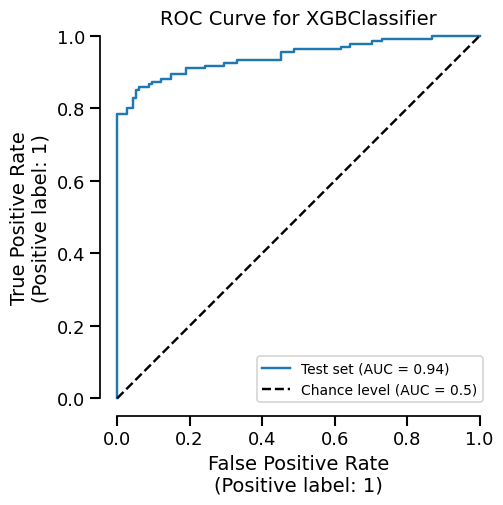
We can easily get the summary of metrics, and also a ROC curve plot for example:
_ = xgb_report.metrics.roc().plot()
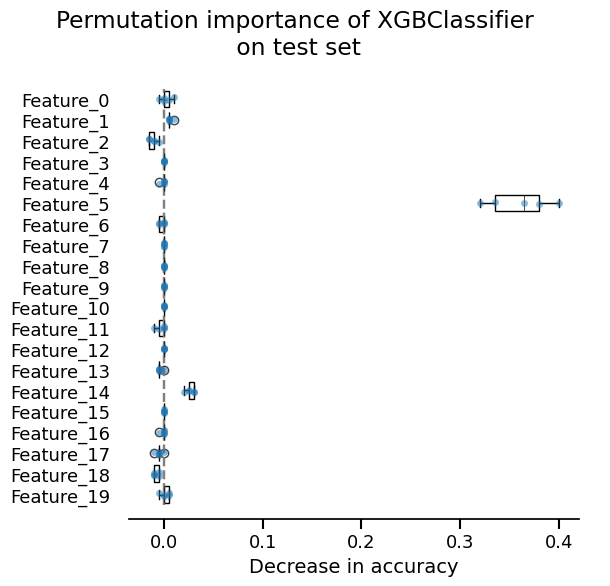
We can also inspect our model:
_ = xgb_report.inspection.permutation_importance().plot()
Custom model#
Now, we showcase how one could create a scikit-learn custom estimator that follows the requirements of scikit-learn.
Here, we create a nearest neighbor classifier:
import numpy as np
from sklearn.base import BaseEstimator, ClassifierMixin
from sklearn.metrics import euclidean_distances
from sklearn.utils.multiclass import unique_labels
from sklearn.utils.validation import check_is_fitted, validate_data


class CustomClassifier(ClassifierMixin, BaseEstimator):
    def __init__(self):
        pass

    def fit(self, X, y):
        X, y = validate_data(self, X, y)
        self.classes_ = unique_labels(y)
        self.X_ = X
        self.y_ = y
        return self

    def predict(self, X):
        check_is_fitted(self)
        X = validate_data(self, X, reset=False)
        closest = np.argmin(euclidean_distances(X, self.X_), axis=1)
        return self.y_[closest]
custom_report = evaluate(CustomClassifier(), X, y, splitter=0.2)
custom_report